
Skip to main content
How Can We Help?
How to add, update or delete linked tenant for each compliance & docs?
To add new linked tenant
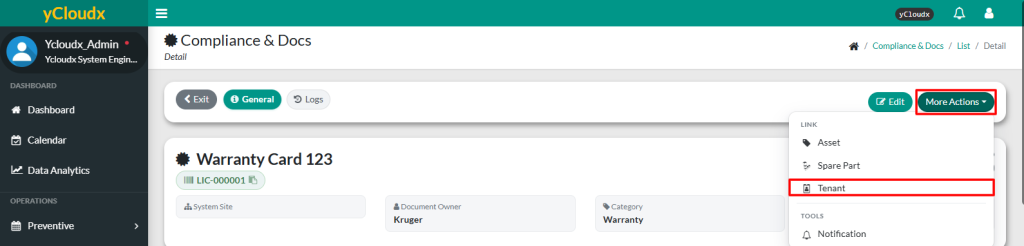
- Proceed to Compliance & Docs > Compliance List > Select Running No > More Options
- Click Tenant button
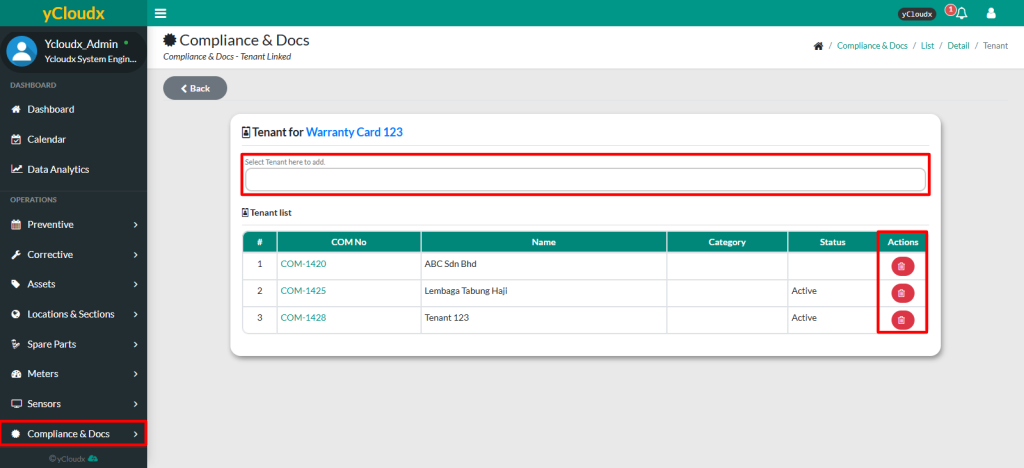
- User need to select the tenant from the dropdown menu
- Click Save to add the tenant into the list
- Once select, tenant will automatically be added to the list
To view or delete linked tenant
- Proceed to Compliance & Docs > Compliance List > Select Running No > More Options
- Click Tenant button
- User able to view the list of linked tenant
- User can click the red trash bin icon to unlink tenant from the compliance document, removing it from the list
