
CMMS + EAM SOFTWARE · MALAYSIA
CMMS software.
Connected operations.
Bring maintenance, assets and facility teams into one clear view. Built and supported in Malaysia, yCloudx connects the work in the field with the decisions in the office.
For maintenance, engineering and facility teams.
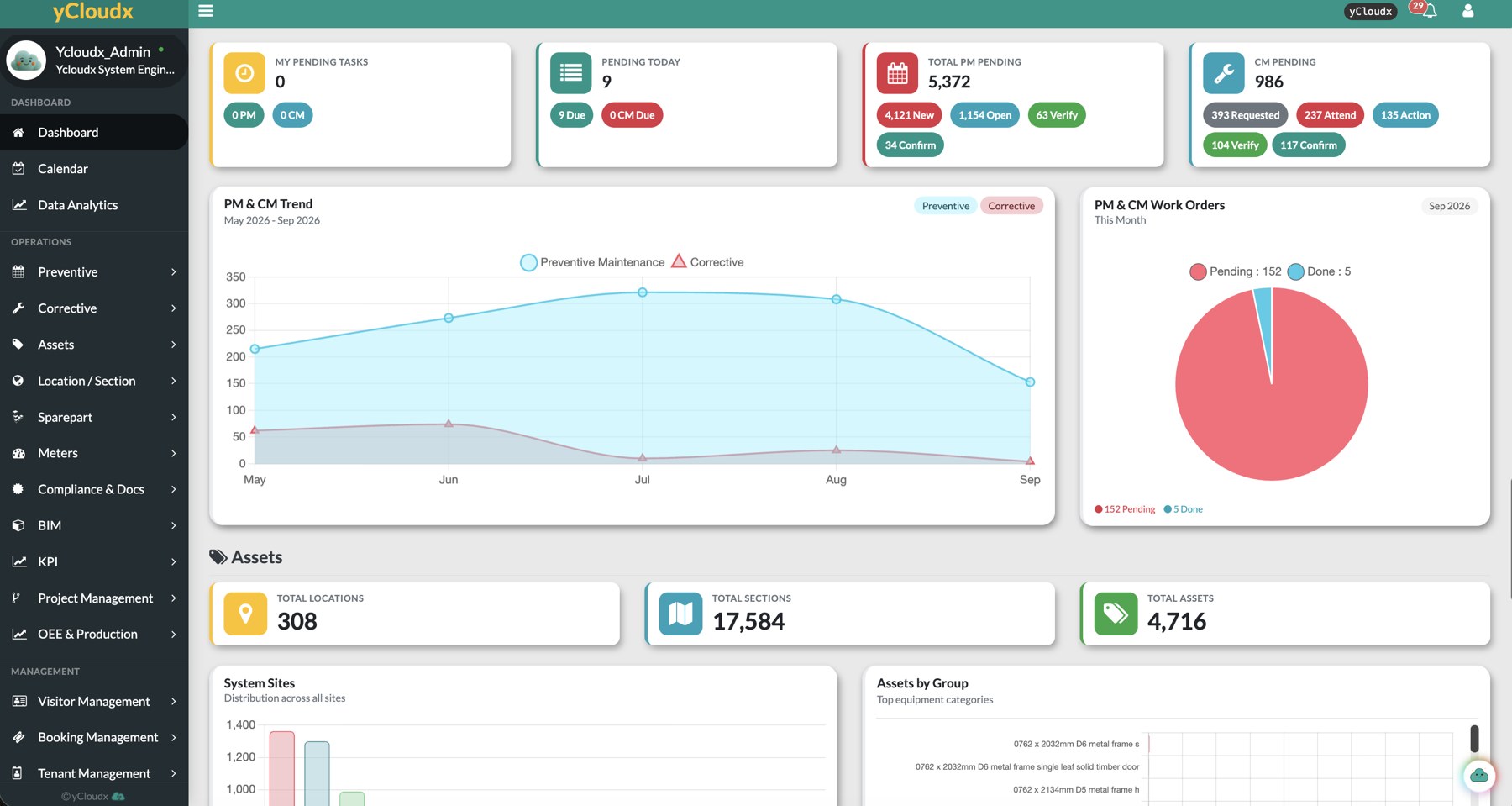
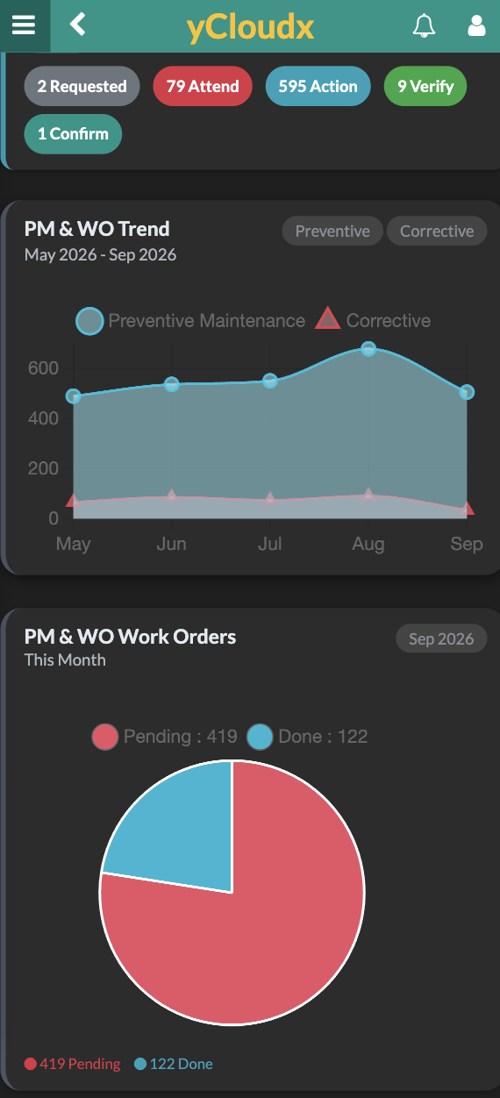
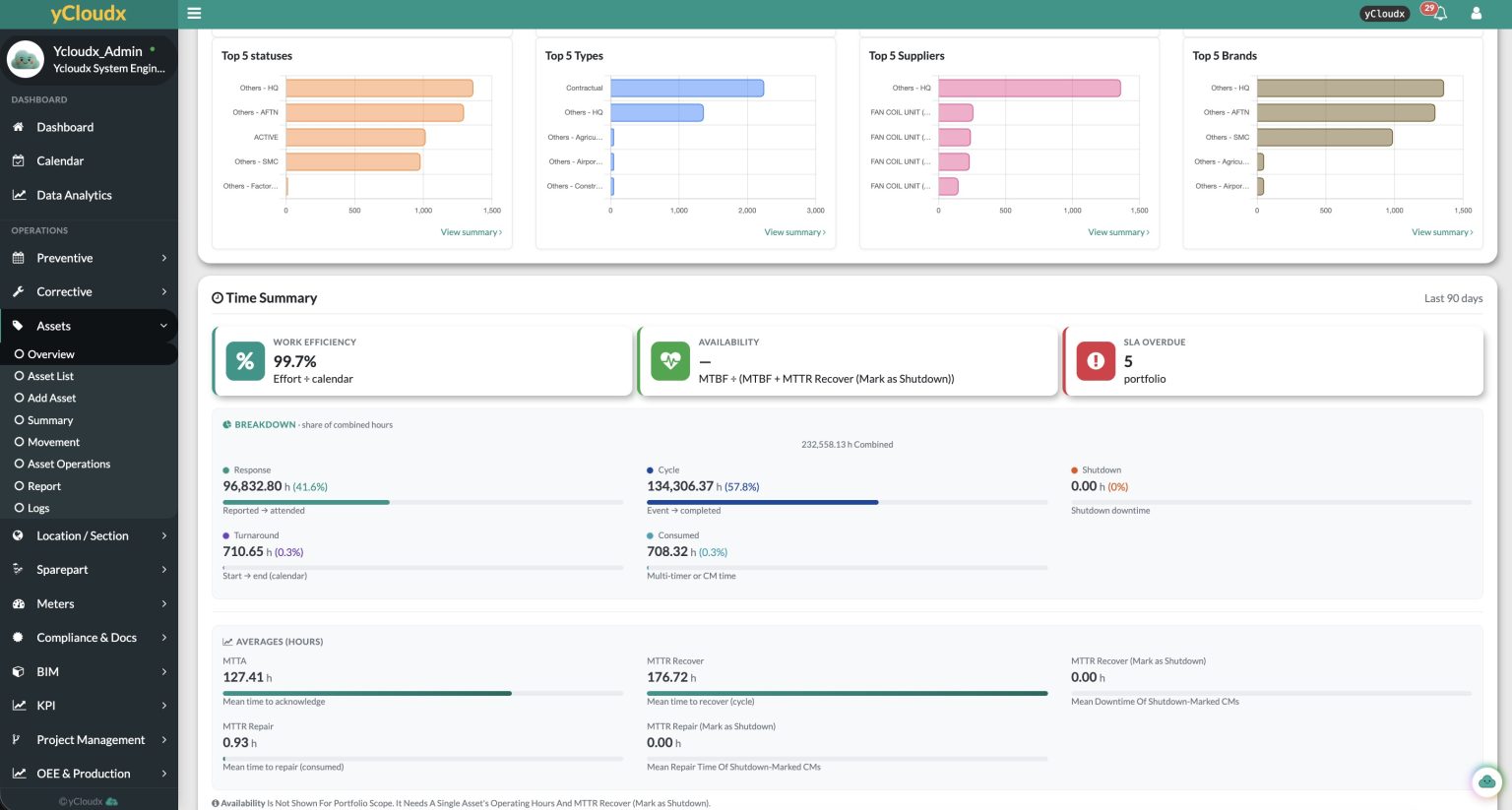
Actual yCloudx dashboard and mobile views.
NEW TO YCLOUDX? START HERE
yCloudx in under two minutes.
CMMS, EAM and IWMS in one platform, built in Malaysia. See how it connects every role, asset and site, in any industry, with Cloudy, your AI assistant, built in. Then explore each part in detail below.
See each part in detail ↓- 25+Years of expertisein maintenance and engineering, since 2000
- 1K+Sites servedfrom single buildings to nationwide portfolios
- 50K+Usersacross web and mobile
- 1M+Work orders & assetsrecords managed on the platform
- 30+Modulesstart with what you need, add more as you grow
Powering operations across industries.












One platform · Every type of facility
Whatever you run, yCloudx runs it with you.
Hospitals, factories, malls, campuses, government buildings and plants all rely on well-maintained assets. Explore how teams in each industry use yCloudx.
01 / THE PLATFORM
One platform. Three connected disciplines.
Plan the work, understand the asset and coordinate the facility—without losing the context between them.
01 — MAINTENANCE
CMMS & Maintenance
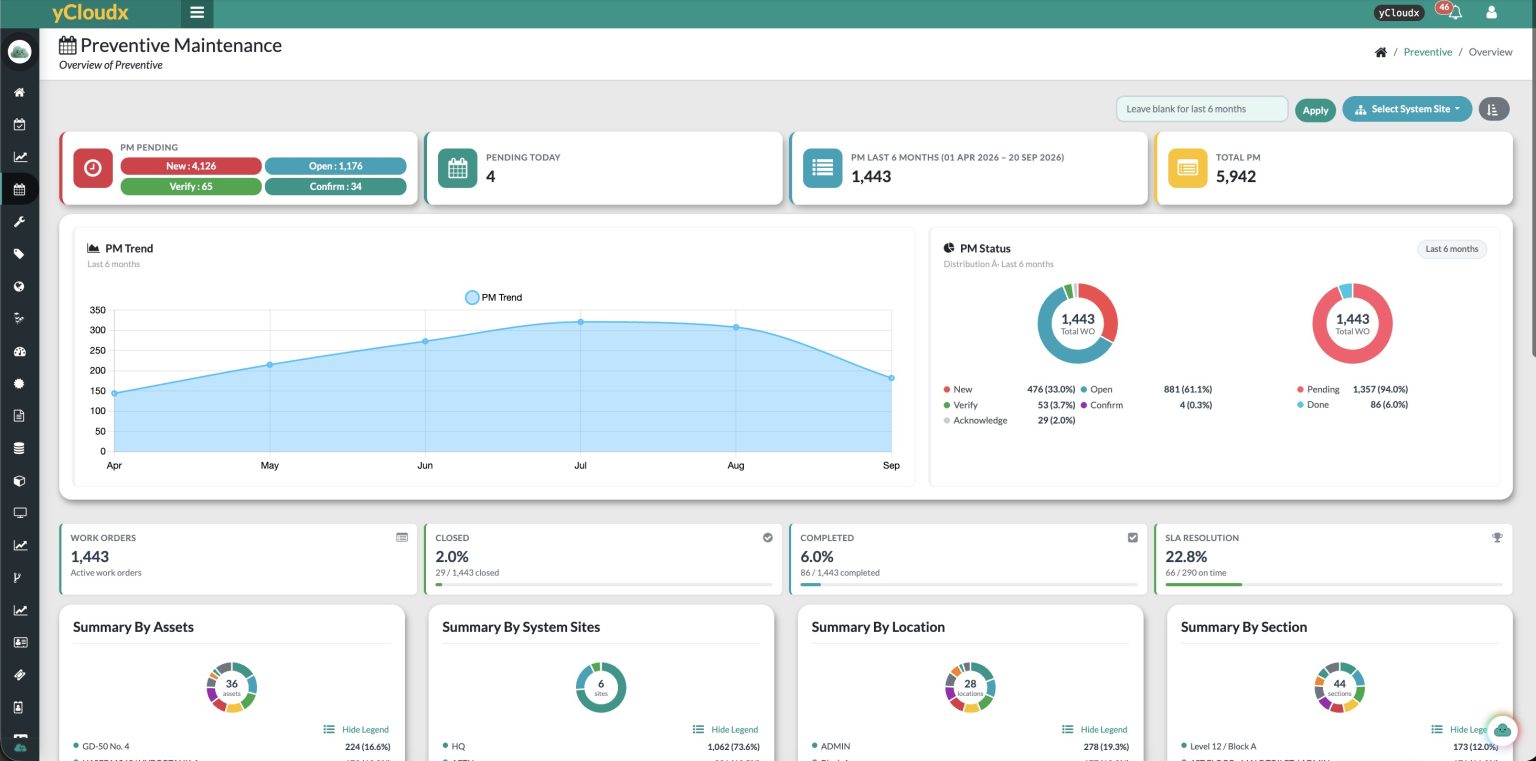
Organise preventive and corrective maintenance, assign work orders and retain the history behind each job.
02 — ASSET LIFECYCLE
Asset Management
Keep asset records, QR identification, movements and lifecycle information connected to maintenance and cost.
03 — FACILITY OPERATIONS
Facility Management
Coordinate sites, vendors, compliance and everyday services with a shared view of what needs attention.
02 / CUSTOMER STORIES
Real teams. Real operational change.
Hear how customers use yCloudx in their own working environments.
Property & Facilities Management
Coordinating work across multiple buildings
“Managing 16 buildings with multiple vendors used to involve a lot of manual work and delays. With yCloudx, our team now benefits from auto-billing, IoT integration, and a mobile app with offline mode.”
Manager · Property & Facilities Management
District Cooling
Maintenance backed by local expertise
“We were looking for a reliable yet cost-effective CMMS, but also needed strong local support and flexibility. With yCloudx, we now have fast, responsive support from a local team, with direct access to technical experts. The widget dashboard, calendar and task list features make it much easier for us to arrange and monitor our maintenance work.”
Maintenance Planner · District Cooling
Facilities Maintenance
A smoother move to digital maintenance
“I am amazed by the seamless transition of yCloudx into our maintenance operations. We manage to complete more work requests and get things done more efficiently.”
Facility Manager · Facilities Maintenance
Property & Retail
Clear identification for every asset
“Overall, we were extremely happy with the product and services. Now every asset has a visible number and corresponds with yCloudx.”
Manager · Property & Retail
03 / CLOUDY AI
Intelligence, where the work happens.
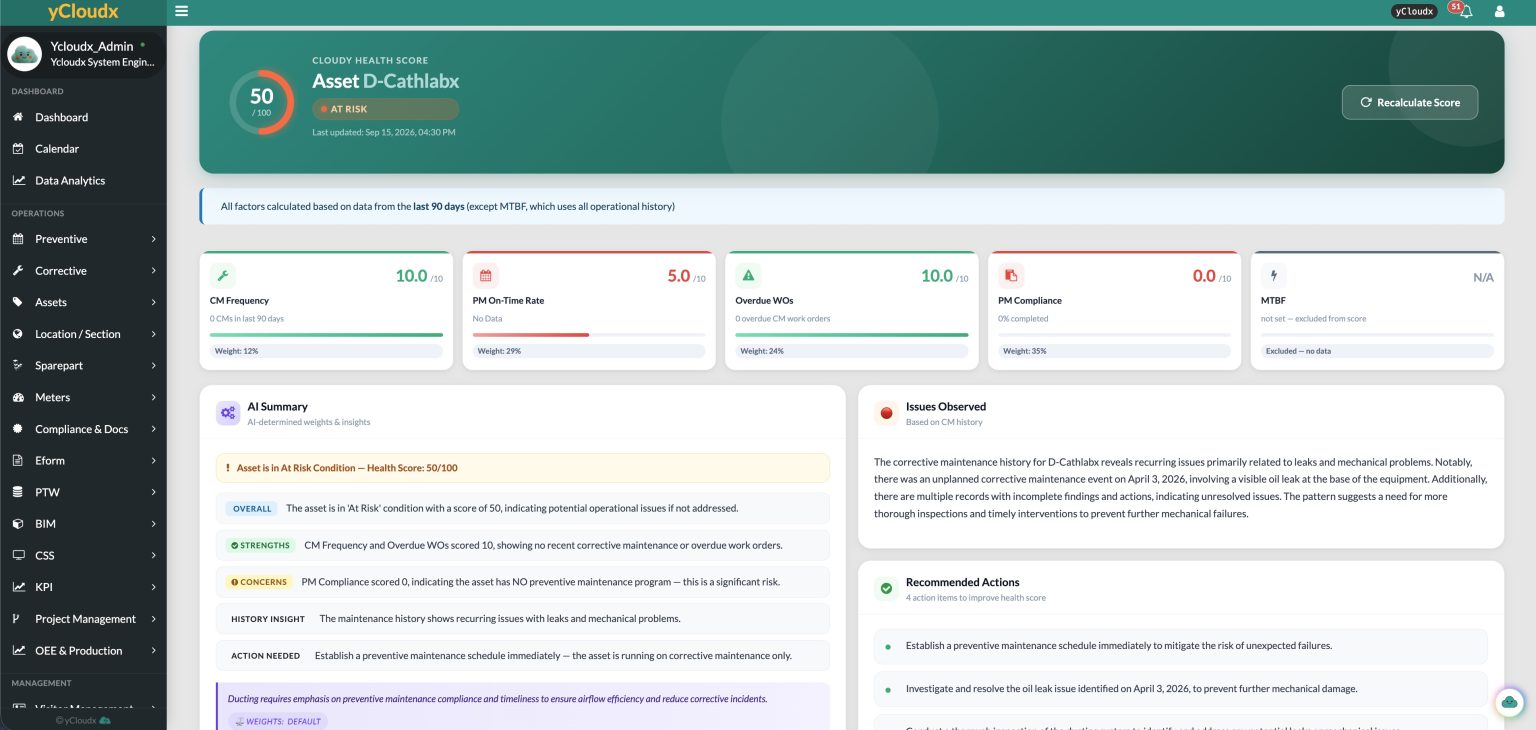
Cloudy brings AI into operational workflows—from capturing a request to understanding patterns and deciding what to do next.
CLOUDY AI ASSIST
Type the request. Structure the work.
Turn everyday requests into structured work-order details, ready for your team to review and apply.
CLOUDY AI VOICE
Capture the details while on site.
Capture site details by voice and turn them into structured information for forms and workflows, with multilingual input.
CLOUDY AI INSPECT
Turn images into useful starting points.
Extract useful information from images and documents to draft fields, suggest actions and prepare reports.
CLOUDY AI INSIGHT
Ask questions of your operational data.
Conversational questions and analysis of authorised yCloudx data help surface summaries, trends and operational insights.
CLOUDY AI PREDICT
Use history to inform the next action.
Use maintenance history to identify patterns, recommend next steps and initiate work orders within configured workflows.
Illustrative example data. Feature availability depends on your configuration and data; your team reviews AI suggestions before applying them.
Six ready-made agents look through your work orders, assets, PM and spare parts, then write up what they find. Run one now or on a schedule, get the result by email or Telegram, and approve any suggested next step. Nothing changes without a person.
04 / FIELD TO OFFICE
Keep the work moving.
Wherever it happens.
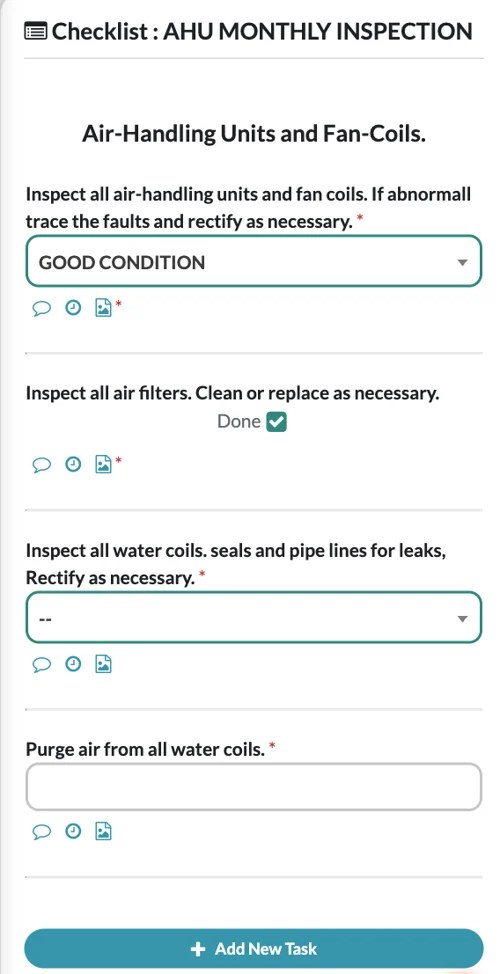
Give technicians the asset context and task details they need on a phone, then bring the record back to the office.
Scan. Inspect. Record.
Use QR identification to reach asset information, access supported work orders and preventive maintenance tasks, and record photos and findings.
Supported offline workflows
Complete supported preventive maintenance checklists and capture photos with limited connectivity. Synchronise when the connection returns.
05 / OPERATIONAL CAPABILITIES
Go deeper, where you need to.
Explore the available modules by the work your team needs to do. Choose a category to see its scope.
Maintenance & asset control
- Preventive MaintenanceSchedule and track planned maintenance tasks.
- Corrective MaintenanceManage unplanned repairs and breakdowns.
- Asset ManagementCentralised asset records, lifecycle information and QR codes.
- Asset LifecycleTransfer, dispose, verify and track depreciation.
- Location & SectionOrganise buildings, levels and asset placement.
- Asset MapSee every site, location, section and asset on one zoomable map or 3D view.
- Floor Plan & GIS MapPin assets on uploaded floor plans or Google Maps. Pins blink when an asset has an issue.
- Asset Live StatusSee which assets are down, faulty or under PM, by location and section.
- Spare Part ManagementControl spare parts, consumables and usage history.
Facilities & service operations
- Meter ManagementRecord and monitor electricity, water and fuel readings.
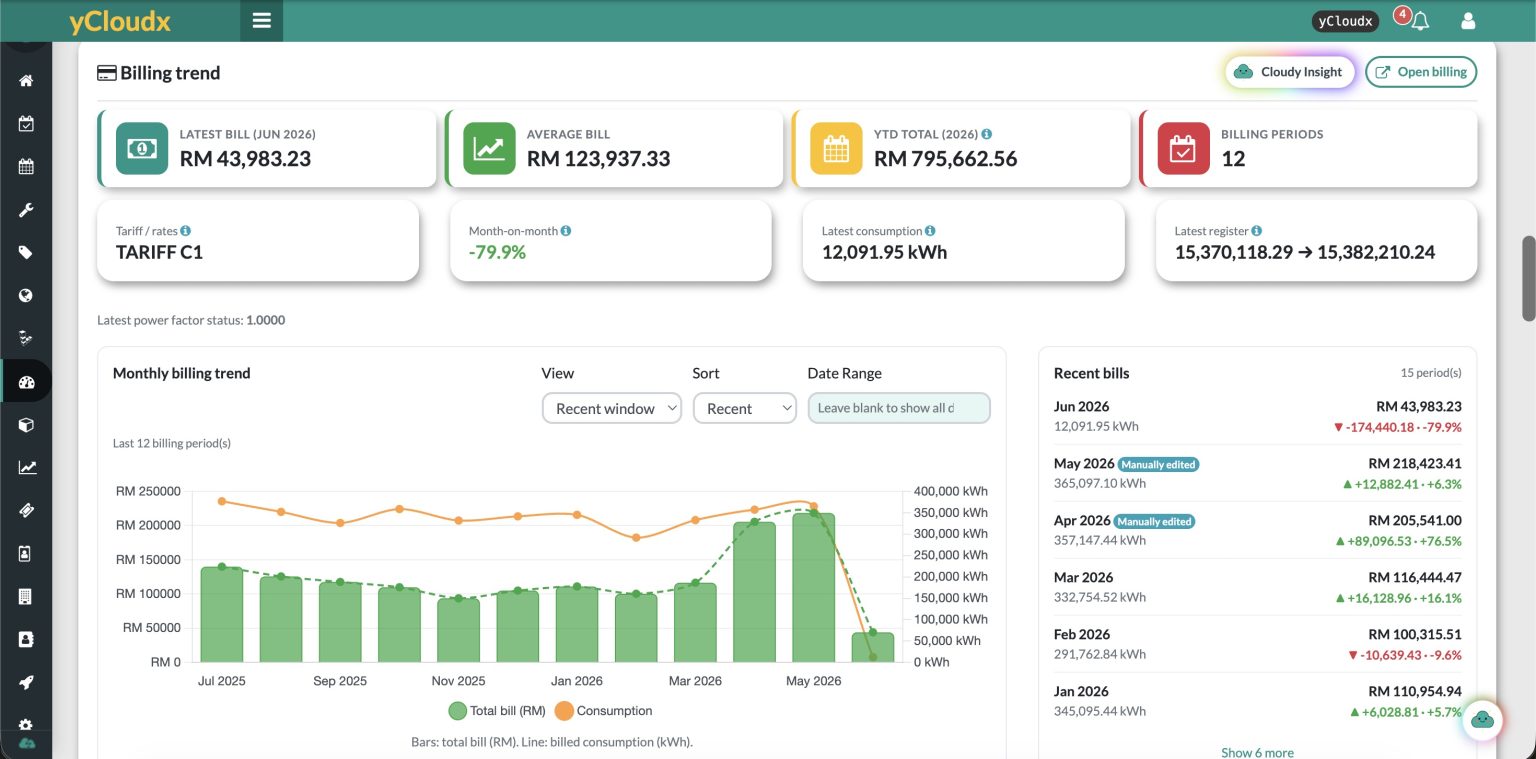
- Billing ManagementCalculate bills from readings and configured formulas.
- Vendor ManagementKeep vendor records and score vendors A to D on SLA, response, first-time fix and PM.
- Tenant ManagementTrack tenants, contracts, occupancy and vacancy.
- Visitor ManagementRegister visitors, approve access and maintain QR entry logs.
- Booking ManagementBook rooms, spaces and assets with approvals and no double bookings.
People & administration
- Workforce Live StatusSee who is on the job, where they are working and where you are short of people.
- AdministrationManage user accounts, roles and system configuration.
- Attendance ManagementTrack attendance with GPS and photo check-in.
- Leave ManagementHandle applications, approvals and entitlements.
- Claim ManagementSubmit and approve staff expense claims.
Projects, cost & performance
- Cost & Budget ManagementTrack work-order expenses and report costs.
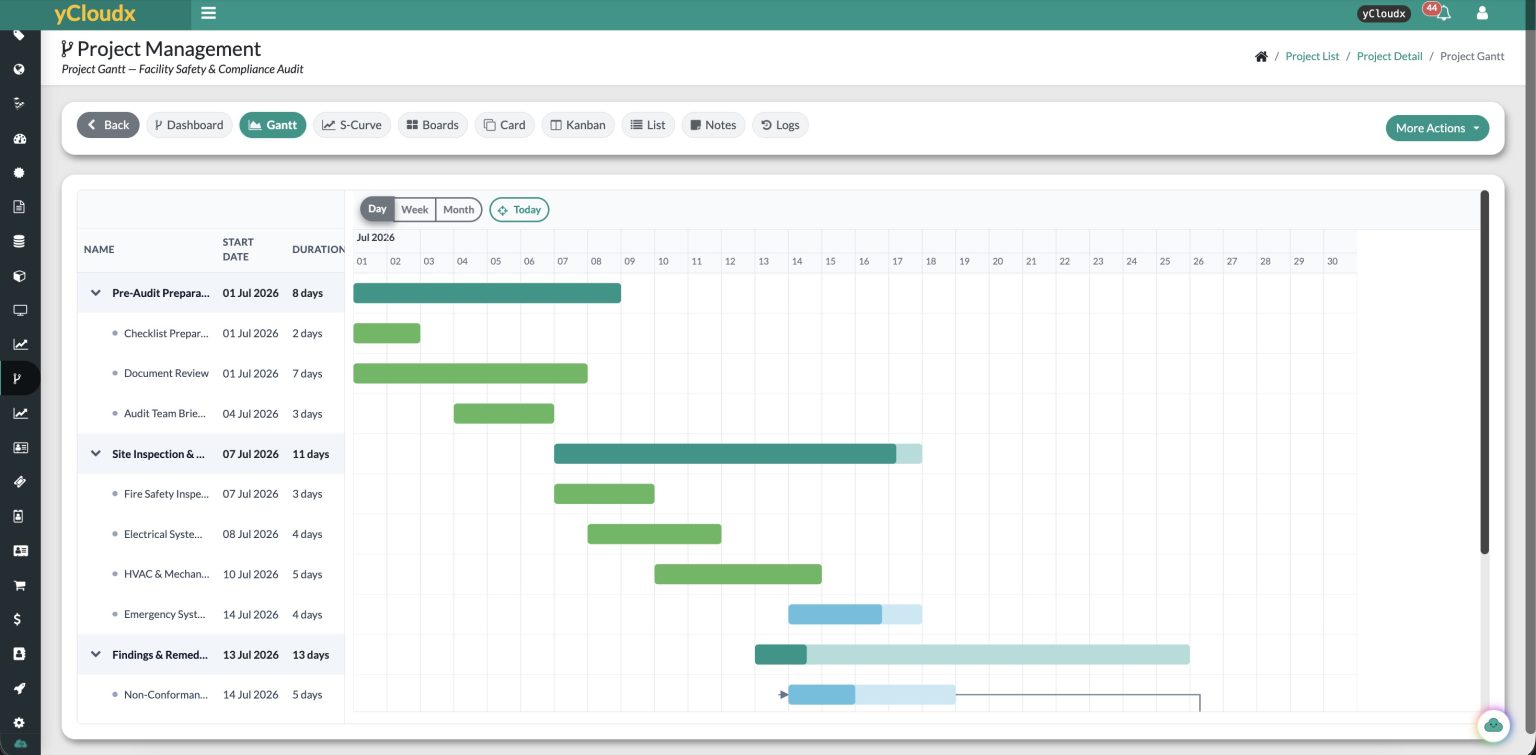
- Project ManagementMonitor milestones and progress with S-curves and Gantt charts.
- Payment ManagementManage payment requests, processing and tracking.
- KPI (APD)Calculate deductions using configured weightage and merits.
- CSSConduct customer satisfaction surveys digitally.
- OEE & ProductionTrack equipment OEE with product and SKU production analysis.
Compliance & connected systems
- Compliance & DocsKeep documents together with expiry and compliance alerts.
- PTWSupport contractor permit-to-work applications and approvals.
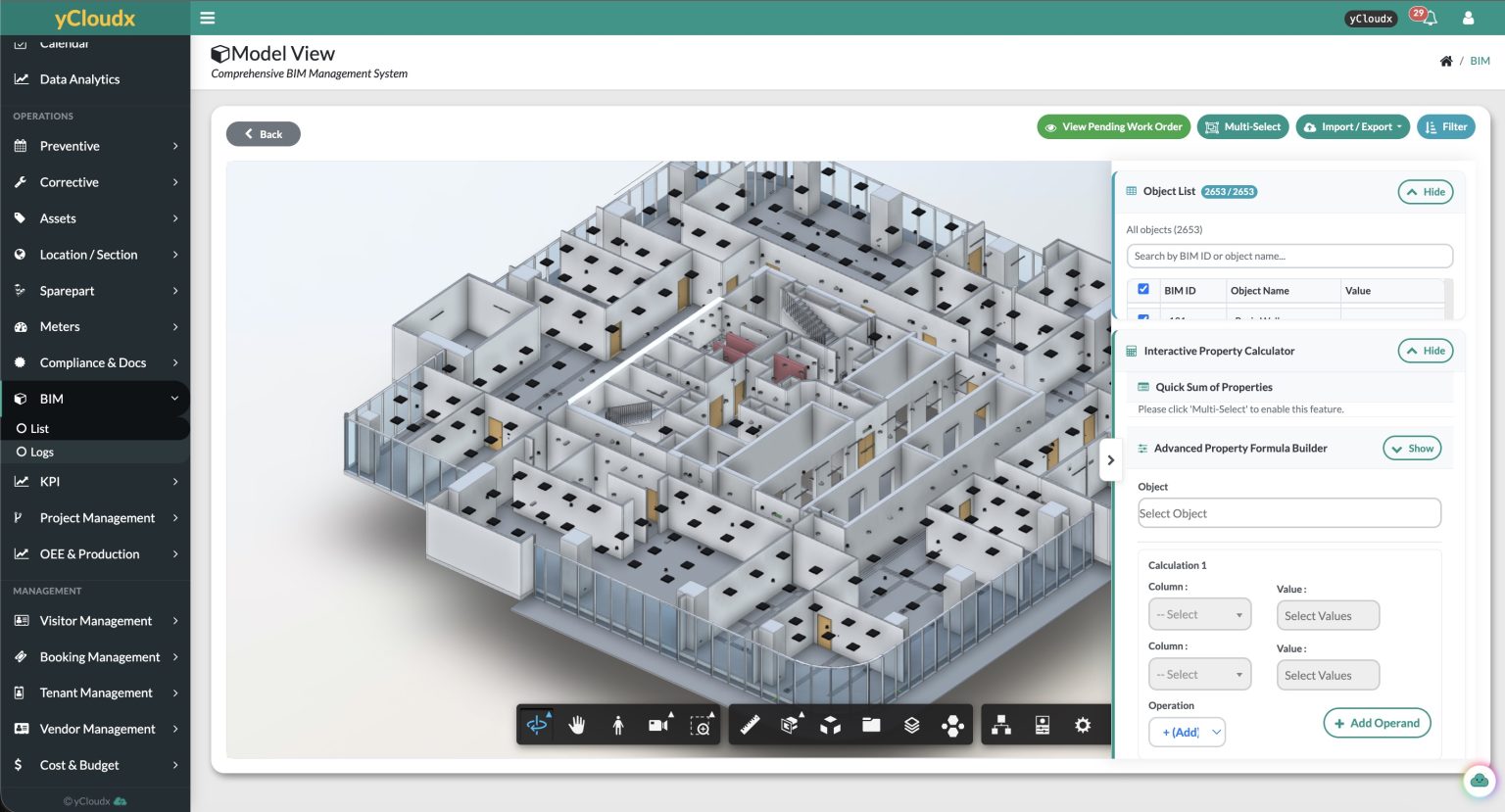
- BIM IntegrationConnect Autodesk Revit and 3D BIM models for asset visibility.
- Open API / IntegrationConnect external systems within the agreed integration scope.
Cloudy AI
- Cloudy AI AssistUse text for smart recommendations, paraphrasing and supported field completion.
- Cloudy AI InspectUse images and files for supported extraction, autofill and recommendations.
- Cloudy AI VoiceConvert speech into text and structured workflow input.
- Cloudy AI InsightExplore authorised operational data through conversational summaries and analysis.
- Cloudy AI PredictUse historical data for recommendations and work-order initiation where configured.
- Cloudy AgentsReady-made AI agents that check your data on a schedule, report what they find and suggest next steps for approval.
Explore selected capabilities
Take a closer look at six core operational workflows.
01
Preventive maintenance
Turn planned maintenance into scheduled, traceable work.
02
Corrective maintenance
Capture issues, assign action and follow work through closure.
03
Spare parts & inventory
Connect part availability and stock records to maintenance needs.
04
Meter management
Record readings and follow usage, trends and configured triggers.
05
Project management
Coordinate tasks, timelines, progress and project costs.
06
Utility billing
Bring meter consumption and configured billing calculations together.
06 / CONNECTED TECHNOLOGIES
Connect the systems around the work.
Extend operational context with BIM, IoT and enterprise integrations designed around your implementation.
 ↔IoT & enterprise data
IoT
Bring sensor readings and configured alerts into maintenance workflows, so your team can respond with the right asset context.
API & ERP integration
Connect selected business processes and existing enterprise systems. Interfaces, data mapping and scope are agreed during implementation.
07 / Why yCloudx
Why teams choose yCloudx.
Built by people who have run maintenance operations and write the software themselves. We care about how every screen feels to use, and about the results you get from it.
Industry know-how, engineering depth
Our team pairs hands-on maintenance and facility experience with in-house software engineers who are passionate about what they build.
Designed for everyone, top to bottom
From management dashboards to technicians in the field, every screen is built to be clear, fast and friendly. Multi-language by design: each user or company can choose their preferred language, and new languages can be added on request.
ManagementSupervisorsTechniciansVendorsPick, customise and integrate
Choose from 30+ modules, configure them around your workflows, and connect ERP, IoT and BIM when you're ready.
CMMSEAMFacilitiesIntegrationsTop-notch local support
Talk directly to the Malaysian team that builds yCloudx, in your time zone, with real answers from real people.
Future-ready
Cloudy AI, IoT and new modules keep arriving, so the platform grows with your operation instead of holding it back.
Best value for what you get
A complete platform with implementation and support at a competitive price, without enterprise-software overheads.
08 / Getting started
From kickoff to go-live.
And every day after.
A local team guides your CMMS implementation at every step. Start with the modules you need, connect the systems that matter, and keep improving long after launch.
Wherever you're starting from, we've done it before.
- STEP 01
Discover & choose modules
We review your sites, assets and current paperwork, then help you pick the modules you need now. Add more whenever you're ready.
We review what works and what doesn't in your current system, then map it to the yCloudx modules you need.
✓ CMMS✓ Assets✓ Spare parts+ Meters+ Billing - STEP 02
Configure your workflows
Locations, roles, approvals, checklists and SLAs are set up around how your team already works.
Request→Approve→Assign→Verify - STEP 03
Migrate & integrate
We turn spreadsheets and paper registers into clean digital records, and connect agreed systems such as ERP, IoT or BIM.
We map and migrate records and history from your current system, and connect agreed systems such as ERP, IoT or BIM.
Digitising asset registerMigrating from current CMMSERPIoTBIMAPI - STEP 04
Train & go live
Admins and technicians are trained on web and mobile, with our team beside you through go-live.
Live · all sitesAdmins ✓ Technicians ✓ - STEP 05
Support & improve
Local support after launch. We review how the system is used and propose improvements as your operation grows.
Usage reviewImprovement proposal - STEP 06
Always up to date
Cloud customers receive new features and improvements, including Cloudy AI, as part of their subscription.
⟳ New features addedNo reinstall needed
BUILT FOR COMPLEX OPERATIONS
CMMS software for Malaysian operations.
For healthcare, retail, manufacturing and engineering, corporate and commercial buildings, multi-site facilities and infrastructure operations.
Your Cloud Xperience.
That’s what yCloudx stands for: your people, assets and everyday operations in one connected workspace. Choose the modules that fit your organisation and connect field work with office decisions.
Local team · Global reach
Made in Malaysia. Built for the world.
Developed and supported by our in-house team in Kuala Lumpur, yCloudx gives your people one connected CMMS workspace on site, in the office and across every location.
- Cloud or on-premisesChoose a cloud subscription or deploy on your own infrastructure.
- Web, Android & iOSDashboards for the office, mobile apps for the field.
- Offline field workflowsComplete supported PM checklists with limited signal, then sync.
- Local supportWork directly with the team that builds yCloudx, in your time zone.
- Multi-languageEach user or company can work in their preferred language on the web platform, with more languages on request.
FAQ
Questions teams ask before choosing yCloudx.
Prefer to talk it through?
Speak with the Malaysian team that builds yCloudx. We'll walk you through the modules that fit your operation.
What is yCloudx?
yCloudx is a CMMS, EAM and IWMS platform developed in Malaysia by Lestari Global Sdn Bhd. It brings maintenance, asset management, facility operations and business workflows into one connected system, on web and mobile.
What is a CMMS?
A Computerised Maintenance Management System (CMMS) is maintenance management software for planning, assigning and recording work. Preventive maintenance helps organise recurring tasks; corrective maintenance tracks reported issues and the actions taken.
How do CMMS, EAM and facility management fit together?
CMMS focuses on maintenance execution. Enterprise Asset Management (EAM) adds the broader asset lifecycle, while facility operations connect the sites, services and people around those assets. yCloudx brings these disciplines together for Malaysian organisations and teams beyond Malaysia.
Do we need to use every module?
No. yCloudx has 30+ modules. Most organisations start with what they need today, such as preventive and corrective maintenance or asset management, and add more modules as their operations grow.
Can yCloudx be deployed on-premises?
Yes. Choose a cloud subscription, on-premises deployment or a hybrid of both. Configuration, data migration and integrations are planned around your organisation.
Does the mobile app work without internet?
Yes, for supported workflows. Field teams can complete supported maintenance checklists offline on the iOS and Android app, and their work synchronises automatically when connectivity returns.
Can yCloudx integrate with SAP, ERP or building systems?
Yes. yCloudx connects with ERP systems such as SAP, and with sensors, meters, BMS, SCADA and other building and industrial systems through its API and SDK. Integrations are tailored to your operations.
What is Cloudy?
Cloudy is the AI built into yCloudx. It helps turn text, voice, photos and documents into structured information, lets you ask questions about your operational records, and suggests maintenance recommendations based on available history. Cloudy Agents can also check your records on a schedule, report what they find by email or Telegram, and suggest next steps that wait for your approval.
How secure is yCloudx?
yCloudx supports single sign-on and multi-factor authentication, role-based access control, encrypted connections (TLS/SSL), audit trails and configurable password policies.
Does yCloudx support multiple languages?
Yes. The yCloudx web application supports multiple languages, which can be set per user or company-wide. Additional languages can be added on request.
What support do you provide?
yCloudx is developed and supported by Lestari Global in Malaysia, the team that builds it, through ticketing, live chat, email, WhatsApp and phone.
09 / INSIGHTS
Make your next decision an informed one.
Practical reading for maintenance, asset and facility teams.

Understand how connected maintenance, asset and business systems support a more coordinated operation.

Explore the features and buying considerations that matter when choosing a CMMS for your team.

Learn how facility maintenance systems bring planned work, assets and day-to-day operations together.
LET’S TALK ABOUT YOUR OPERATION
See how it comes together
for your team.
Bring your maintenance priorities, asset challenges and integration requirements. We’ll help you explore a practical way forward.
Talk directly with the yCloudx team in Malaysia.
