Electricity & water
Keep utility readings and history connected to the relevant asset or facility. Define the appropriate units and reading intervals.

Centralise readings, follow usage trends and turn configured thresholds into maintenance work. yCloudx Meter Management connects equipment and utility data with the assets, sites and teams behind it.
For maintenance, engineering and facility operations teams.
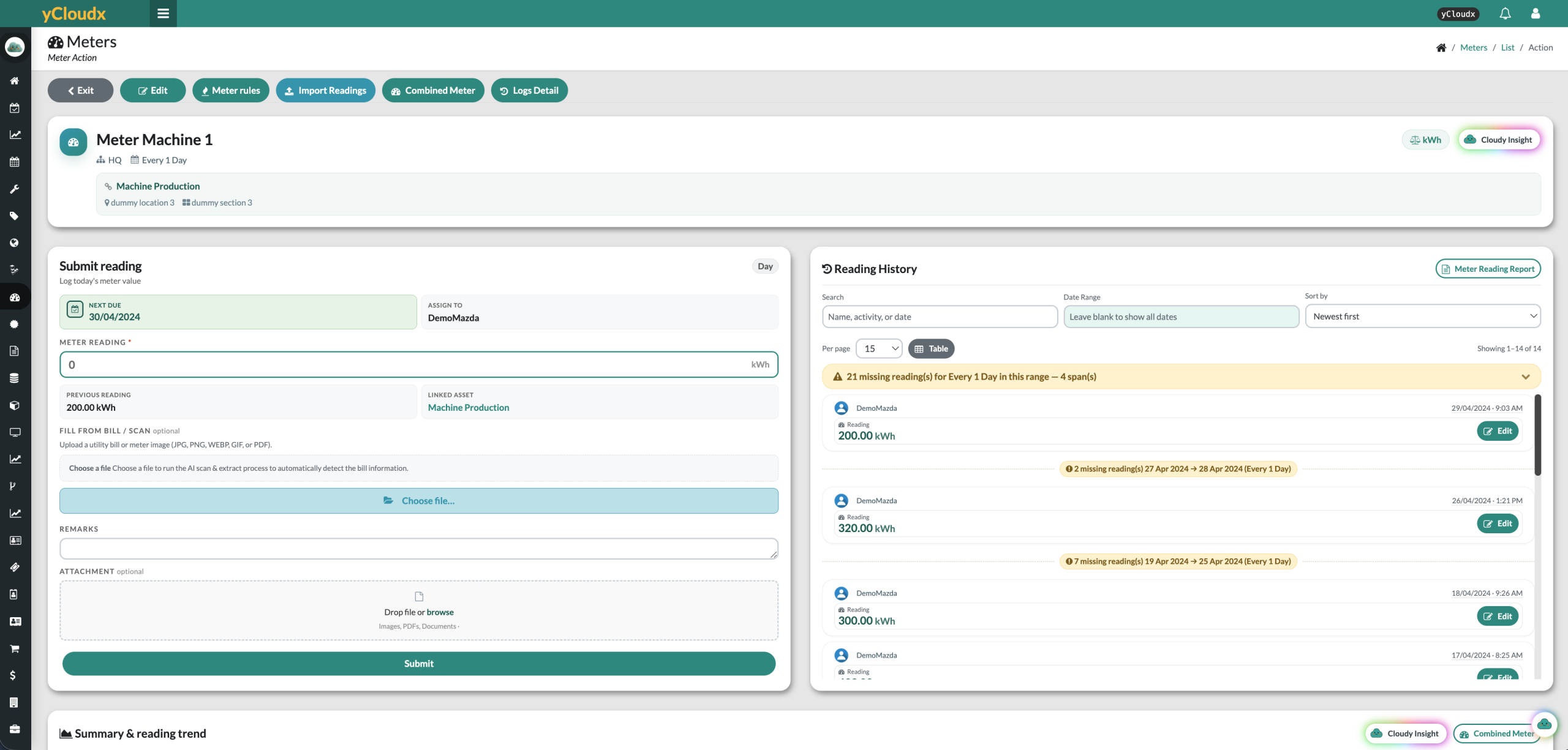
A number alone tells only part of the story. Keep the meter’s identity, measurement unit, linked asset and location alongside its reading history, so teams know what was measured, where and when.
Bring the meter name, unit and reading frequency into a consistent record.
Keep the asset, system site, location and section visible with the reading.
Review previous values, reading dates, users, remarks and supporting attachments.
Set reading frequency and responsibility, record values against the meter and review gaps in the history. Pending-reading visibility helps teams follow up work that still needs attention.
Define the reading interval and responsible user.
Submit the value with remarks and evidence where needed.
Compare previous readings and investigate missing entries.
Follow trends, pending readings and configured rule status.
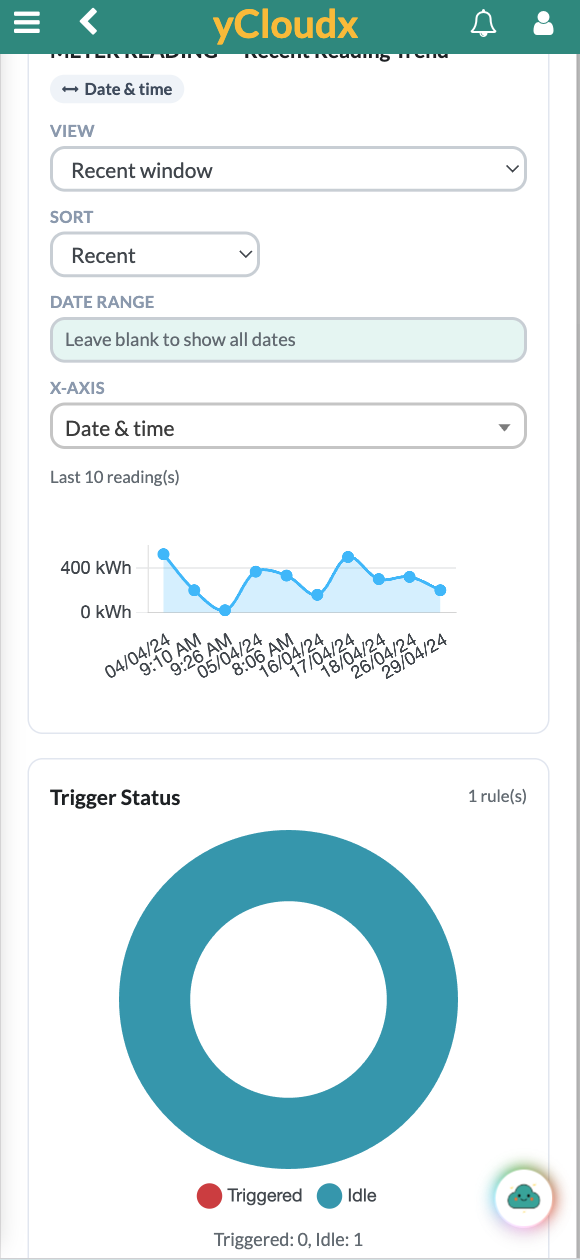
Use dated readings and trend views to understand how equipment usage or a utility register changes over time. Filter the period, review recent readings and investigate unexpected increases, decreases or gaps.
Review patterns in operating hours, cycles or other configured units.
Keep the same meter, unit and period in view when comparing values.
Follow up unusual values and missed readings before using the record for decisions.
A cumulative register and period consumption are different. Interpret changes using the meter type, reading interval and any reset or replacement history.
Configure rules that evaluate a meter reading and create a preventive maintenance work order when the defined condition is met. Set the action, assignment and checklist so the trigger leads into an actionable maintenance process.
A recorded value becomes the input to an enabled rule.
Evaluate the configured limit, range or change since the previous reading.
Create the configured PM work order for the assigned team or user.
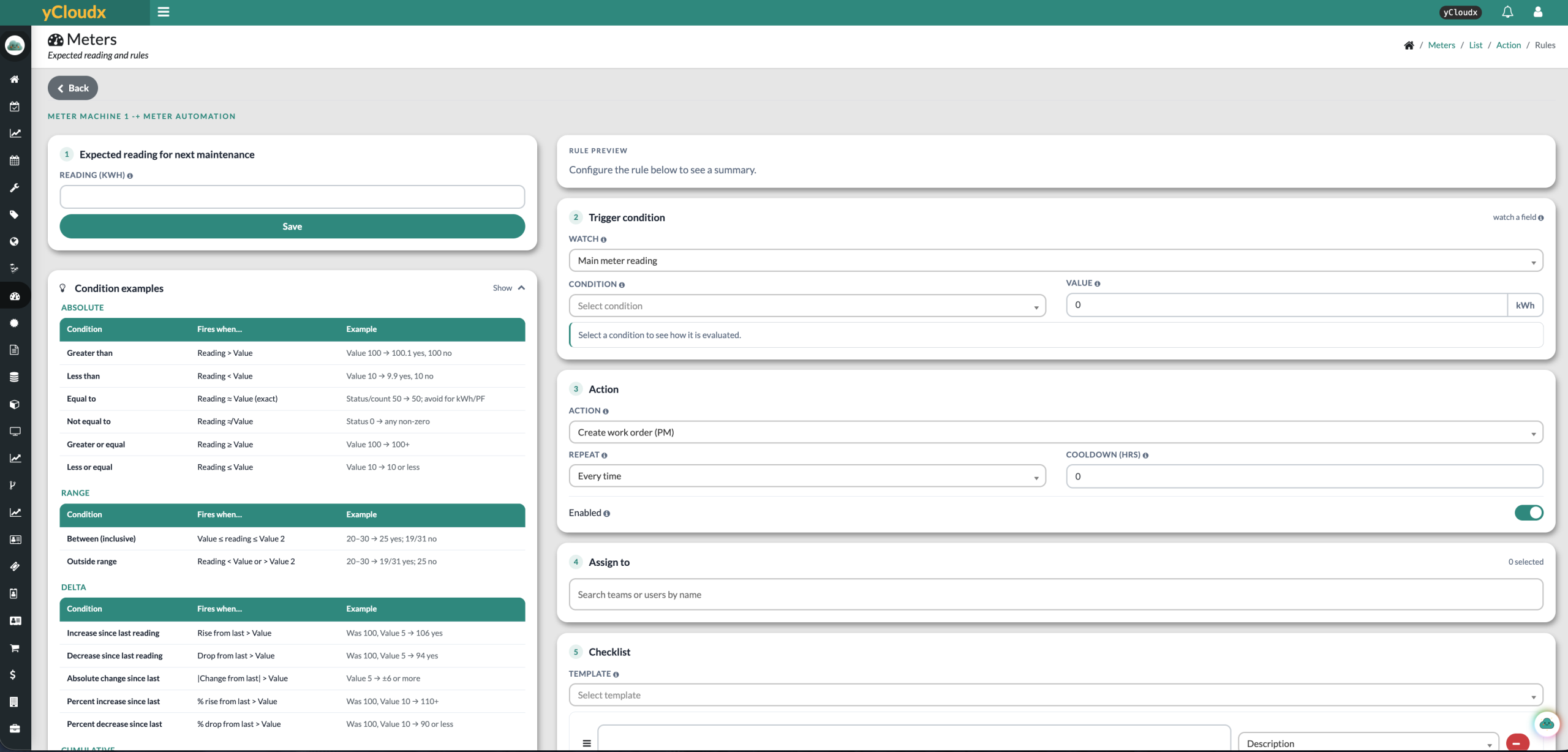
Use supported comparisons, ranges or changes between readings.
Configure repeat and cooldown settings to suit the maintenance process.
Link the generated work to the appropriate people and checklist.
Usage-based maintenance responds to recorded use; condition-based maintenance responds to defined condition limits. Threshold rules are not, by themselves, predictive maintenance.
Link meters to their assets and keep site, location and section context visible. Teams can review readings alongside maintenance records when planning service or investigating an equipment issue.
A meter-triggered work order brings a measured condition into the maintenance workflow. The asset provides the shared reference between readings, planned maintenance and the work carried out.
The reading, unit, interval and history.
The equipment being monitored and its operational location.
The relevant schedule, triggered work order and recorded follow-up.
Use meter reading management for equipment and utility measurements relevant to your operation. Agree the meter type, units, reading method and rules during setup rather than treating every value as the same kind of consumption.
Keep utility readings and history connected to the relevant asset or facility. Define the appropriate units and reading intervals.
Track configured runtime, operating-hour or cycle readings to support usage-based service planning.
Discuss fuel, pressure or other equipment readings with the team and confirm the required units and capture method.
yCloudx supports maintenance and facility monitoring; this is not a claim of full BMS control or a dedicated energy-management platform.
Organise meters across system sites and asset locations. Review the latest entries, pending readings, reading frequency and triggered work orders to identify where follow-up is needed across your facilities.
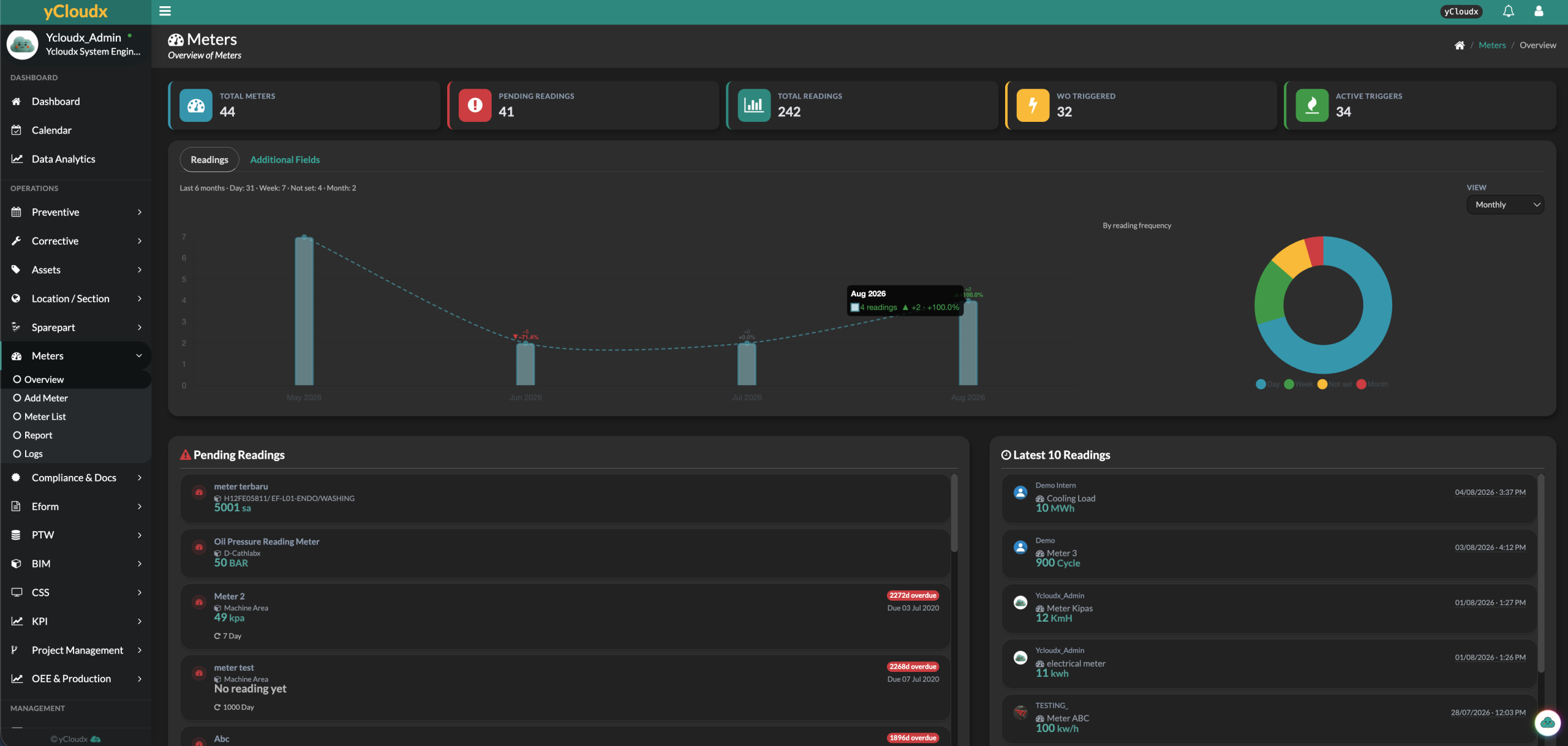
See pending readings and recent entries before investigating individual meters.
Review active triggers and meter-related work-order activity.
Use consistent site and location references across buildings and operating areas.
Dashboard figures are sample product records, not performance promises. Reading counts show capture activity, not utility consumption.
Record readings manually or use the available reading-import workflow. Where devices and interfaces support it, an IoT or API integration can bring readings into the agreed meter workflow.
Automatic capture depends on the device, connection, API availability and integration scope. Confirm data mapping, units, timestamps and update frequency before enabling an automated feed.
Capture a value with remarks and supporting files.
Bring prepared readings into the supported import process.
Scope device or API integration for the required data flow. Connectivity is not assumed for every meter.
A connected view for maintenance managers, facility teams and engineers managing equipment use and utility readings across their operations.
Meter management software organises meter records, readings, measurement units, dates and history. Within a CMMS, it also connects readings to assets and can use configured rules to initiate maintenance when a usage or condition threshold is reached.
yCloudx supports configured equipment and utility readings with relevant units, such as electricity readings, operating hours, cycles and pressure. Water, fuel and other measurement requirements should be mapped to the required units, capture method and rules during setup.
Yes. Enabled meter rules can evaluate supported limits, ranges or changes and create a PM work order when the configured condition is met. Actions, repeat behaviour, cooldown, assignment and checklist settings should match your maintenance process.
Yes. Meter records provide dated reading history, previous values and trend views. Teams can search or filter the history and review missing-reading indicators to follow up gaps in scheduled capture.
Yes. Meters can be linked to assets with system-site, location and section context. This gives teams an equipment reference when reviewing readings, maintenance history and meter-triggered work.
Electricity and water reading requirements can be organised through configured meter records and appropriate measurement units. Confirm whether the required workflow uses manual entry, imports or a scoped device integration. Automatic connectivity is not assumed.
Automatic capture can be implemented where the device, interface and agreed integration support it. Confirm the available connection or API, data mapping, timestamps and update frequency. Manual reading capture and reading imports are also available.
Yes. Meters can be organised using system-site and asset-location references, supporting meter records across facilities. Define the site structure, responsibilities and access needed for your organisation during implementation.
No. A threshold rule responds when a defined condition is met, such as a reading exceeding a limit. Predictive maintenance involves estimating future condition or failure using relevant data and analysis. A rule-based PM trigger alone is not a prediction.
Bring a meter example, a reading schedule and a maintenance threshold. See how yCloudx connects the record, the rule and the work that follows.
