
CMMS software.
Every job.
Connected.
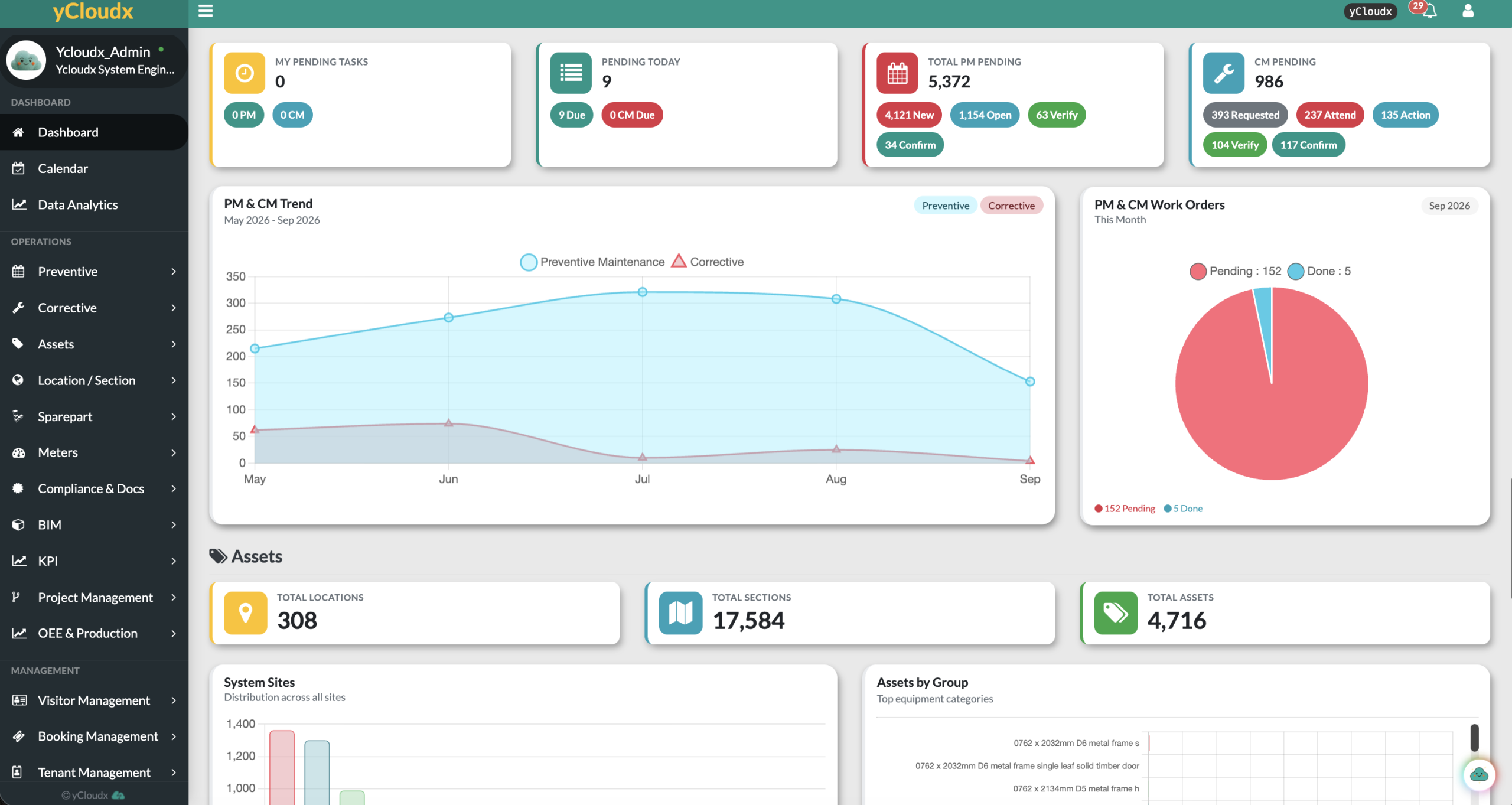
Plan preventive maintenance, manage work orders and connect every job to its asset history. yCloudx gives maintenance managers, engineers and technicians one shared system to assign, execute and verify work across sites.
Malaysian-built and supported · Cloud or on-premise deployment
- 25+Years of expertisein maintenance and engineering, since 2000
- 1K+Sites servedfrom single buildings to nationwide portfolios
- 50K+Usersacross web and mobile
- 1M+Work orders & assetsrecords managed on the platform
- 30+Modulesstart with what you need, add more as you grow
The work, the people.
The records behind it.
A Computerised Maintenance Management System (CMMS) brings maintenance execution into one place. Replace disconnected task lists with linked schedules, work orders, equipment records and service evidence.
Make upcoming work visible.
Set recurring preventive maintenance, review meter readings and coordinate the workload in a shared calendar.
Give every job context.
Turn service requests into assigned work. Keep the asset, instructions and required parts connected to the maintenance activity.
Review more than completion.
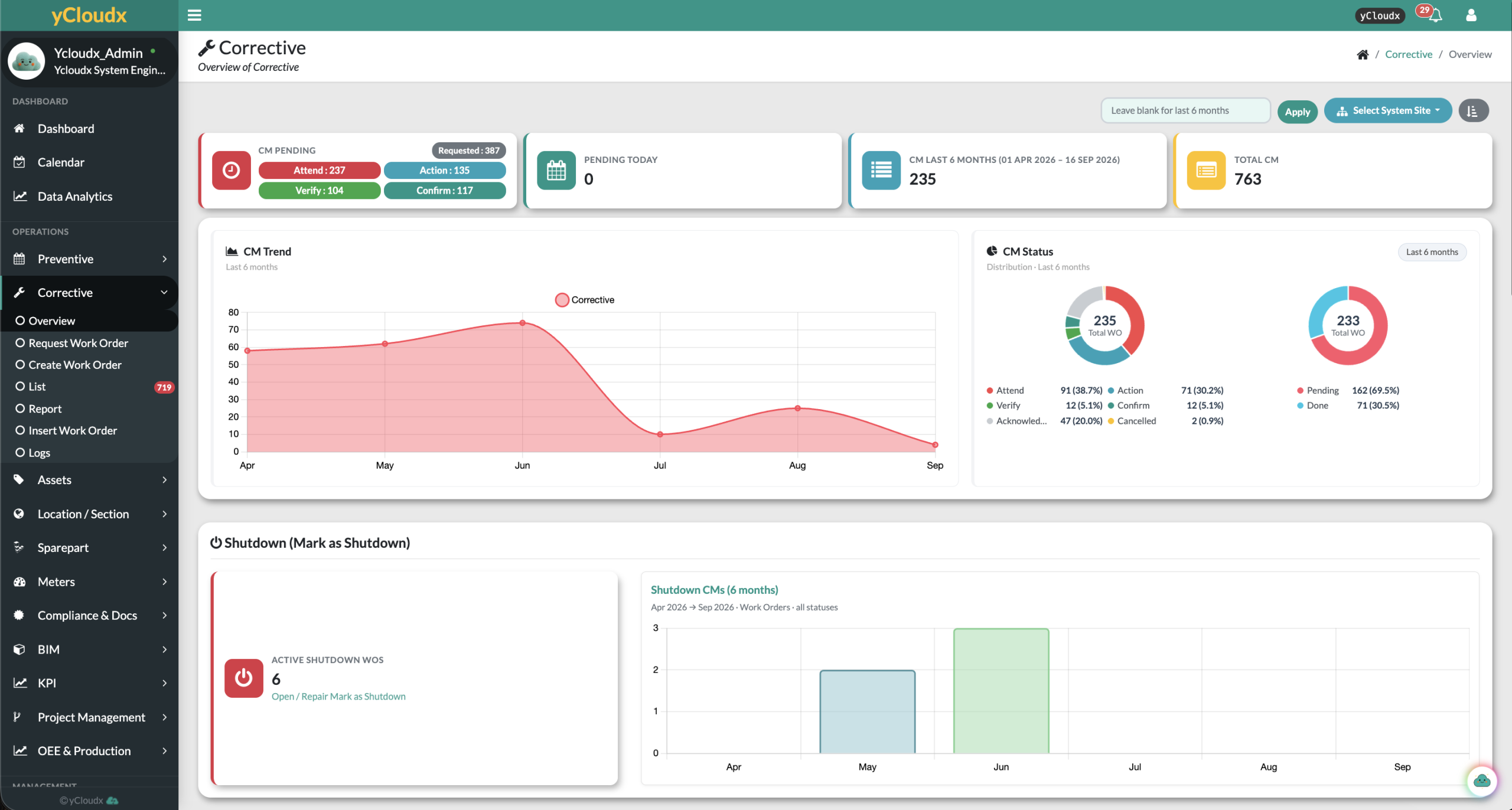
Monitor status, response and repair time. Use SLA visibility and maintenance history to identify follow-up work.
Plan once.
Keep recurring work moving.
Create time-based schedules or configured meter-triggered maintenance. Automatically generate PM work orders with assigned personnel and checklist instructions, so planned work becomes an actionable task.
- Set maintenance frequencies and planned dates for each asset.
- Notify assigned technicians when PM work is generated.
- Review current and future maintenance activity.
- Record inspection results, photos and start/stop times.
- Create corrective work when an inspection identifies a fault.
A practical calendar for the team
Create work orders from a date, reschedule with drag-and-drop and filter by priority or team. Keep personal reminders and team events alongside the maintenance workload.
From reported issue.
To verified resolution.
Keep responsibilities clear through every handover. Configure submission, approval and completion workflows, with priorities and SLA expectations visible to the people doing the work.
- 01
Request
Capture the issue, asset, location and photos.
- 02
Approve / Assign
Route the request and identify the responsible technician or team.
- 03
Attend
Record attendance and response time.
- 04
Repair
Track start/stop time and document the work.
- 05
Verify
Review evidence and capture digital sign-off.
- 06
Close
Confirm completion and retain the service record.
Know the equipment.
Before starting the job.
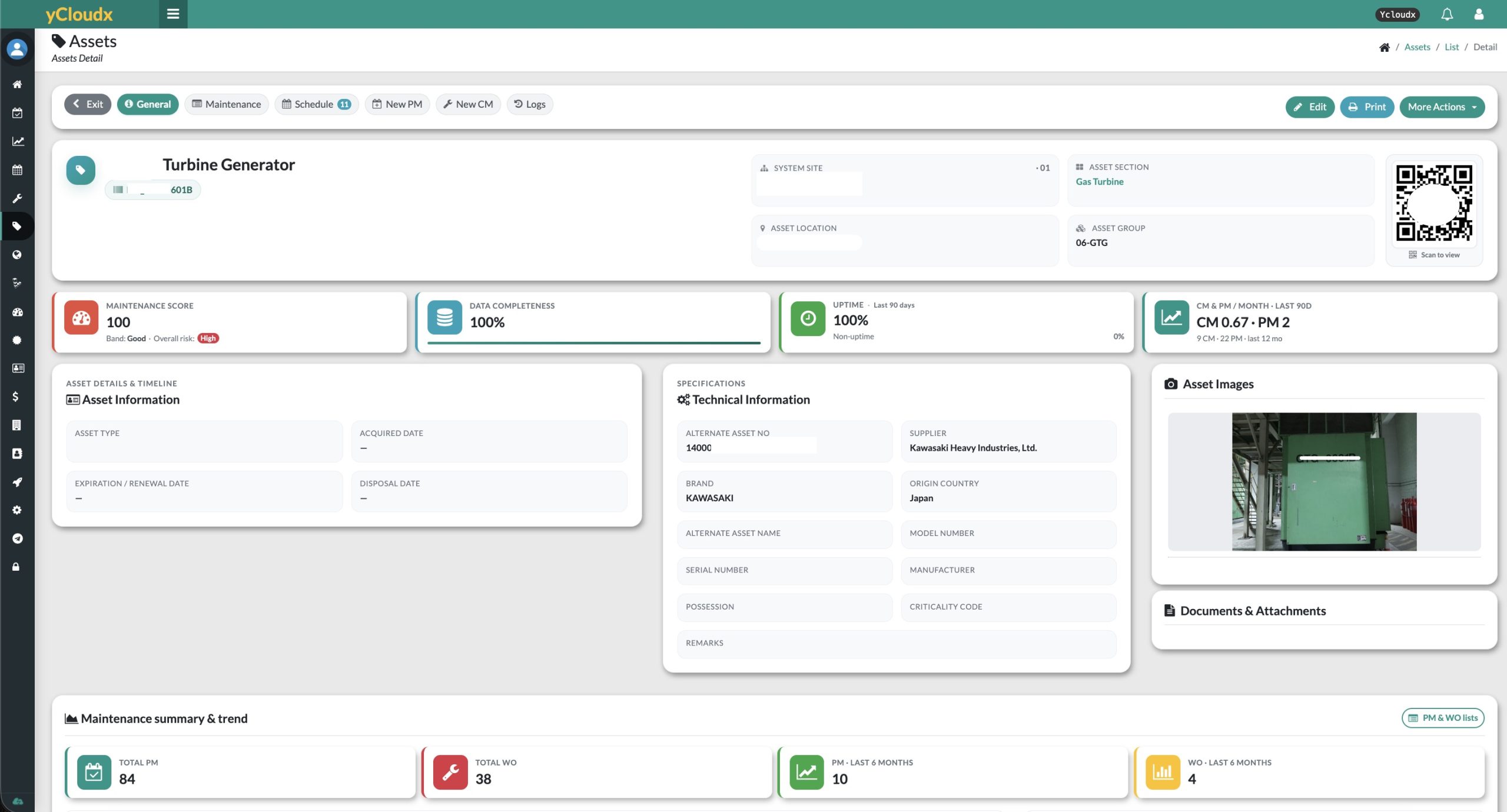
Open an asset record through QR identification and see its technical details, maintenance history and supporting documents. Connect recurring servicing and corrective work to the same equipment record.
- Keep nameplate information, warranties, photos and documents accessible.
- Review PM schedules, previous repairs and recorded failures.
- Connect meter readings and relevant spare parts to the equipment.
- Use recorded maintenance costs to support repair and replacement reviews.
Know what is available.
Know where it went.
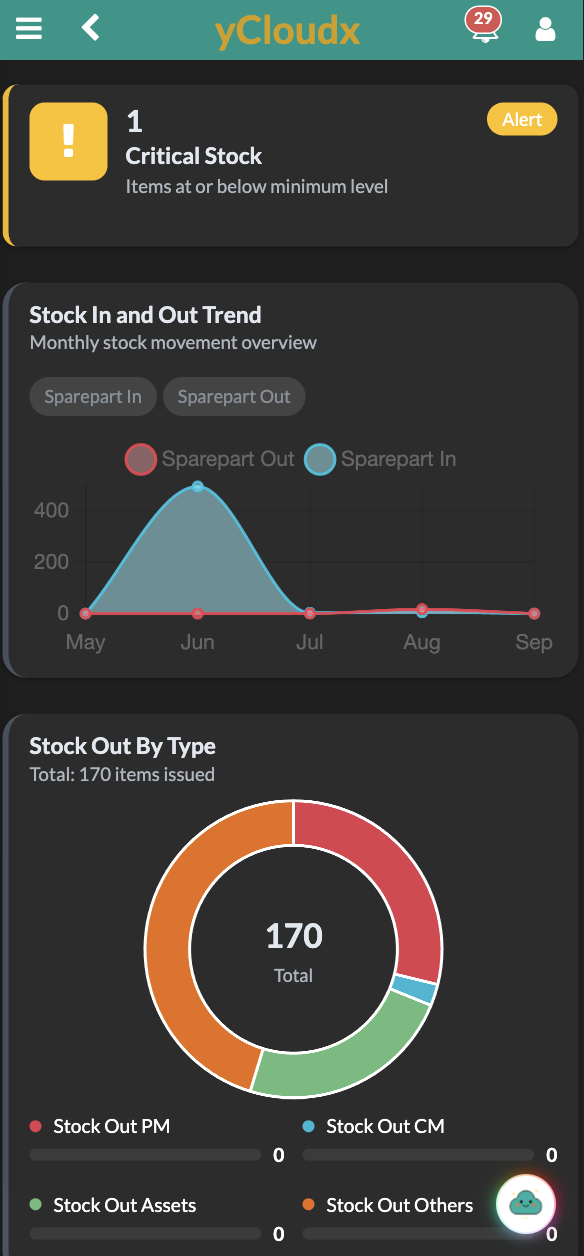
Keep spare-parts information connected to maintenance rather than in a separate stock spreadsheet. Review quantities across locations and identify the parts associated with an asset.
- View item numbers, part images, locations, on-hand stock and unit costs.
- Use QR codes to open part records on mobile.
- Submit stock requests for approval before parts are issued.
- Review stock movement, usage history and critical-stock alerts.
Let readings inform
the next maintenance action.
Schedule reading capture, assign the responsible user and retain equipment readings as figures and charts. Configured thresholds can trigger preventive work orders and their checklists when a condition is met.
Set the reading routine.
Define how often the meter should be read and who records it. Keep successive readings linked to the equipment.
See change over time.
Review reading history and trends to investigate unusual values and understand equipment usage.
Generate the next task.
Use configured reading conditions to generate PM work, supporting usage- or condition-based maintenance alongside calendar schedules.
At the asset.
With the information to act.
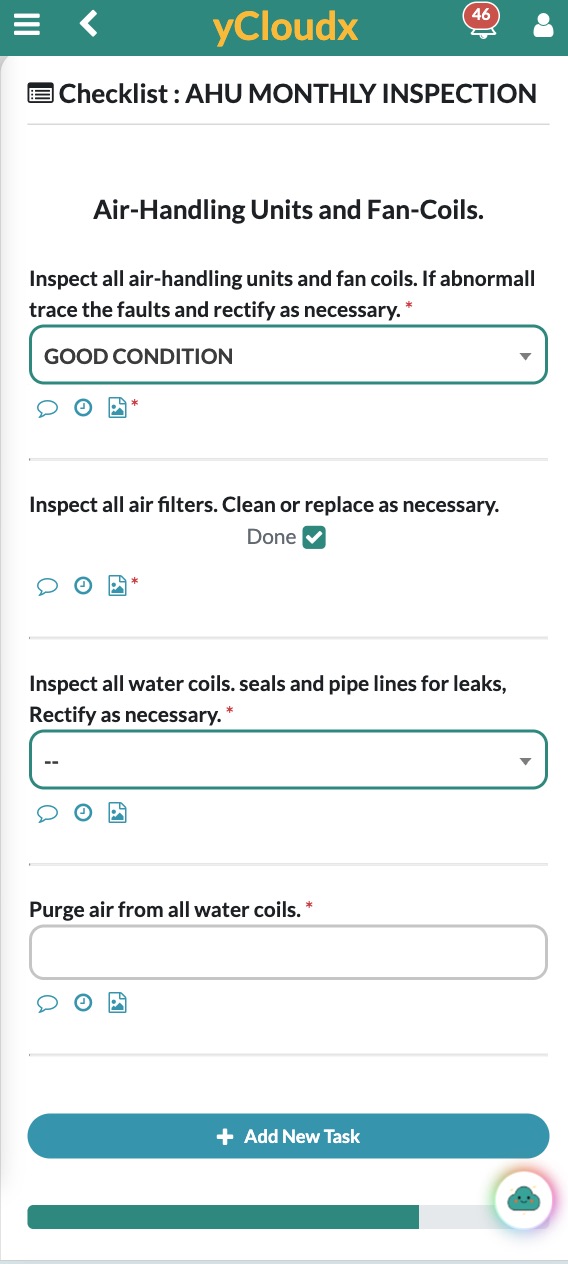
Give technicians access to work orders, PM tasks and equipment information while moving between buildings or production areas. Capture evidence at the point of work instead of reconstructing it later.
- Scan QR codes to identify equipment and open its record.
- Follow task instructions and complete inspection checklists.
- Add photos and attachments, update progress and record start/stop time.
- Complete supported PM checklists and photos offline, then sync when connected.
See the backlog.
Understand the delay.
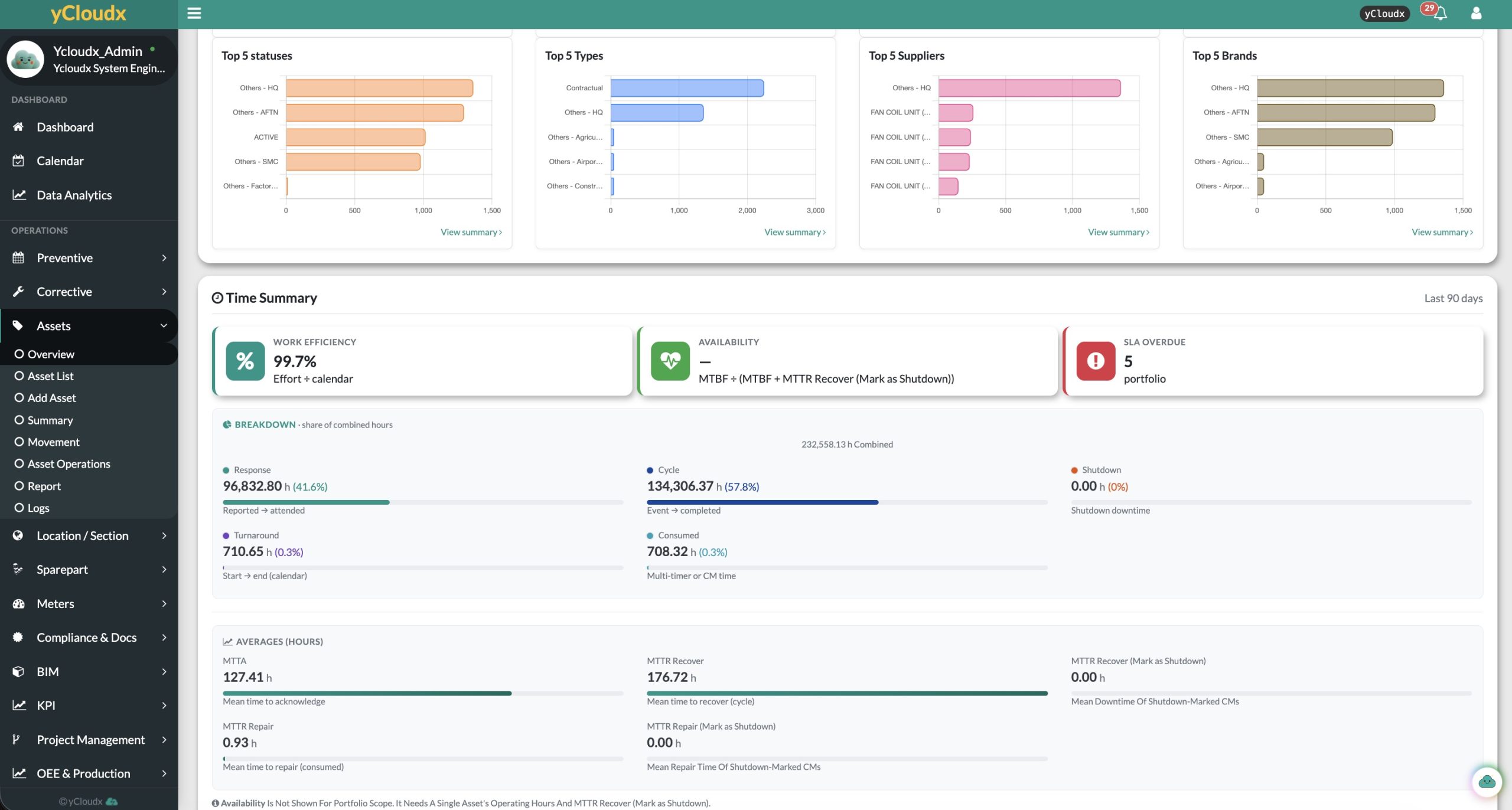
Review maintenance activity by status, asset and site. Separate response time from repair duration and the full recovery cycle, so managers can investigate where work is waiting—not only how many jobs are closed.
Workload & completion
Review open and pending work, PM completion and preventive versus corrective maintenance trends. Use site and asset context to prioritise follow-up.
Response & service levels
Monitor SLA on-time and breached work, mean time to acknowledge, repair duration and recovery time. Review the activity recorded by assigned teams.
Downtime & cost context
Investigate shutdown-marked work and recorded maintenance costs. Reliability and downtime measures depend on the operating-hour and event data captured.
Maintenance at the core.
Connect what comes next.
Start with maintenance execution. Extend the operational context through the yCloudx modules and integrations relevant to your organisation.
Asset lifecycle & mapping
Extend equipment servicing into asset lifecycle records and location context.
Asset Management (EAM) →Facility operations
Connect maintenance with wider vendor, tenant, utility and building workflows.
Facility Management →BIM context
Bring model information into the conversation around assets and pending work.
BIM Integration →Connected readings
Discuss sensor inputs and the maintenance actions that should follow.
IoT Integration →Project delivery
Manage defined improvement projects with schedules, progress and cost visibility.
Project Management →Open API & Cloudy AI
Scope system integrations and supported AI assistance around your workflow, with people reviewing the output.
Discuss integration requirements →Modules and integrations are scoped with you during implementation.
For teams responsible
for keeping assets working.
Support maintenance and facility managers, engineering teams, technicians and FM service providers—from a single building to a multi-site enterprise. Organise site, location, section and asset records around your operations.
Built in Malaysia.
Configured for your work.
Maintenance software built by people who have run maintenance operations, and supported by the same in-house team that develops it. Start with the modules you need and grow from there.
Local development & support
Talk directly to the Malaysian team that builds yCloudx. Hands-on implementation, training and support after go-live, for sites in Malaysia and overseas.
Designed for every user
Clear screens for managers, supervisors and technicians alike, on web and mobile, with cloud or on-premise deployment and offline field checklists.
Modular and integration-ready
Choose from 30+ modules across CMMS, EAM and facility operations, configure them around your workflows, and connect ERP, IoT or BIM when you are ready.
CMMS software FAQs
What is CMMS software, and what does CMMS stand for?
CMMS stands for Computerised Maintenance Management System, also spelled Computerized Maintenance Management System. CMMS software helps teams plan preventive maintenance, manage work requests and work orders, track assets and spare parts, and retain maintenance records for reporting and follow-up.
What is the difference between CMMS and EAM?
CMMS focuses on maintenance execution: work orders, preventive maintenance, parts and service history. Enterprise Asset Management (EAM) covers a broader asset lifecycle, including registration, verification, transfers, value and disposal. yCloudx connects maintenance activity with its EAM capabilities so both use the equipment context.
What is the difference between preventive and corrective maintenance?
Preventive maintenance is planned servicing or inspection intended to reduce the likelihood of problems. It can follow a calendar or configured reading condition. Corrective maintenance addresses a reported fault or inspection finding. A CMMS records both against the relevant asset so teams can review its full service history.
Can yCloudx automatically generate PM work orders?
Yes. Recurring schedules can automatically generate preventive maintenance work orders with assigned personnel and checklists. Configured meter-reading thresholds can also trigger PM work. The schedule, notification and trigger rules are set up around your maintenance requirements.
Can yCloudx manage corrective maintenance and service requests?
Yes. Teams can submit issues with photos, route requests through configured approvals, assign work, record attendance and repair time, and verify completion with digital sign-off. Priorities, SLA expectations and supporting evidence help keep handovers clear.
Does yCloudx support QR codes?
Yes. QR identification allows users to access asset and spare-part records from mobile devices. Linking the code to the correct record helps technicians identify equipment and review its information before carrying out maintenance.
Can technicians use yCloudx on mobile and offline?
Yes. Supported mobile workflows include work orders, PM tasks, asset information, QR access and photo capture. PM checklists and photos can be completed offline and synced later. Confirm the offline scope for other actions against your intended workflow during a demonstration.
Can a CMMS track spare parts and inventory?
Yes. yCloudx tracks part records, stock quantities, locations and unit costs, with parts linked to relevant assets. Stock requests and approvals support controlled issuing, while movement history and critical-stock information support inventory review.
Can yCloudx support multiple sites?
Yes. Maintenance records can be organised by site, location, section and asset. This helps teams plan and review work across buildings or operational locations while keeping the equipment and responsible personnel identifiable.
Can yCloudx integrate with BIM, IoT or ERP systems?
yCloudx offers BIM integration, IoT integration and Open API capabilities. ERP or other system connections require an agreed scope covering the external system, available endpoints, data mapping, permissions and workflow. Do not assume every connector is included or available without configuration.
Is cloud or on-premise deployment available?
Yes. Discuss cloud and on-premise options with yCloudx to align the deployment with your operational and IT requirements. Confirm hosting, access, backup, security and support responsibilities before implementation.
Is yCloudx CMMS software suitable for organisations in Malaysia and overseas?
yCloudx is developed and supported by a Malaysian team and can be evaluated for local and international operations. It supports maintenance-intensive environments such as facilities, manufacturing, healthcare, campuses, government and multi-site enterprises. Deployment and support scope should be agreed for your locations.
How much does yCloudx CMMS cost?
Request a proposal based on your users, sites, modules, deployment and integration requirements. A demonstration can help define the workflows and implementation scope before pricing is agreed.
Can we see yCloudx before deciding?
Yes. Request a demonstration using a typical maintenance request, PM schedule and asset record from your organisation. The team can walk through assignment, field execution, verification and reporting, including the mobile activities you need.
Bring your maintenance workflow.
See it in yCloudx.
Explore a planned task, a corrective work order and the asset history behind both. See how yCloudx CMMS can support your team’s day-to-day work.
