
Booking management system.
No double bookings.
Let staff, tenants and visitors book every room, hall, facility and asset in one place. yCloudx checks availability as they book, applies your rates, routes the request for approval and can prepare the space before anyone arrives.
One booking system for every space and shared asset.
Set up anything people need to reserve, from a meeting room to a function hall or a pool vehicle. Each one has its own availability, rules and rates, and every booking is recorded in one place.
Meeting & training rooms
Rooms, boardrooms, training and discussion rooms, booked by the hour or by the day.
Halls & event spaces
Multipurpose halls, auditoriums, function rooms and community spaces for events and functions.
Sports & recreation
Courts, pools, gyms, BBQ pits and other shared facilities for residents, members or staff.
Property units & areas
Units, zones and sections within a building or site. Book a whole location or just part of it.
Equipment & assets
Projectors, AV kits, vehicles, tools and other shared assets, linked to your asset register.
Your own booking types
Group bookable items by location, section or asset, so people only see the options that apply to them.
Add resources to any booking
Let people add the services they need. Each resource can carry its own rate.
- Lighting
- Air-conditioning
- Internet & Wi-Fi
- Security
- Cleaning
- AV & projector
- Parking
- Setup & furniture
Clashes are caught before a booking is made.
When someone picks a time, yCloudx checks it against existing bookings for that space or asset. If the slot is taken, they see it straight away and can choose another time, so two groups never turn up for the same room.
- Live availability. Booked slots are marked on the calendar, so people can see what is free before they request.
- One-off or recurring. Book a single slot, or repeat a booking daily, weekly or monthly for a set period.
- Clear status. Every booking shows where it stands: pending, approved, completed or withdrawn.
Training Hall · Thursday · 14:00–17:00
Meeting Room A · 09:00–10:00 · 7 weeks
Rates that follow the duration and the extras.
Set different rates for hourly, half-day and full-day bookings, and price each add-on resource separately. The charge is worked out as the booking is made, so there are no manual quotes and no surprises later.
- Duration-based pricing. Hourly, block or full-day rates for each space or asset.
- Priced resources. Air-conditioning, security, cleaning or AV can be charged per hour or per booking.
- Free where it should be. Internal bookings can carry no charge while external bookings are billed.
Example rates for illustration only. You set your own rates, units and resources.
Ask for exactly what you need, inside and outside.
Build the booking form around how you work. Choose which fields appear, which are required, and which are only for your internal team. Share an external booking link so tenants, members or the public can request a booking without an account.
- Internal and external fields. Show different questions to staff and to outside users.
- Booking types. Organise options by location, section or asset.
- External booking link. One link to share on your website, email or WhatsApp.

Every request reviewed, every step on record.
Send bookings to the right approver before they are confirmed. Each booking keeps a full timeline, so you can see who requested it, who approved it and what happened on the day.
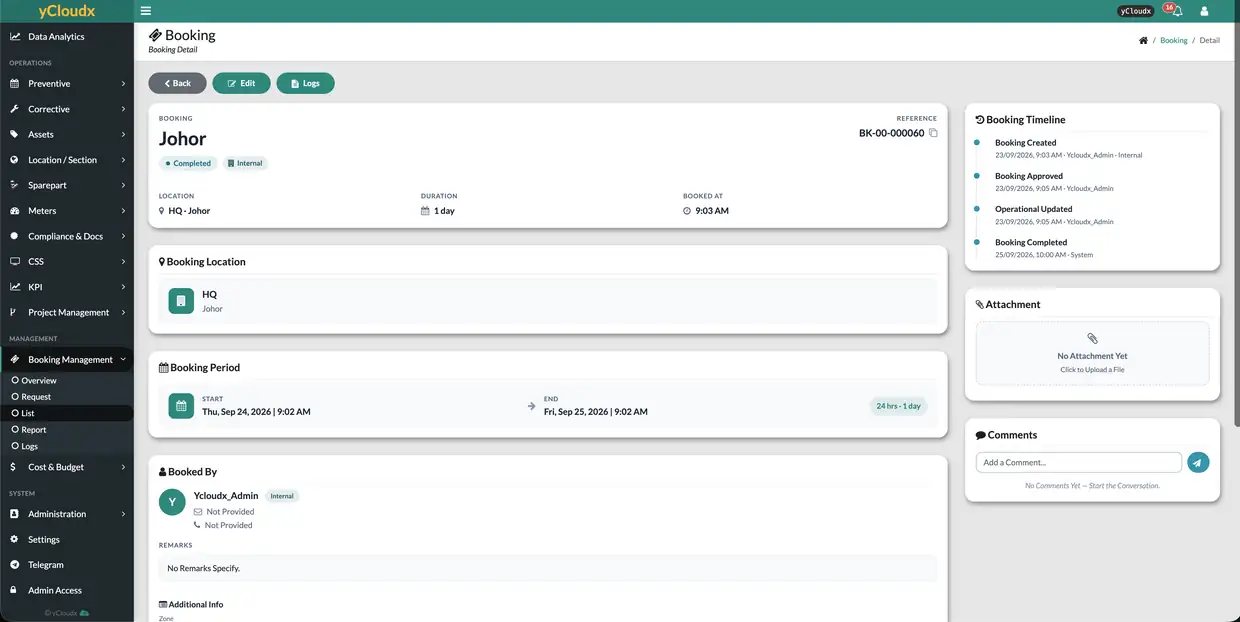
See every booking at a glance, on desktop or mobile.
View bookings on a calendar or as a list with status, site, location, asset, period, duration and cost. Managers can follow bookings from their phone, and reports show how your spaces are really used.


Calendar view
See what is booked across spaces and assets, and spot free slots quickly.
List & filters
Find bookings by status, site, location or asset, and open any record in one click.
Utilisation reports
Understand which spaces are busy, which sit empty, and when demand peaks.
Charges & history
Track booking charges and keep a complete history for audits and billing.
Bookings that prepare the room for you.
Where your building systems allow it, yCloudx can connect bookings to air-conditioning, lighting and access control through your BMS, BCS or EMS. Spaces get ready before people arrive and switch off when they leave.
Ready on arrival
Air-conditioning and lights switch on shortly before an approved booking starts.
WHEN booking starts in 15 min
THEN aircond + lights ON
Off when empty
Turn equipment off after the booking ends, or when a booking is withdrawn, to cut energy waste.
WHEN booking ends or is withdrawn
THEN aircond + lights OFF
Energy per booking
Use meter and EMS data to see energy use by space and booking, and price it where needed.
LINK EMS meter → Function Room 2
REPORT kWh per booking
Integration depends on your building systems and is scoped with you. See IoT integration for the systems yCloudx can connect to.
Built for shared spaces of every kind.
Corporate offices
Meeting rooms, training rooms and pool cars, booked by staff with approvals where needed.
Recurring weekly meetings, AV add-ons, cost centre trackingProperty & residential management
Function rooms, BBQ pits, courts and halls booked by residents through an external link.
Resident requests, booking charges, management approvalUniversities & training centres
Lecture halls, labs and equipment shared across departments without timetable clashes.
Semester-long recurring bookings, equipment loansGovernment & community halls
Public halls and venues with clear rates, approval steps and a record of every booking.
External applications, approval workflow, usage reportsSports & recreation
Courts, fields and pools with hourly rates and lights that follow the booking.
Hourly rates, lighting control, member and public bookingsHospitals & large facilities
Rooms, halls and shared equipment across buildings and sites, managed in one system.
Multi-site locations, asset bookings, operational remarksPart of the yCloudx platform.
Booking works alongside the rest of yCloudx, using the same locations, assets and users you already manage.
Booking management system FAQ
What is a booking management system?
A booking management system lets people reserve rooms, spaces, facilities and equipment online. It shows what is available, prevents two bookings for the same slot, applies rates and approvals, and keeps a record of every booking. yCloudx brings this together with maintenance, assets and facility operations in one platform.
How does yCloudx prevent double bookings?
When someone chooses a time, yCloudx checks it against existing bookings for that space or asset. If the slot is already taken, the user is told straight away and can pick another time before the request is submitted.
Can I set up recurring bookings?
Yes. Bookings can be one-off or recurring, for example every Tuesday from 9:00 to 10:00 for a set number of weeks. This suits regular meetings, classes and training sessions.
Can rates change based on how long the booking is?
Yes. You can set custom rates by duration, such as hourly, half-day or full-day rates, and add separate charges for resources like air-conditioning, security, cleaning or AV equipment. Internal bookings can be free while external bookings are charged.
Can people outside my organisation make bookings?
Yes. You can share an external booking link with tenants, residents, members or the public. The external form can show different fields from the internal one, and every request can go through your approval workflow.
Can I customise the booking form?
Yes. You choose the fields on the form, which ones are required and which are shown to internal or external users. Booking types can be organised by location, section or asset.
Does yCloudx booking work with IoT and building systems?
Where your building systems allow it, bookings can be linked to air-conditioning, lighting and other equipment through BMS, BCS or EMS integration, so a space is ready before the booking starts and switched off after it ends. Integration is scoped to your site.
Is there a mobile app for bookings?
Yes. Bookings can be viewed and followed on mobile as well as the web app, so managers and approvers can stay on top of requests on the go.
Ready to end double bookings?
Tell us about your rooms, facilities and assets. We will show you how yCloudx booking would work for your organisation and get back to you as soon as possible.
