
Preventive maintenance software.
Planned work.
Clear accountability.
Plan recurring maintenance, generate work orders and equip technicians to complete the job. yCloudx connects scheduling, field execution and monitoring for facility, maintenance and engineering teams in Malaysia and beyond.
The right task.
The right asset. The right time.
A preventive maintenance system brings recurring work into a shared plan. Define the frequency, equipment, location, responsible personnel and checklist before work becomes due.
Set recurring schedules
Organise daily, weekly, monthly, quarterly, half-yearly or yearly maintenance. Review planned dates, last maintenance and the next scheduled occurrence.
Link work to the asset
Keep the asset, system site, location and section with the schedule. Give planners a clear view of where the work belongs.
Prepare the work
Assign personnel and attach the relevant checklist template. Include planned hours and maintenance instructions so technicians know what to inspect and record.
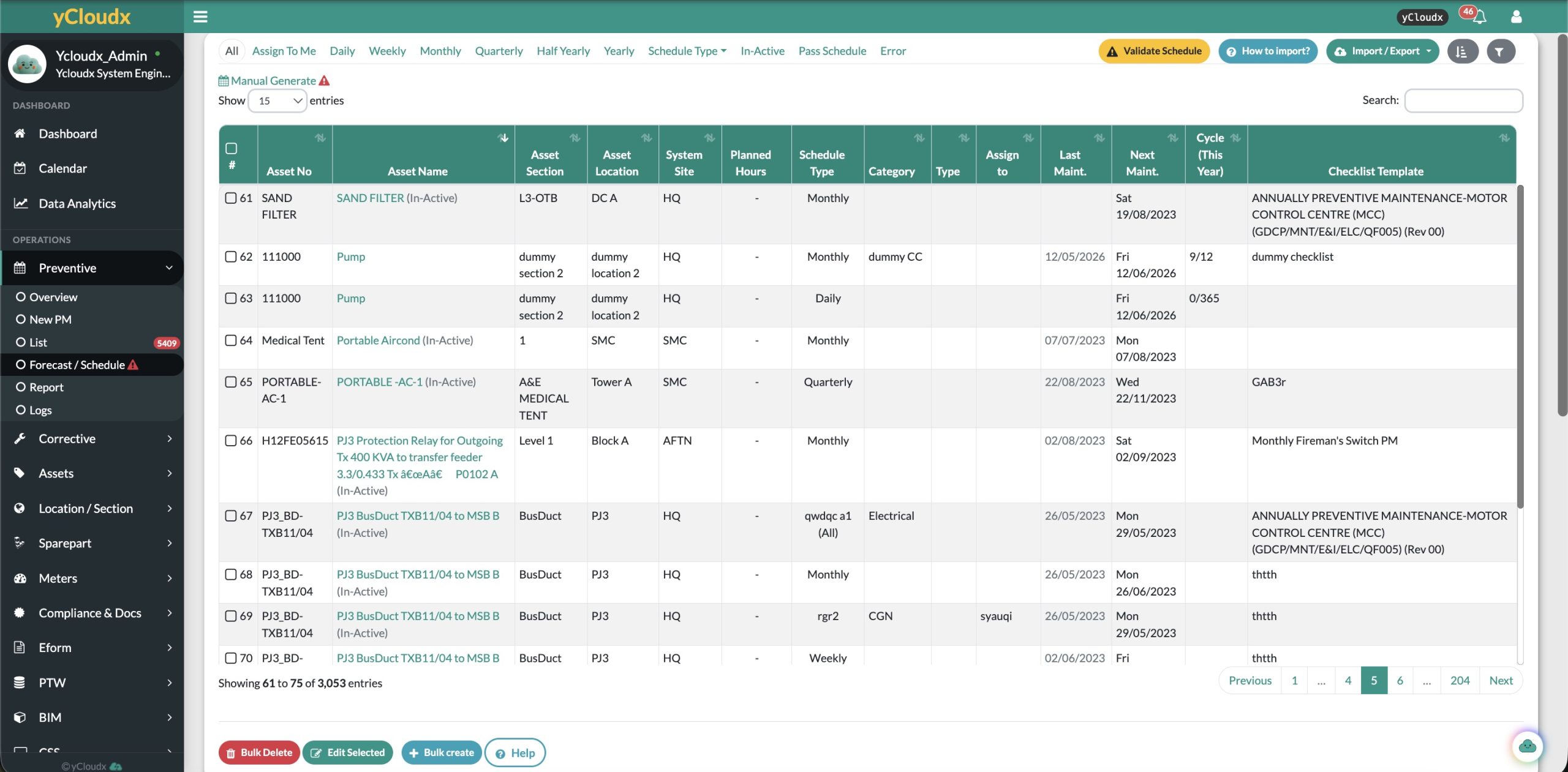
Screenshots show example operational records, including inactive or overdue items—not performance claims.
Turn the maintenance plan
into work people can act on.
Recurring schedules automatically generate PM work orders according to the configured rules. Follow the work from assignment through completion, then review status and outstanding activity.
Define the asset, task and maintenance requirements.
Set the frequency and planned dates for recurring work.
Give the work order a responsible person or team.
Follow instructions and record checklist findings.
Submit results and update the work status.
Review progress, pending work and completion records.
Work generation, assignment and review depend on the configured schedule and workflow. A generated work order is not the same as completed maintenance.
Give technicians the checklist.
Keep the evidence with the work.
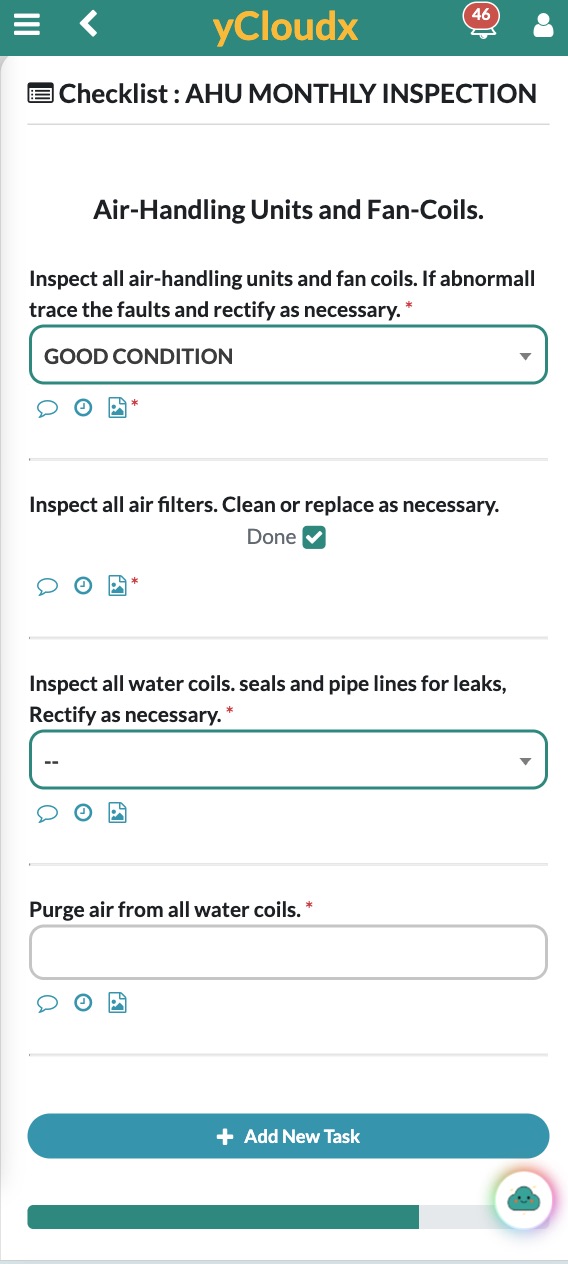
Access PM work on mobile, follow inspection instructions and record the result at the equipment. Bring task completion, photos, attachments and field updates into the maintenance record.
- Complete checklist items and record inspection findings.
- Add supporting photos and attachments to the job.
- Update PM status without returning to a desk.
- Complete supported PM checklists and capture photos offline, then synchronise when connectivity returns.
Agree device setup and the offline synchronisation workflow during implementation so field teams know which work is available before going offline.
Every planned job
adds to the asset story.
Keep preventive maintenance connected to the equipment it serves. Review service history alongside readings, parts, corrective work and recorded costs for a fuller operational picture.
For building operations, connect this maintenance context with your facility management system. Broader business requirements can be discussed alongside ERP & Business Operations.
See what is coming.
Know what still needs attention.
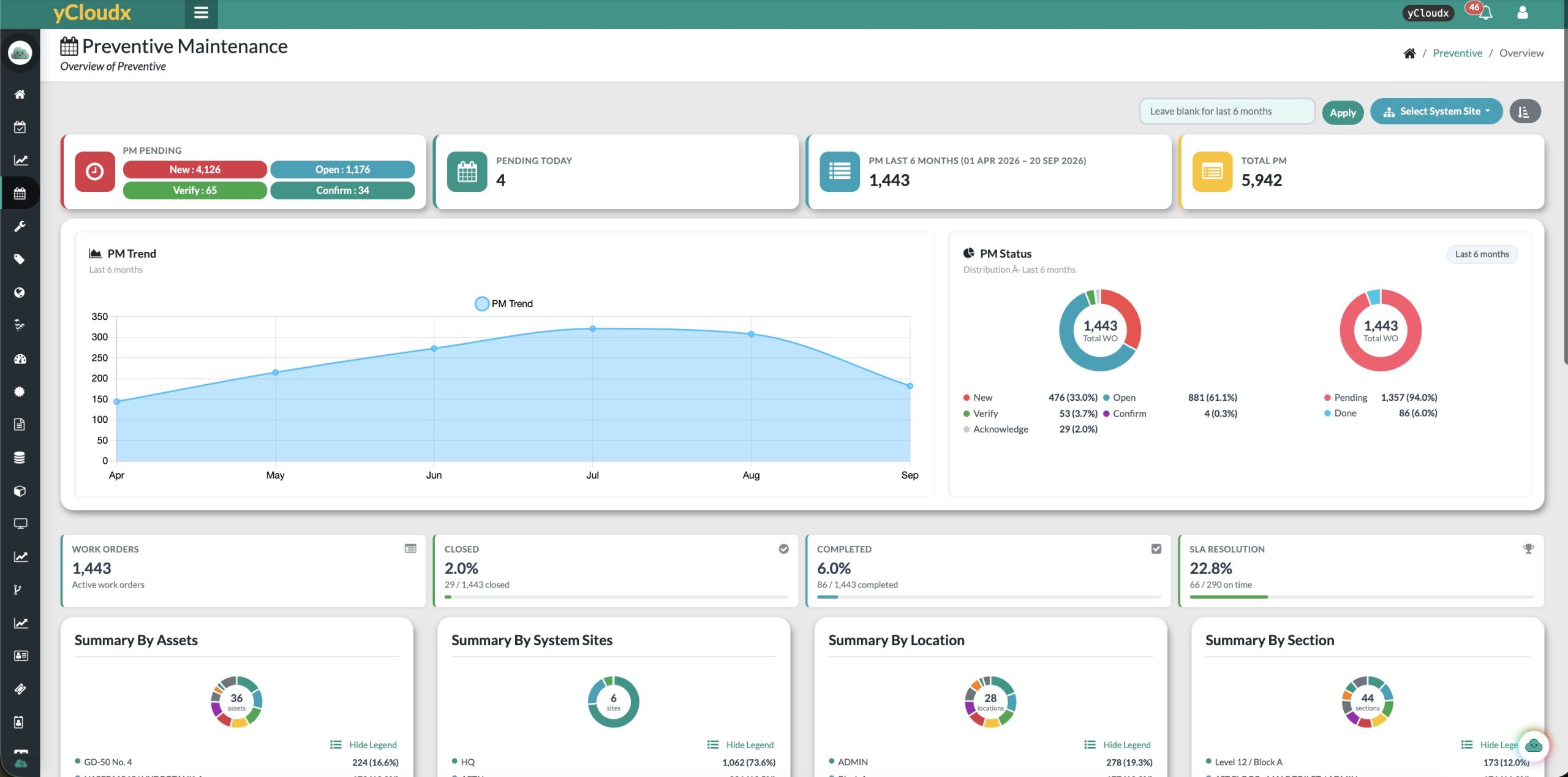
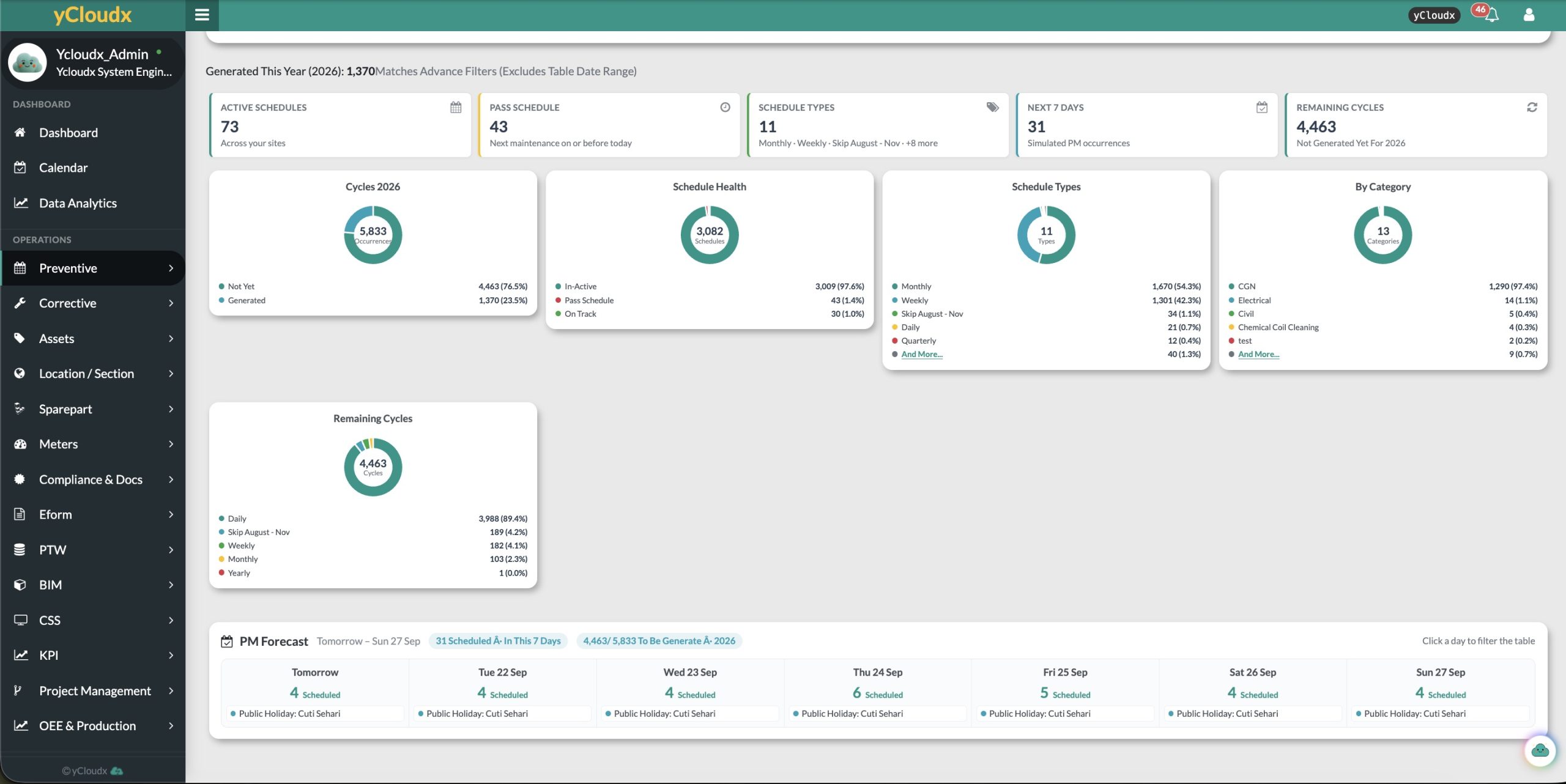
Review scheduled work, generated PM, pending activity and completed jobs. Use forecast and status views to identify overdue schedules and follow up before the backlog becomes harder to manage.
From schedule coverage
to completion visibility.
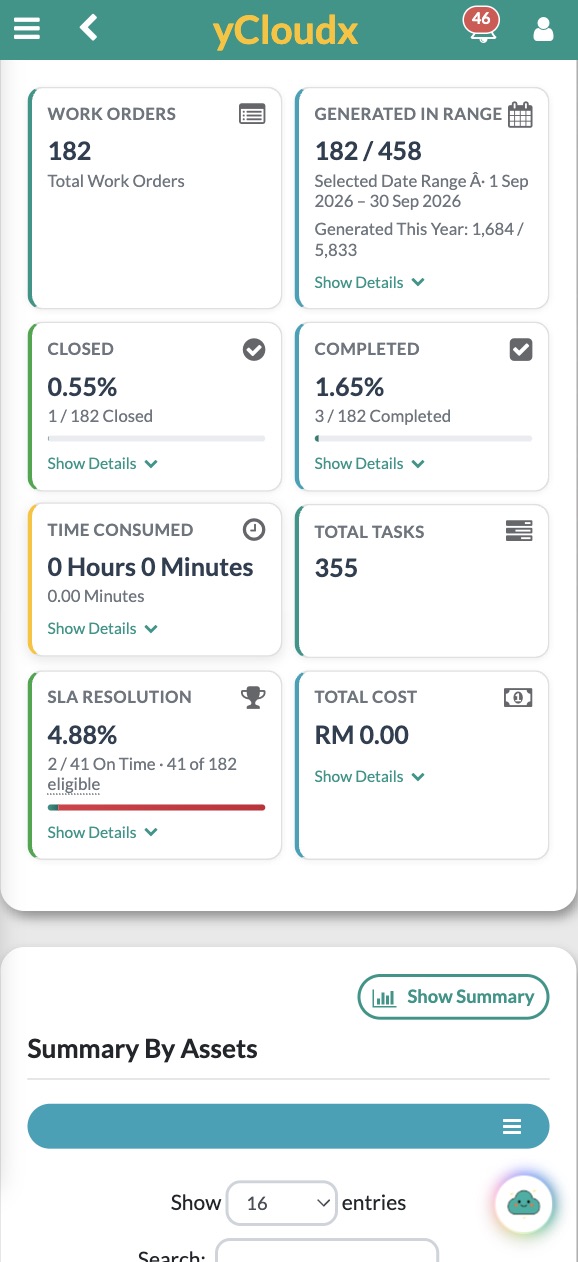
Distinguish future schedule occurrences from work orders already created.
Review completed, closed and pending work with the selected reporting period in view.
Review eligible SLA resolution records and follow up outstanding work.
Review recorded time, tasks and costs alongside PM activity.
Use the wider CMMS dashboards to review preventive and corrective maintenance trends together. This helps teams assess the balance between planned work and reactive demand.
Dashboard values depend on recorded data, selected dates and eligibility rules. The screenshots illustrate the interface, not promised savings or completion rates.
A year of PM.
On one screen.
The PM activity heatmap shows every day of the past twelve months and the weeks ahead, coloured by how much planned work was completed. The annual PM plan lays out every asset by month, so gaps and missed work stand out before an audit does.
PM activity heatmap
Each square is one day. Switch between compliance and volume, hover a day for its numbers, and look for red dots where work is still overdue.
Annual PM plan
Every cell shows completed over planned work for the month, coloured by its worst status. Group by asset, location, category or assignee, click a status to filter, then print the annual plan or export it to Excel.
PM forecast · next 7 days
See how much PM is scheduled for each of the coming days, so supervisors can plan people before the week starts.
Illustrative sample data. Your own schedules, assets and completion figures appear here.
Less missed work.
More maintenance visibility.
Preventive maintenance software supports a disciplined routine. Clear plans and complete records help teams act earlier and review what actually happened.
Reduce missed maintenance
Keep recurring dates and outstanding activities visible instead of relying on separate spreadsheets or memory.
Improve maintenance planning
Bring assets, personnel, planned hours and checklist requirements together before a job is due.
Support asset reliability
Build consistent inspection and service routines that help identify wear and developing issues.
Reduce reliance on reactive work
Use planned checks and recorded findings to address issues before they become urgent repairs.
Strengthen accountability
Make responsibility, progress and outstanding work easier for managers and technicians to review.
Maintain complete records
Keep checklist results, photos and service history available for handovers, reviews and future planning.
Built around the people
responsible for reliable operations.
A shared preventive maintenance system for facility managers, maintenance managers, engineering managers and technicians—across one site or a wider portfolio.
Plan building-services inspections, recurring equipment servicing and routine operational checks. Define the asset structure, responsibilities and maintenance standards around your organisation’s needs.
Questions about planned maintenance?
What is preventive maintenance software?
Preventive maintenance software helps teams plan, schedule, assign and record recurring inspections and servicing before equipment fails. It connects planned dates, assets, work orders and maintenance history so teams can execute and monitor planned maintenance in one place.
What is a preventive maintenance schedule?
A preventive maintenance schedule defines which asset or equipment needs attention, what work should be done and when it should happen. It can include frequency, planned dates, responsible personnel and the relevant maintenance instructions or checklist.
What is a maintenance management system?
A maintenance management system organises maintenance processes and information, including asset records, schedules, work orders, parts and service history. Preventive maintenance is one part of that wider maintenance management workflow.
How does preventive maintenance work in a CMMS?
In a CMMS, a preventive maintenance plan links recurring tasks to assets and schedules. Work orders are generated or created, assigned to technicians, completed with recorded results and monitored through status and reporting views. The completed work becomes part of the asset’s maintenance history.
Can yCloudx automatically schedule recurring maintenance?
Yes. yCloudx supports recurring preventive maintenance schedules and automatic PM work order generation according to configured schedule rules. Teams can review frequencies, planned dates, assignments and generated work alongside future maintenance requirements.
Can technicians use yCloudx on mobile and offline?
Yes. Technicians can access PM work, complete supported checklists, capture photos and update work status on mobile. Supported PM checklists and photos can be completed offline and synchronised when connectivity returns. Device preparation and the synchronisation process should be agreed during setup.
Can preventive maintenance be linked to assets?
Yes. yCloudx PM schedules and work records can be linked to assets, with site, location and section context. This connects planned maintenance with asset information and service history.
What is the difference between preventive and corrective maintenance?
Preventive maintenance is planned inspection or servicing intended to reduce the likelihood of failure. Corrective maintenance addresses a fault or defect that has been identified. Both are needed: planned checks may reveal issues that require corrective work.
Can maintenance be scheduled by machine usage hours?
yCloudx supports usage-based maintenance alongside calendar-based planning. Confirm the relevant meter or running-hour source, thresholds and generation rules during implementation so the schedule reflects how the equipment is used.
Can the preventive maintenance system handle multiple sites?
Yes. yCloudx organises preventive maintenance by system site, asset, location and section. Managers can review activity across the relevant sites while keeping individual maintenance records in context.
Can maintenance records support DOSH and ISO reporting?
Inspection details, checklist results and maintenance history can support your organisation’s audit and reporting processes. Required records and workflows should be mapped to the applicable requirements. Software use alone does not establish DOSH compliance or ISO certification.
Does yCloudx integrate with ERP and IoT?
yCloudx supports ERP and IoT integration scenarios. The connected systems, available data, interfaces and maintenance workflows need to be scoped for each implementation; integration is not assumed to be automatic for every device or ERP product.
How long does implementation take?
Implementation depends on the number of assets and sites, existing data quality, schedule and checklist requirements, integrations and user training. Agree the scope and validate the maintenance setup before committing to a rollout timeline.
Make recurring maintenance
easier to plan and follow through.
Explore yCloudx with your assets, schedules and checklists in mind. See how planning, mobile execution and monitoring fit together for your team.
