
Every project. Every task.
A clearer view.
Bring plans, people, progress and costs into focus. Flexible project management software with Gantt charts, Kanban boards and S-curve tracking—built for the way your team works.
See the work
your way.
Use a timeline to plan, a board to coordinate and a dashboard to review. Move from the big picture to the detail without losing the project context.
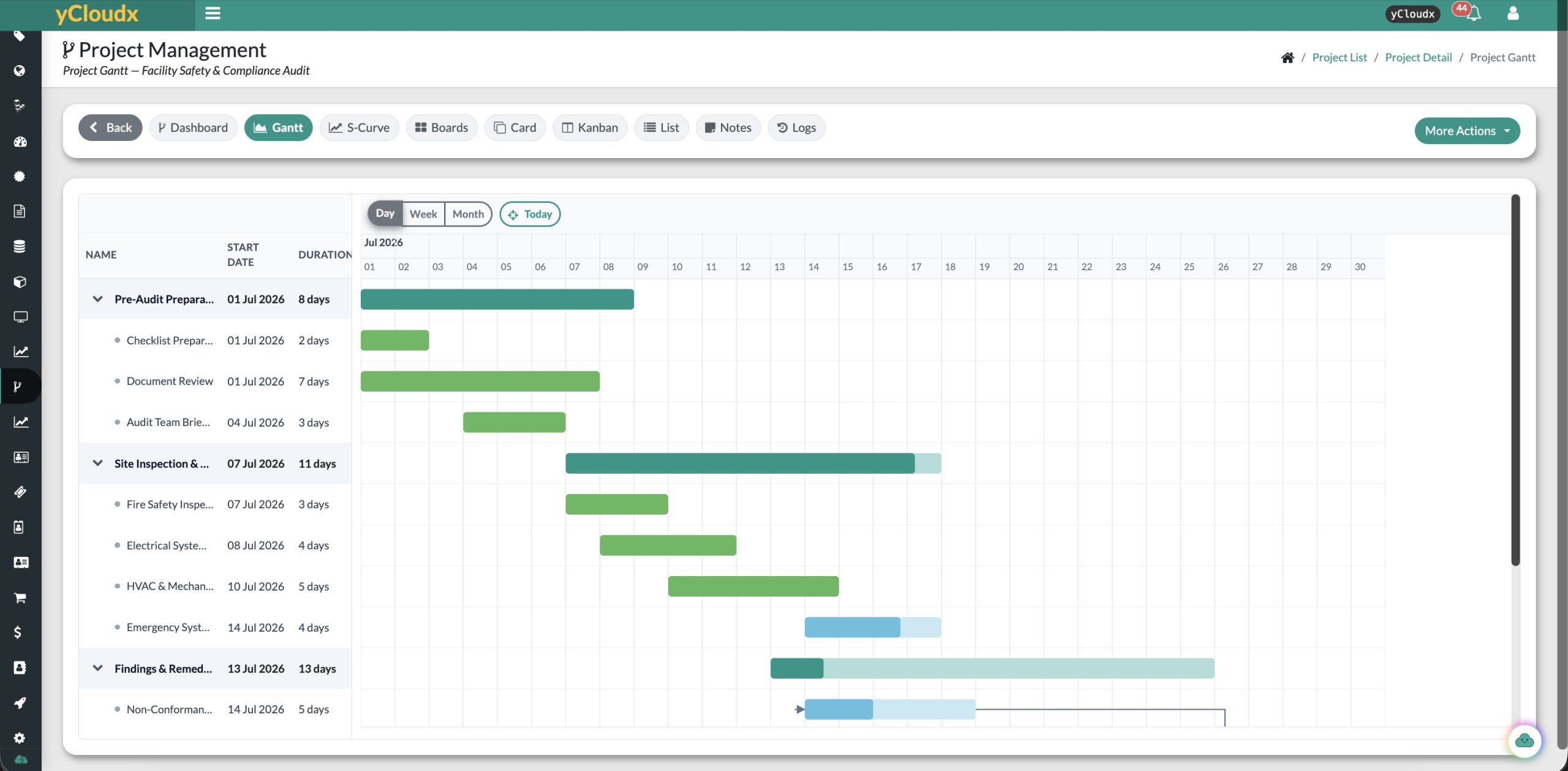
Gantt charts
Visualise project phases and task durations. Review planned dates and progress across a day, week or month timeline.
Kanban
See what has not started, what is ongoing and what is completed, with task progress and due dates in view.
Boards & cards
Break projects into manageable stages and tasks. Keep assignees, weightage, dates and budget information alongside the work.
List views
Review task details in a structured table, from status and planned dates to budget balances and earned value.
Project dashboard
Bring project status, duration, progress and a financial summary into one overview for more focused reviews.
S-curve analysis
Compare planned and actual progress over time. Review progress alongside the cost indicators available for your project.
From “what’s happening?”
to “what’s next?”
Make work status easy to understand. Kanban brings tasks, due dates and completion progress together so the team can focus its next conversation.
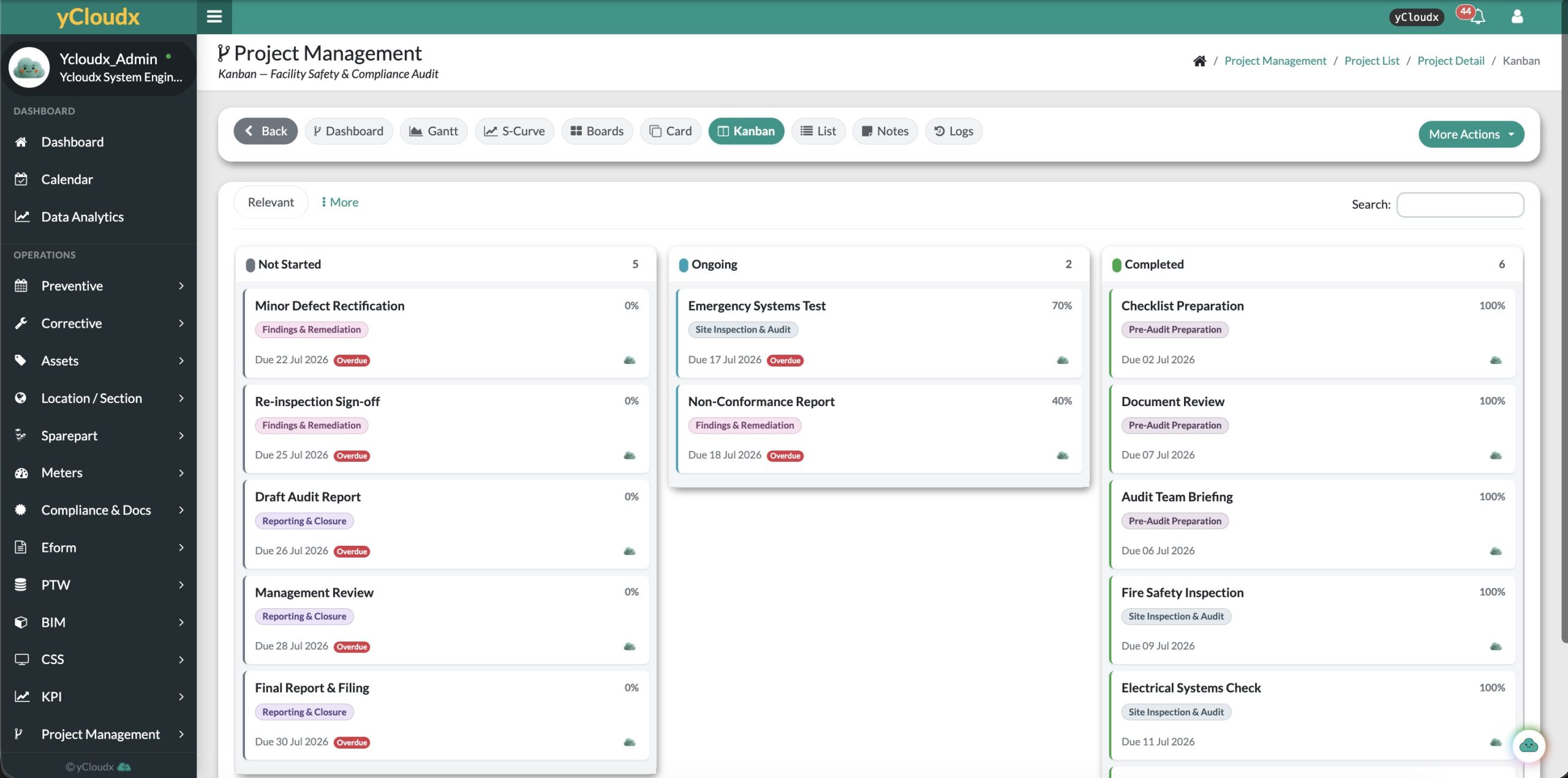
Group related work into boards and individual cards.
Keep responsibilities and planned dates with each task.
Review incomplete tasks and overdue dates before the next update.
The plan is one line.
Reality is another.
Compare cumulative planned and actual progress to see where delivery is diverging. Switch between project, board and card perspectives for a more focused review.
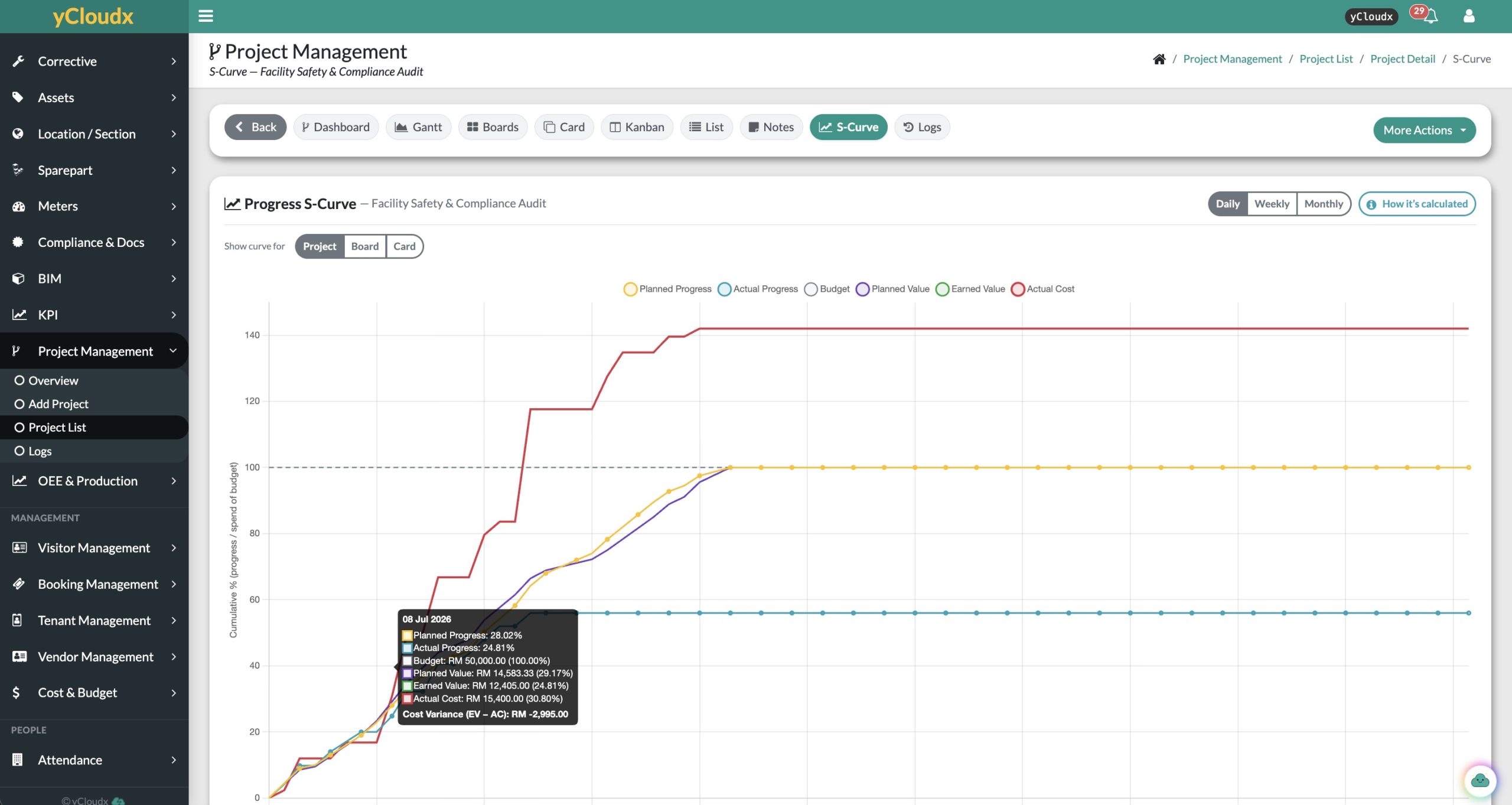
Review the trajectory, not just a single percentage.
Use daily, weekly or monthly views to support your reporting rhythm.
Discuss the gap between the plan and recorded performance.
Keep the budget
in the conversation.
Track budget, actual cost and remaining balances alongside delivery progress. Make overspending and performance variances visible during project reviews.
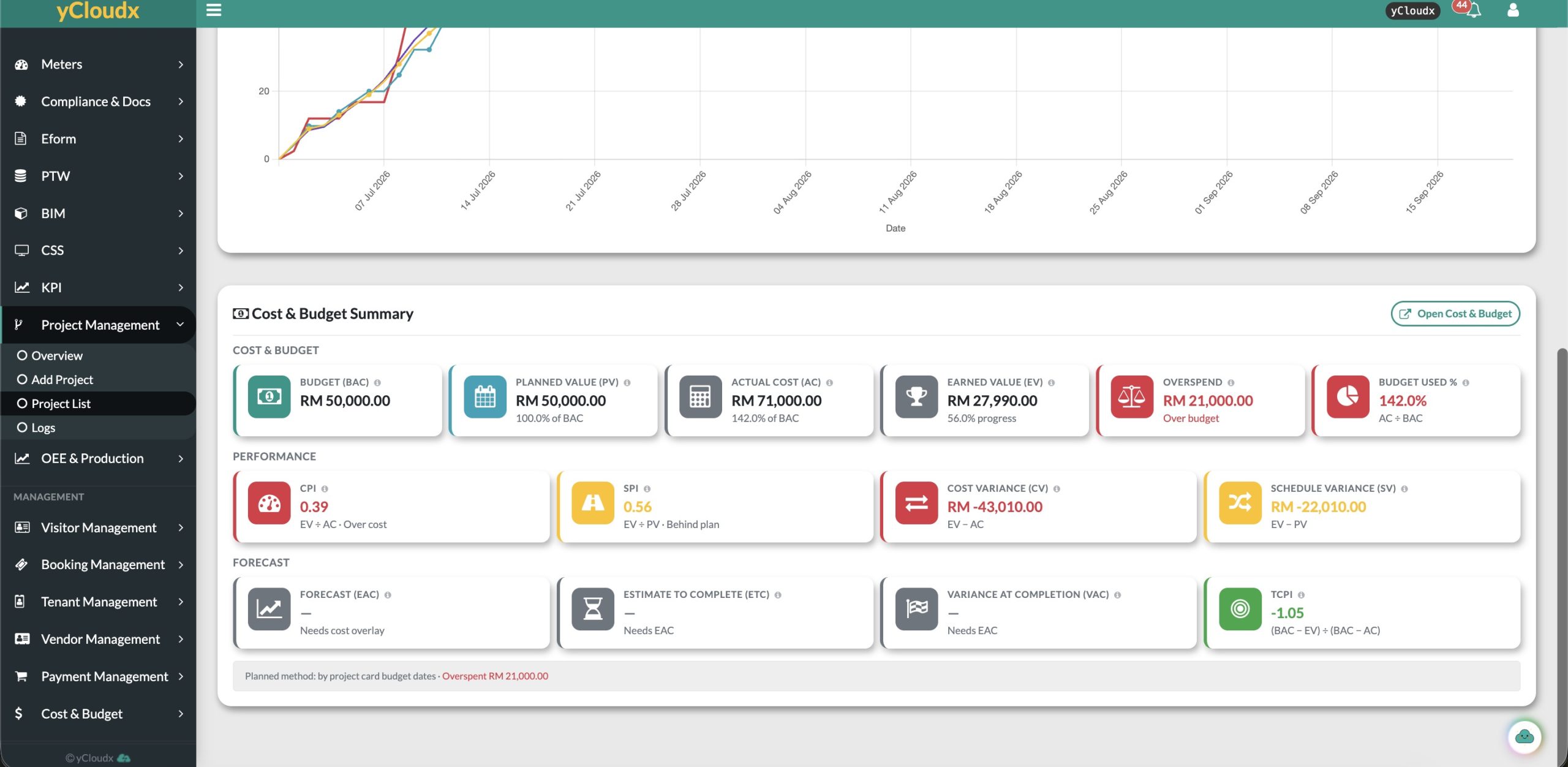
Review planned amounts, actual spending and remaining or overspent balances.
See planned value, earned value, CPI, SPI and cost and schedule variances where the required data is available.
Open the linked Cost & Budget workspace for a closer financial review.
Indicators depend on project inputs and cost configuration. Screenshots show example interface data, not promised outcomes or customer performance results.
Your project doesn’t
stay at your desk.
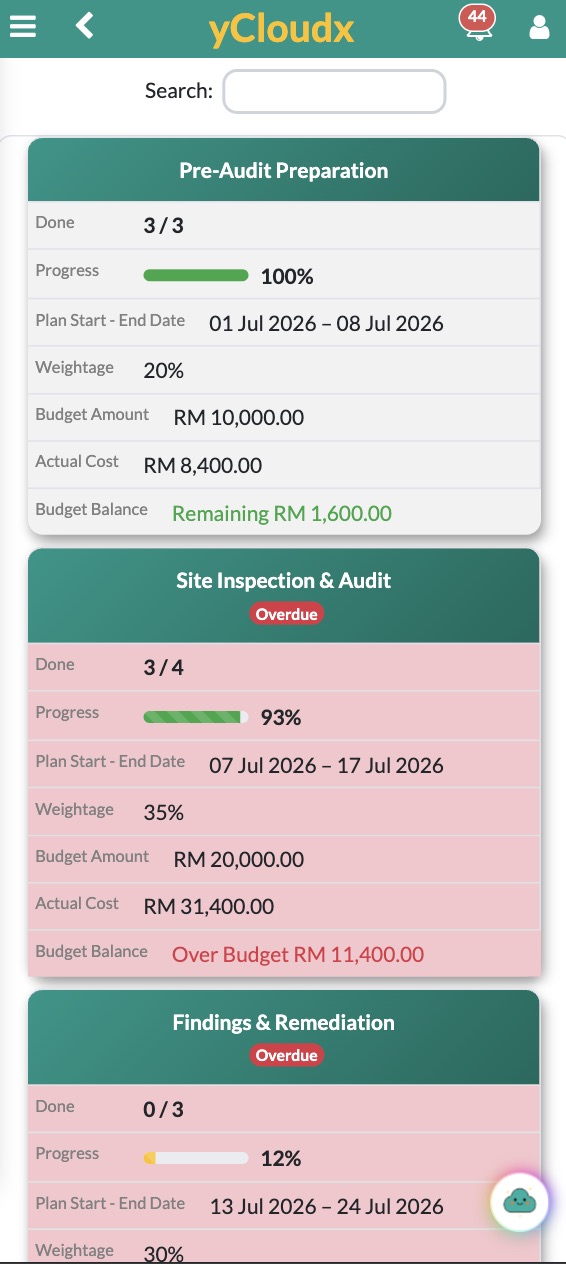
Review board progress, planned dates and budget balances from a mobile-friendly view. Keep a useful overview close at hand between meetings or site visits.
Completion counts. Progress percentages. Overdue flags. Budget balances. The essentials, presented in a compact card layout.
For detailed Gantt timelines and financial analysis, use a larger screen.
One practical workflow.
Different kinds of projects.
From facility audits and improvement works to internal initiatives and operational rollouts, organise projects around their own stages, tasks, owners and dates.
Define
Set the project scope, planned dates and the work to be delivered.
Organise
Break the work into boards and cards, with assignees and task details.
Track
Review activity through Gantt, Kanban and list views as work progresses.
Review
Compare progress and costs, then agree the next actions with the team.
Project management
with operational context.
Looking for project management software in Malaysia, or evaluating tools for an international team? Start with your workflow: the stages you manage, the people involved and the reports you need.
yCloudx brings project tracking into a broader operations platform. Explore CMMS and maintenance management or BIM integration, and ask which modules fit your requirements.
For a useful demonstration, bring an example project, your preferred progress-reporting method and the cost details you want to monitor.
Project management FAQs
What is yCloudx Project Management?
It is a project planning and tracking module for organising work into boards and cards, assigning responsibilities, monitoring dates and reviewing progress and costs. Gantt, Kanban, list and S-curve views provide different perspectives on the work.
Which project views are available?
The module includes a dashboard, Gantt chart, S-curve, boards, cards, Kanban and list views, with notes and logs available in the project workspace. Choose a view to suit planning, daily coordination or a progress review.
How does S-curve project tracking help?
An S-curve compares cumulative planned and actual progress over time. The illustrated yCloudx view also includes budget, planned value, earned value and actual cost, helping teams discuss schedule and spending differences together.
Can we monitor project budgets and actual costs?
Yes. The supplied interface shows budget amounts, actual costs, remaining or overspent balances, earned value and cost and schedule indicators. Available figures depend on the project data entered and the relevant cost configuration.
Is it only for facilities or maintenance projects?
No. Boards, tasks, assignees, dates and budgets can support different project types. The screenshots illustrate a facility safety and compliance audit; discuss your own workflow with our team to confirm the right setup.
Can I review projects on my phone?
The mobile view shows board completion, progress, planned dates and budget balances. Detailed timelines and financial analysis are easier to review on a larger screen.
Is yCloudx suitable for teams in Malaysia and internationally?
yCloudx is developed in Malaysia for teams working locally and beyond. Request a walkthrough of your project structure, reporting needs and deployment requirements to assess fit.
Less chasing updates.
More clarity on the work.
See how your project could look in yCloudx—from the first task to the progress and budget review.
