Assist
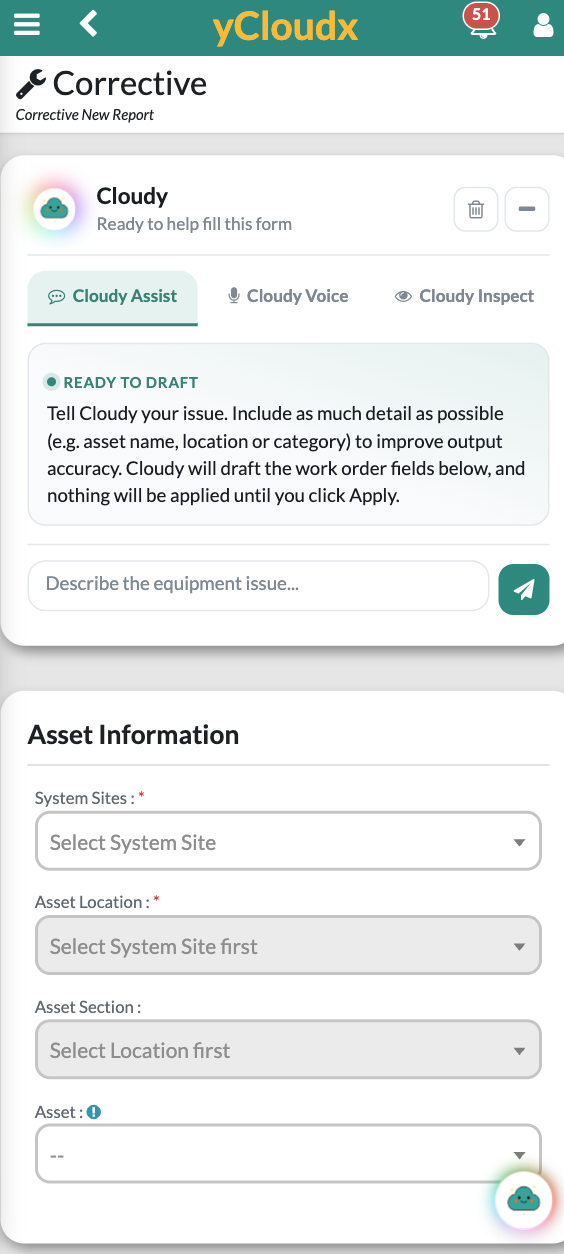
Describe the issue naturally. Cloudy interprets your intent, drafts descriptions and suggests relevant form fields.
See assisted reporting →
Turn everyday words, voice notes and visual information into structured work. Cloudy brings AI assistance, operational insights and predictive-maintenance recommendations directly into yCloudx CMMS, EAM and facility workflows.
Assist · Voice · Inspect · Insight · Predict
Choose the interaction that fits the task. Cloudy works inside supported yCloudx workflows, helping teams move from unstructured input to useful information and a reviewed next step.
Describe the issue naturally. Cloudy interprets your intent, drafts descriptions and suggests relevant form fields.
See assisted reporting →Speak instead of typing. Cloudy interprets multilingual voice input and helps structure information for supported forms.
Explore field input →Provide a photo or document. Cloudy extracts, classifies and suggests relevant details and actions for review.
See visual assistance →Ask questions about authorised yCloudx data. Explore historical patterns, summaries and recurring issues conversationally.
Ask your data →Use available maintenance history to identify risk signals and recommend preventive attention.
Explore predictive assistance →AI assistance is most useful when it connects to the next step of the job. Cloudy can turn everyday input into draft fields, an operational insight or a maintenance recommendation.
Type, speak, upload or ask a question.
Cloudy uses the input and available context.
Extract details, analyse records or draft information.
Check the suggested fields, insight or recommendation.
Apply selected details and continue the supported workflow.
AI outputs can be incomplete or incorrect. Users remain responsible for verifying information and deciding the appropriate action.
Technicians should not have to turn every field observation into polished form text. Type or speak in natural language, including supported multilingual input, and let Cloudy help organise the details.
Include the asset, location and observed issue so the draft has useful operational context.
Cloudy Voice offers an alternative to typing for supported reporting and data-entry workflows.
Check descriptions and relevant classifications before applying them to the form.
Continue the work-order process in yCloudx rather than copying text from a separate AI tool.
In the illustrated work-order form, Cloudy drafts information; nothing is applied until the user selects Apply.
Cloudy can analyse images and documents, extract relevant information and suggest classifications, descriptions or next steps. Use it to support field reporting, inspections and asset-related documentation.
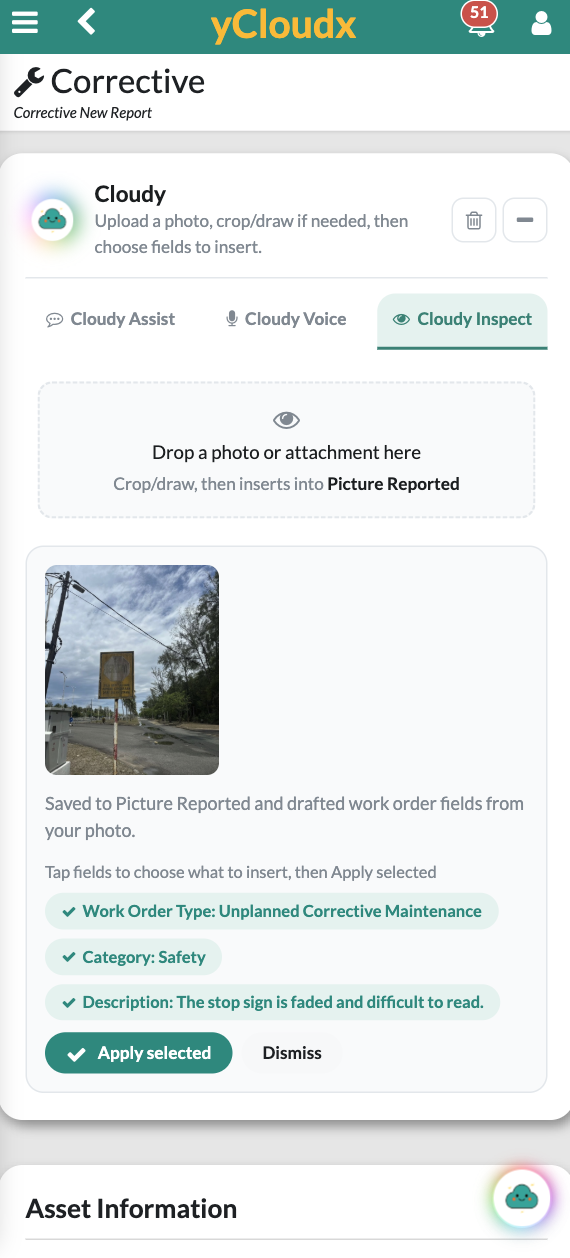
The supplied product example shows a faded sign photo translated into suggested work-order details. The user chooses which fields to apply.
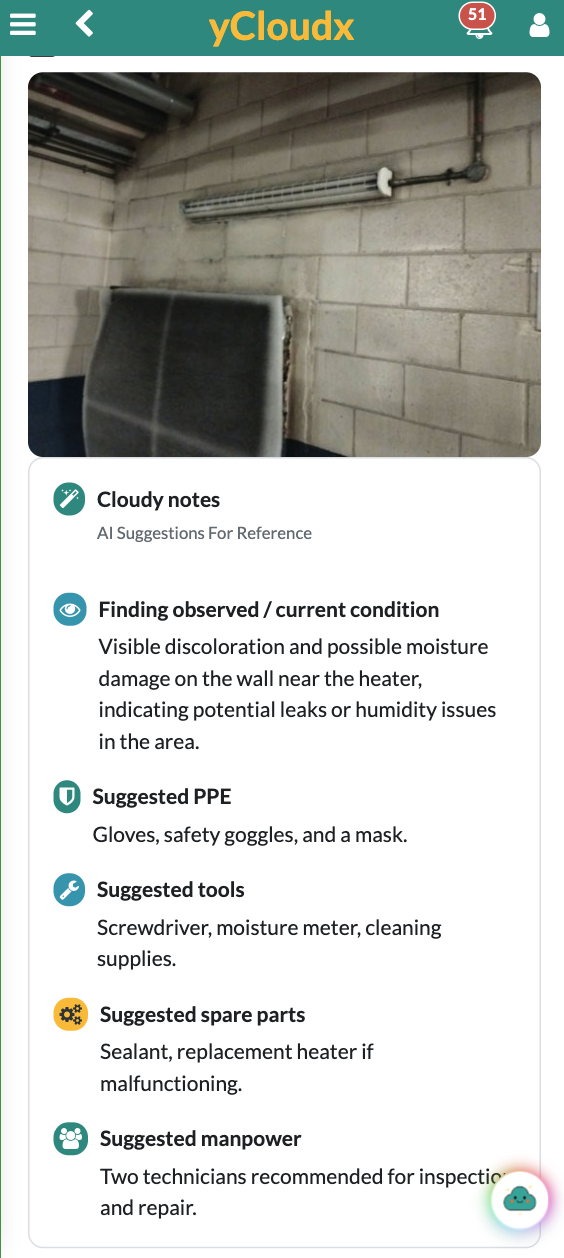
Reference suggestions can help teams prepare follow-up work. A competent person must verify the actual condition, hazards, PPE and safe work method before action.
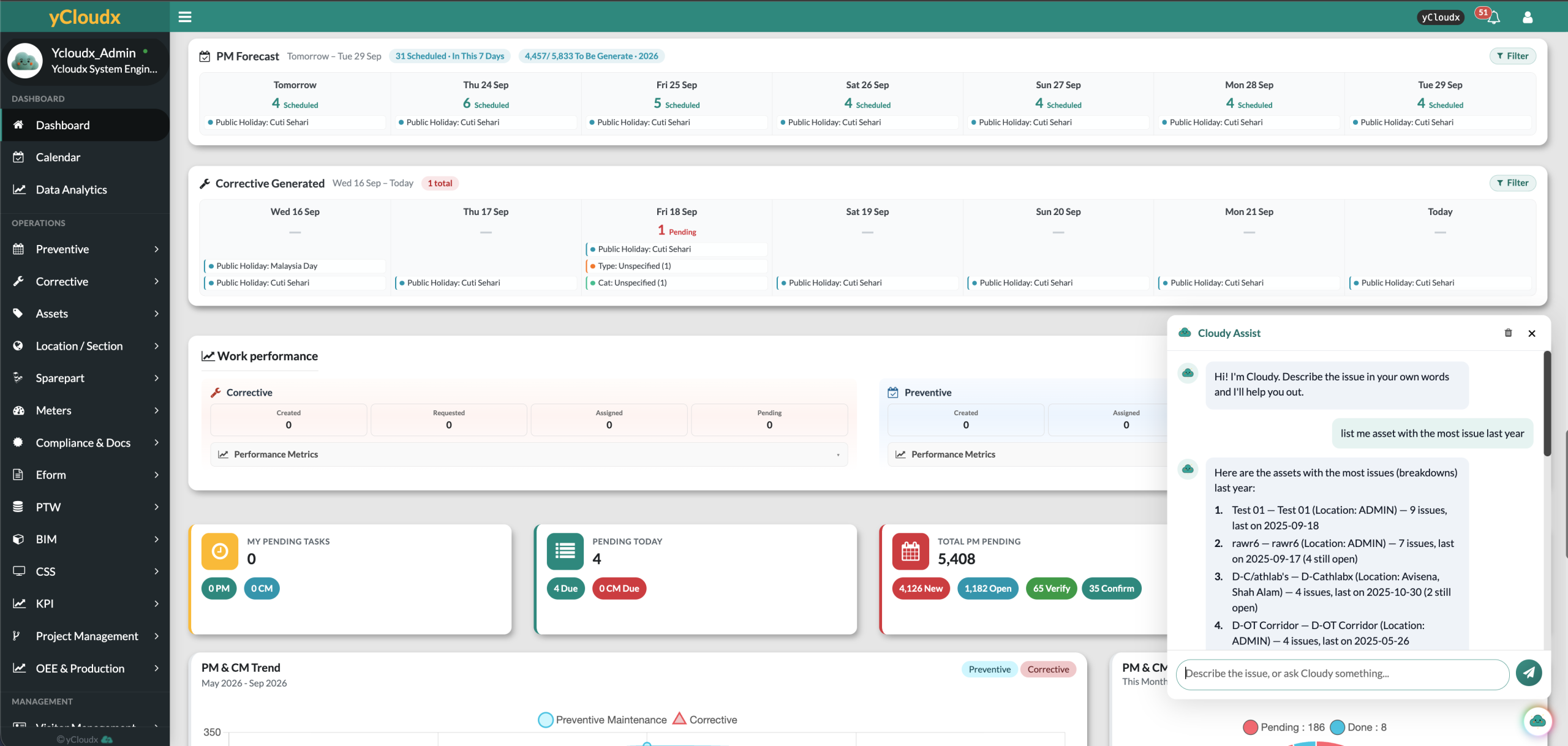
Authorised users can ask natural-language questions about available yCloudx records. Cloudy helps summarise historical and operational information, identify trends and explain what may need attention.
Instead of manually searching several screens for an initial overview, start a conversation about the records available to you—then verify the underlying information before making a decision.
“List me assets with the most issue last year”
The supplied screenshot shows Cloudy returning assets with issue counts and recorded dates. This supports a focused review of recurring breakdown activity.
Specify the asset or period you want to investigate.
Use summaries and observations to guide a closer review.
Check source records and involve the responsible team.
The example appears in the in-product Cloudy Assist conversation panel. Insight describes the data-question capability; available answers depend on authorised data and implementation scope.
Cloudy supports AI-assisted predictive maintenance by analysing available maintenance and operational history. It identifies patterns and potential risk signals, then recommends preventive attention or a work order where appropriate.
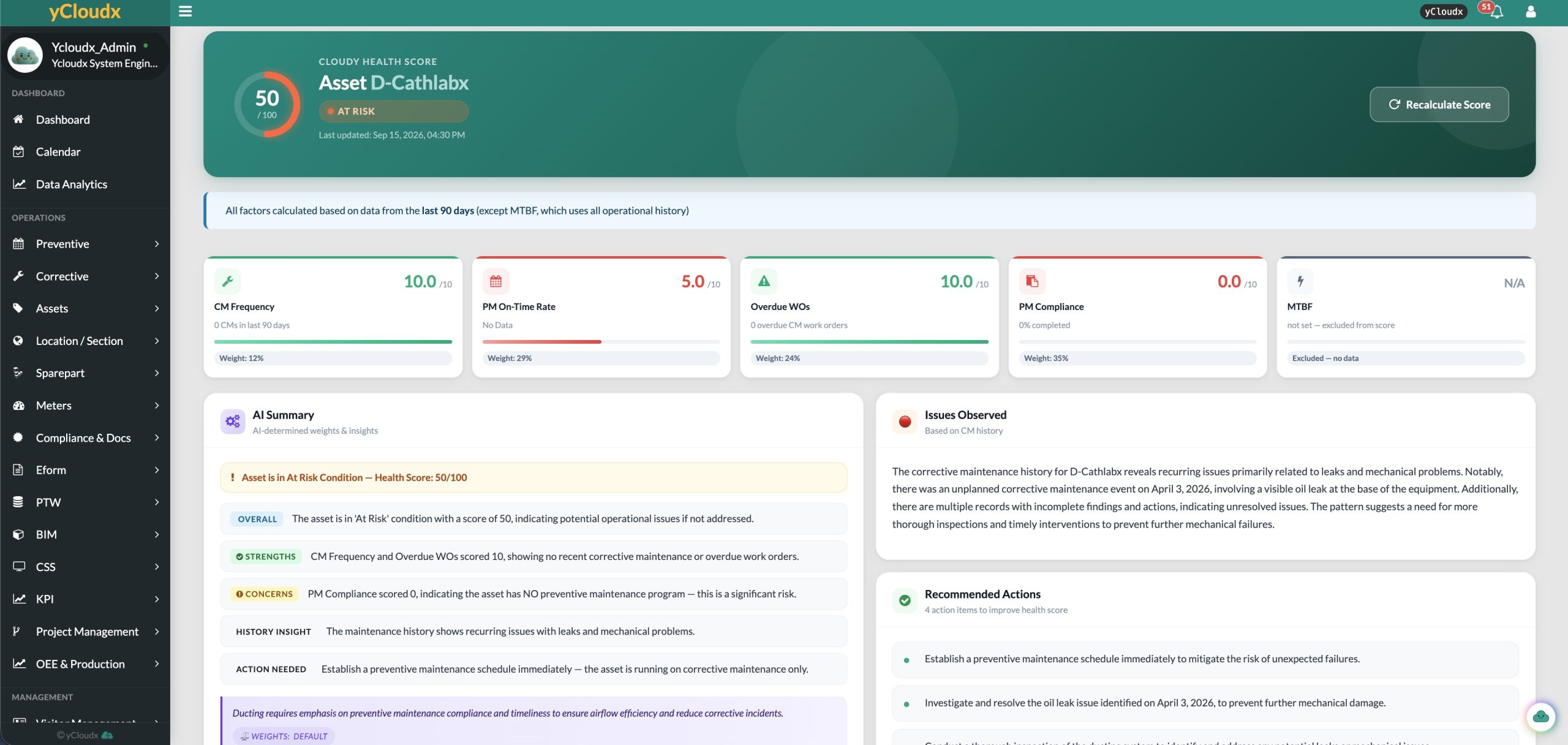
Available maintenance and operational records.
Recurring issues and potential risk signals.
Suggested preventive attention or follow-up.
Reviewed action or a configured work-order workflow.
Recommendations depend on data quality, completeness and history. Cloudy can create or initiate a work order where configured and supported; automation scope and review requirements should be agreed before use.
Cloudy is an AI layer within yCloudx, not a standalone replacement for operational systems. Connected maintenance, asset and facility records provide context for supported assistance and analysis.
Support work-order drafting, corrective reporting and the review of maintenance activity.
Explore CMMS with AI →Use maintenance history and recommendations to inform a reviewed preventive action.
Explore Preventive Maintenance →Bring asset context, service history and available health information into operational reviews.
Explore Asset Management →Support field reports, inspections and analysis within wider building operations.
Explore Facility Management →Discuss how available connected readings could support the agreed operational workflow and data scope.
Explore IoT Integration →AI assistance sits inside supported yCloudx forms and operational workflows.
Combine text, multilingual voice, images, documents and conversational questions.
Review draft fields, investigate insights and connect recommendations with maintenance action.
Built in Malaysia for maintenance and facility operations. Confirm module availability, supported languages, data access and automation scope during your demonstration.
Cloudy is yCloudx’s built-in AI layer for CMMS, EAM and facility operations. Its five capabilities—Assist, Voice, Inspect, Insight and Predict—support data entry, visual analysis, operational questions and maintenance recommendations in supported workflows.
AI can help turn natural-language reports into structured work-order information, extract details from images or documents, summarise maintenance records and identify historical patterns. Cloudy applies these capabilities within supported yCloudx workflows, with human review of outputs.
AI predictive maintenance uses available historical or operational data to identify patterns and potential maintenance needs. Cloudy AI Predict supports this approach with risk signals and recommended actions. It does not guarantee that a failure will be predicted or prevented.
Cloudy Assist and Inspect can suggest work-order fields for users to review and apply. Cloudy Predict can recommend, create or initiate a work order where the relevant workflow is configured and supported. Confirm the automation scope and approval requirements for your deployment.
Yes. Cloudy Voice interprets natural speech and helps populate relevant information in supported forms. This gives technicians and field users an alternative to typing. Users should check the resulting information before applying it.
Yes. Cloudy Inspect can analyse supplied images and documents to extract information, suggest classifications, draft fields and recommend relevant next steps. Results require review; visual analysis is not a definitive equipment diagnosis or safety assessment.
Yes. Authorised users can ask questions about available historical and operational data. Cloudy AI Insight can provide summaries, trends, observations and recommendations. The answer scope depends on authorised data and the actual implementation.
Yes. Cloudy Assist and Voice support natural multilingual input. Confirm the languages and workflow requirements relevant to your team during a demonstration, and review generated text and field values before use.
Cloudy analyses available maintenance and operational history for patterns and potential risks, then recommends preventive action or a work order where appropriate. Data completeness, quality and history affect the usefulness of the output. Configured workflows determine whether a work order can be initiated.
No. Cloudy assists reporting, analysis and decision-making. Responsible personnel must verify outputs, assess actual site conditions and follow maintenance, safety and approval procedures. AI suggestions do not replace professional judgement.

Bring a typical report, inspection photo or maintenance question. Explore how Cloudy can support your team inside yCloudx.
