
ERP & Business Operations.
Connect the everyday work.
Bring approvals, commercial documents, workforce and property operations into a modular platform. yCloudx connects the work around your maintenance and assets—and can complement your existing ERP environment.
Built in Malaysia. For teams, sites and operational portfolios.
The right modules.
A clearer way to work.
Business management software should reflect the work your organisation actually does. Select the yCloudx modules you need, define responsibilities and bring records into a shared operational environment.
Documents & approvals
Manage quotations, purchase orders, invoices and payment-related records with defined review and approval workflows.
People & attendance
Coordinate attendance, rosters, leave and employee claims. Administration controls determine account access and module settings.
Facilities & projects
Connect tenant and visitor operations, compliance documents, utility billing and project activities with your facilities portfolio.
From request.
To a recorded decision.
Replace scattered messages and paper forms with a defined process. Capture supporting information, route supported requests to approvers and keep decisions visible alongside their records.
- 01
Request
Submit details and supporting documents.
- 02
Route
Notify the relevant reviewer or approver.
- 03
Review
Check the information and record a decision.
- 04
Update
Communicate the resulting status.
- 05
Monitor
Review pending items and the recorded history.
Example approval flow. Steps, notifications and audit records depend on the selected module and configured process.
Keep commercial work
moving through approval.
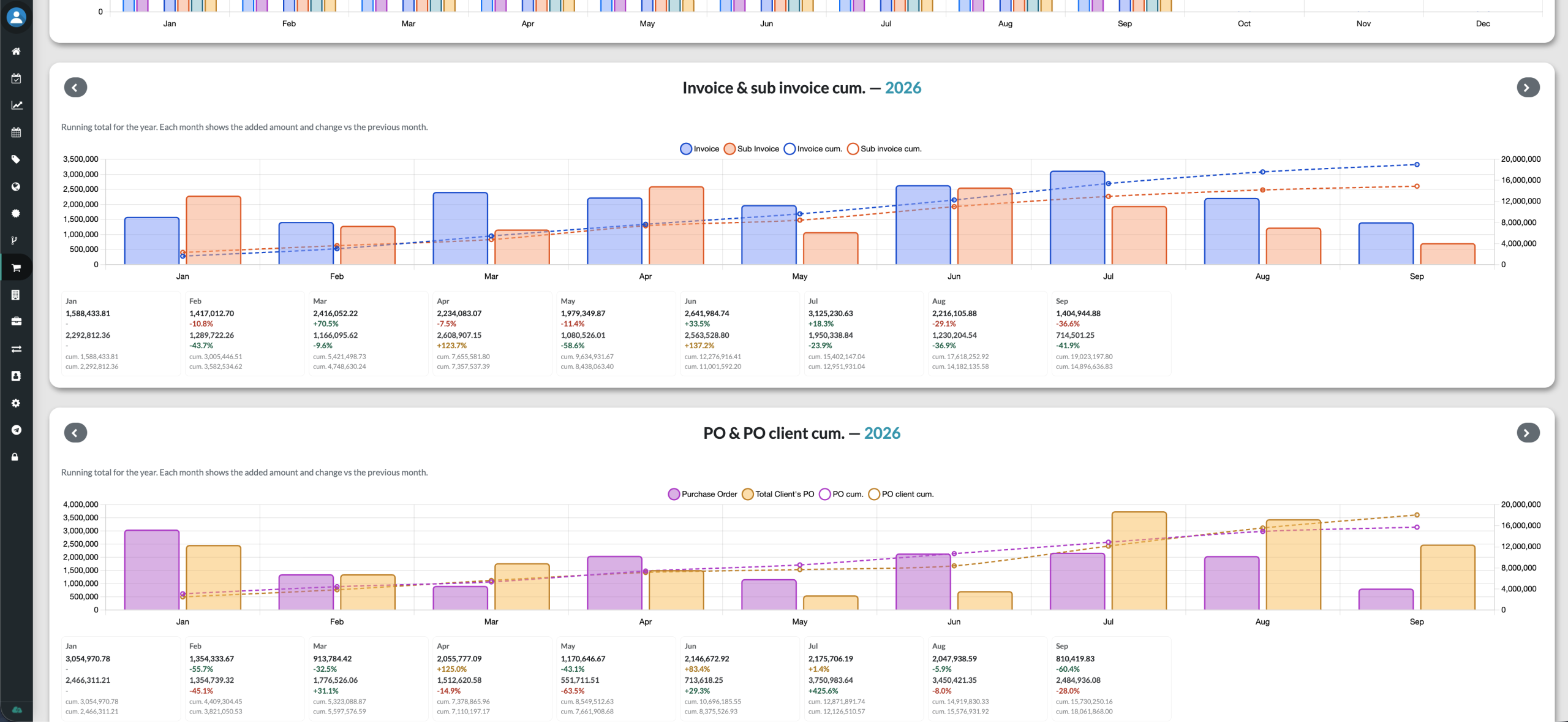
Give teams a structured way to issue, review and track commercial documents. yCloudx supports the operational side of quotations, purchase orders, invoices and payment records—not a claim to replace your accounting ledger.
Quotation, PO & invoice
Organise client and vendor documents, supporting attachments and approvals. Retain the related records so teams can follow the transaction history.
Payment visibility
Review payment-related records and document status. Use invoice and purchase order dashboards to understand activity over time.
Utility billing
Bring meter readings, consumption and billing information into property operations. Review recent bills and monthly trends.
Explore Utility Billing Management →Clear system boundaries
Keep general ledger, statutory accounting and other core finance requirements in your chosen finance system. Define any required data exchange during integration scoping.
Plan attendance.
Keep requests visible.
Give staff and managers a consistent place for everyday workforce administration. Connect roster visibility with attendance, leave applications and claim approvals.
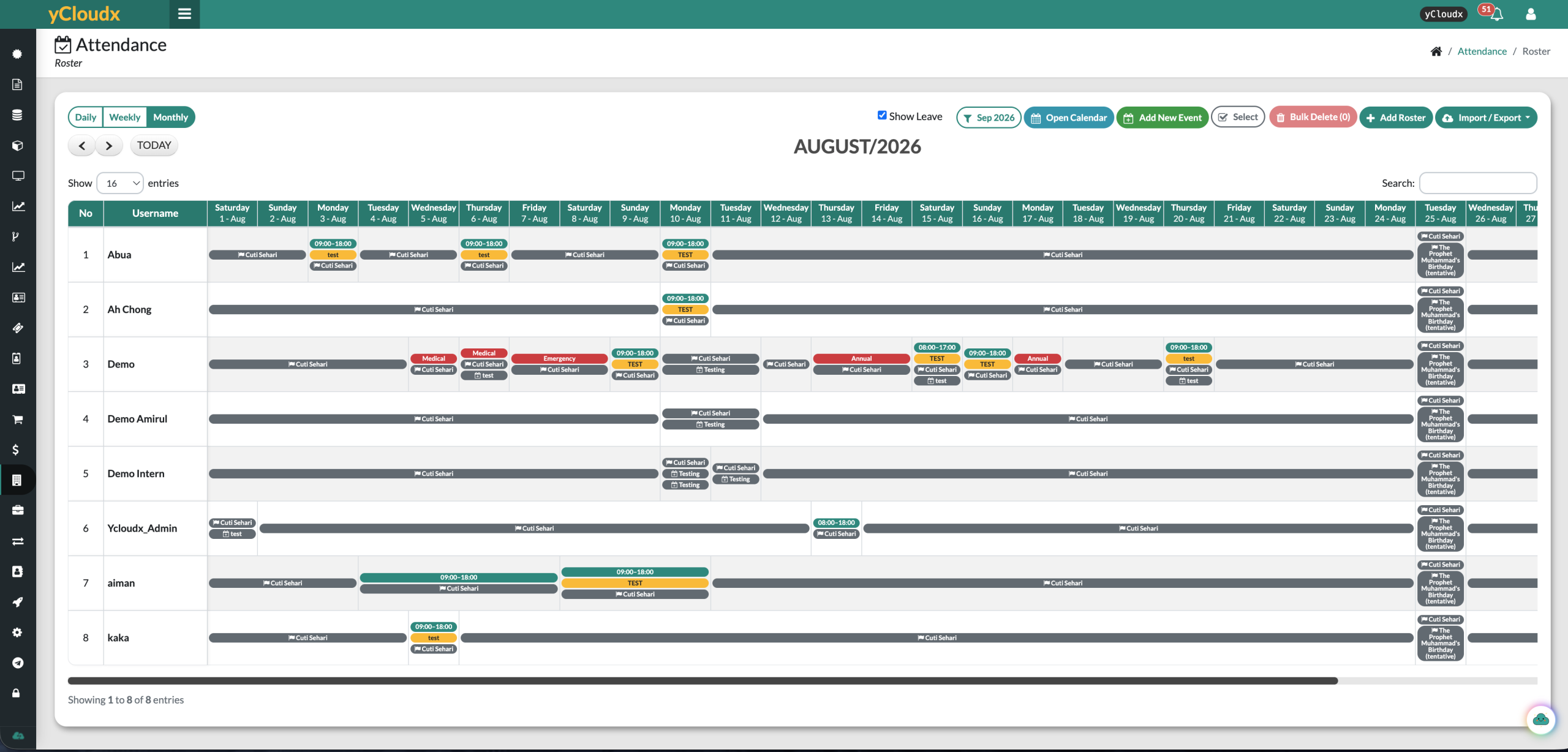
Review attendance across sites, clock-in/out records and timesheets. Location and image records support the configured attendance process.
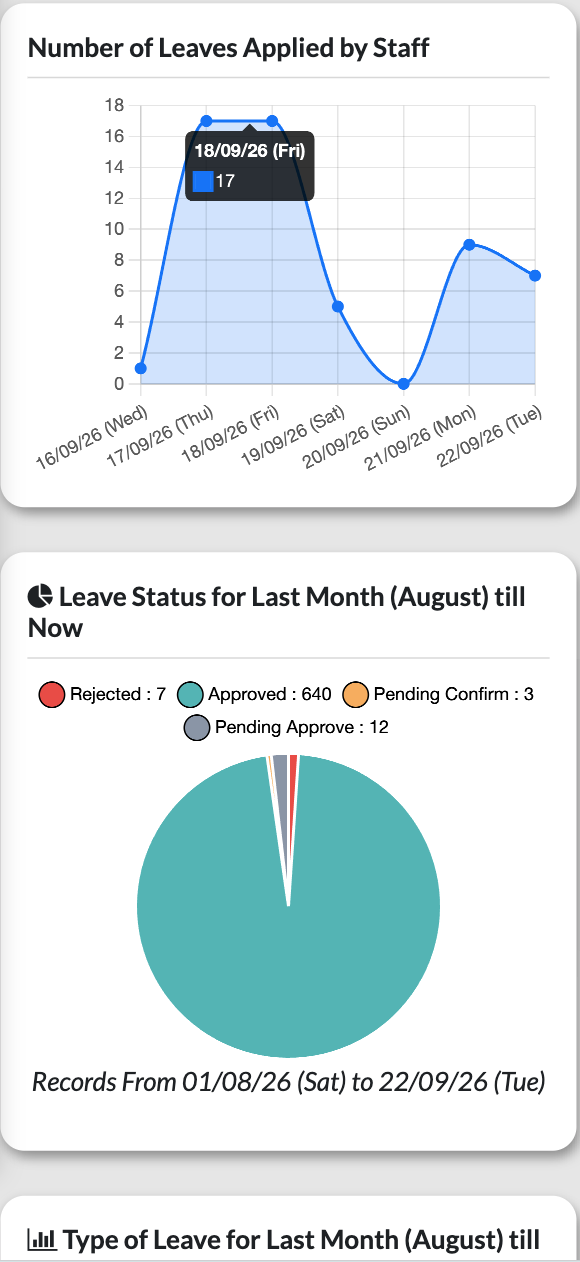
Submit applications with supporting documents, review balances and entitlements, and track approval status.
Route claims for manager review and monitor pending, approved and rejected requests. Supported claim types include mileage, medical, overtime and petty cash.
Manage staff accounts, access permissions, module settings and relevant renewal reminders.
Connect the building.
And the people behind it.
Tenant records, visitors and compliance documents belong in the operational picture—not in separate spreadsheets with no connection to the facility.
Tenants & visitors
Maintain tenant profiles and related documents. Support visitor registration, check-in/out and host coordination through the relevant modules.
Compliance & documents
Organise licences, certificates and contracts; monitor validity and expiry dates with renewal reminders. Retain supporting files and renewal instructions.
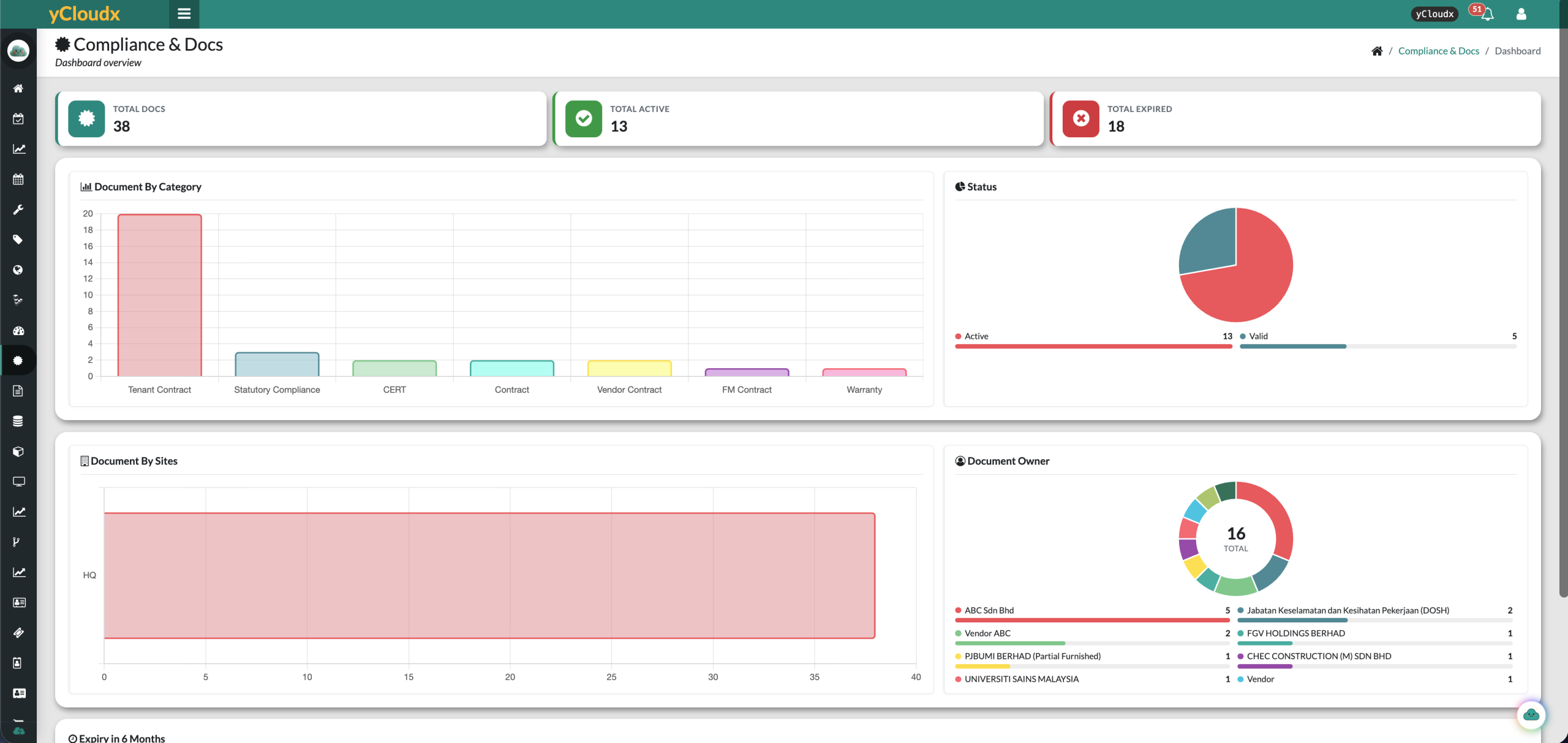
Document tracking supports your compliance procedures; it does not itself guarantee regulatory compliance. Screenshots illustrate product records, not promised customer results.
From everyday tasks.
To planned projects.
Coordinate audits, upgrades and operational initiatives using boards, cards, lists, Kanban, Gantt and S-curve views. Review responsibility, progress and recorded budget or cost information.
Keep maintenance and assets in context
Business operations sit alongside yCloudx maintenance and asset management. Use the relevant modules for work orders, preventive schedules, asset records and service history.
Extend your ERP.
Keep its core role clear.
Already using SAP or another enterprise ERP? yCloudx can support the maintenance, asset, facility and business-operation workflows around it. API-based integration can connect agreed data flows where required.
yCloudx
Operational requests, assets, maintenance and selected business records.
API / integration workflow
Defined data mapping, permissions, direction and validation.
Your existing ERP
Finance and enterprise processes retained in SAP or your chosen system.
Integration is scoped to the ERP version, available interfaces and required workflow. This is not a claim of an out-of-the-box or certified SAP connector.
Complementary roles.
A connected operation.
Traditional ERP
Enterprise Resource Planning software commonly supports finance, accounting, procurement and enterprise-wide business processes. Product scope varies, and some suites also include manufacturing, supply chain or customer management.
yCloudx
A modular platform focused on maintenance, assets, facilities and configurable operational/business workflows. Selected modules cover commercial documents, workforce administration, property operations and projects.
Evaluating an ERP system in Malaysia?
Start with the gap you need to solve. If you need full accounting or a general ledger, assess a finance ERP for those requirements. If your priority is connected operational work, yCloudx can provide the relevant modules and complement your ERP through a scoped integration.
Cloud ERP describes how an ERP is delivered; it does not mean every cloud business application provides the same functionality. Compare the actual workflows, responsibilities and integration requirements—not just the label.
For teams managing
people, places and work.
Support organisations with recurring operational activity across departments and sites. Choose modules around your processes rather than adopting a full suite you do not need.
Map your current process, system boundaries and priority workflows.
Agree modules, roles, records and integrations; test representative scenarios.
Plan data preparation, user training and a phased rollout with clear ownership.
Your questions. Answered.
What is ERP software?
ERP stands for Enterprise Resource Planning. ERP software connects core business processes and shared data across functions such as finance, accounting and procurement. Capabilities vary by provider, so check the modules and processes included.
What is an ERP system?
An ERP system combines business software, shared records and configured processes to help departments work with consistent information. Implementation includes defining responsibilities, preparing data and connecting the required workflows.
Does yCloudx replace an ERP?
Not necessarily. yCloudx is a modular business operations platform with maintenance, asset and facility capabilities. It can complement an existing ERP. Do not assume quotation, invoice or payment workflows provide a complete accounting or general ledger system.
Can yCloudx integrate with SAP or another ERP?
Yes, integrations can be scoped using APIs and agreed integration workflows. Feasibility depends on the ERP version, available interfaces, permissions and required data exchange. Confirm the specific requirements; a ready-made or certified connector is not implied.
What business-operation modules does yCloudx provide?
Relevant modules include Tenant Management, Compliance & Documents, Visitor Management, quotation/PO/invoice and payment workflows, Attendance, Leave, Claims, Project Management, Administration and Utility Billing. Select the modules that fit your operating requirements.
Can yCloudx manage approvals and workflows?
Yes. Supported modules provide request submission, review and approval processes, status visibility, notifications and recorded history. Configure responsibilities and verify the approval and audit-trail requirements for each selected workflow.
Is yCloudx suitable for multi-site organisations?
Yes. Site-based operational records and administration controls support organisations working across multiple locations. Define site structures, user access and reporting responsibilities to match your operating model.
How does yCloudx support attendance, leave and claims?
Teams can record attendance, review rosters, apply for leave and submit employee claims. Managers can review requests and monitor their status. Administration controls manage account access and relevant settings; these capabilities do not imply a full payroll system.
How much does an ERP system in Malaysia cost?
Cost depends on users, modules, deployment, implementation, data preparation, support and integrations. For yCloudx, request a quotation based on the business-operation modules and workflows you need. Compare total implementation scope rather than subscription price alone.
Can SMEs use yCloudx business management software?
Yes, where the available modules match their operational needs. A focused scope can help smaller teams organise approvals, workforce requests, projects or property records without assuming they need a complete traditional ERP replacement.
How does yCloudx connect business operations with CMMS and EAM?
Business-operation modules sit alongside yCloudx maintenance, asset and facility management. Teams can use the relevant modules for work orders, preventive schedules, asset history and wider administrative workflows within the platform.
See where yCloudx
fits your operation.
Bring one approval process, your priority modules and your ERP integration requirements. We will walk through the relevant workflows with your team.
