
Asset management system.
Built for the full lifecycle.
yCloudx is an enterprise asset management system built and supported in Malaysia. Connect asset information, maintenance, verification and lifecycle decisions, with EAM, CMMS and facility operations together for teams responsible for physical assets across sites.
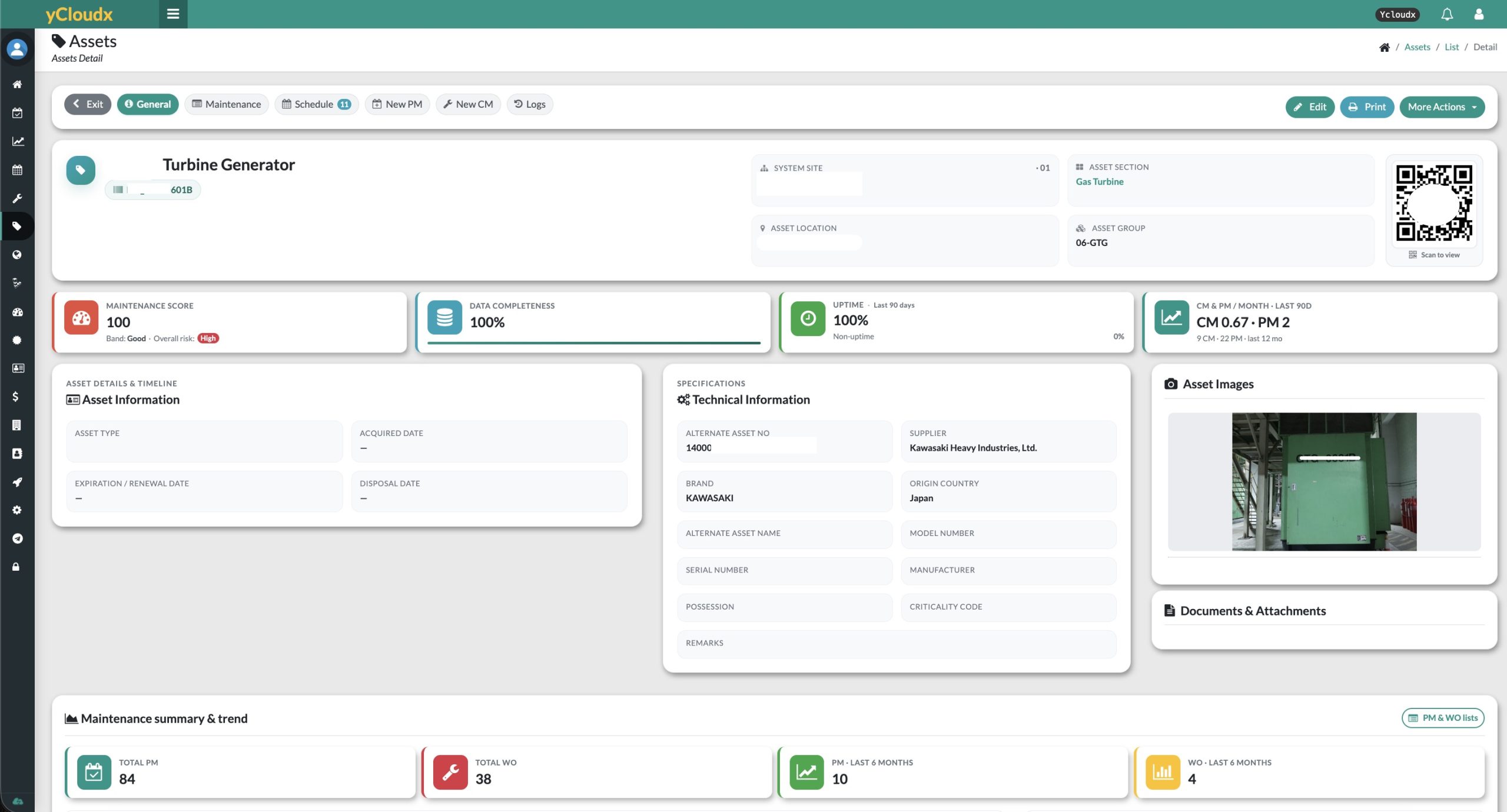
One asset record.
A shared operational reference.
Give asset, engineering, maintenance and facility managers a consistent place to find equipment information—without rebuilding the history each time work changes hands.
Know what you manage
Organise asset IDs, names, types and groups. Use QR identification to connect a physical asset with its digital record.
Keep site context
Structure records by entity or site, location and section, so teams can relate an asset to the place it operates.
Retain the detail
Bring technical information, documents, condition and history together for more informed maintenance and lifecycle decisions.
Asset ID, name, asset type, group and status.
Entity/site, location, section and asset movement context.
Manufacturer, brand, model, serial number and specifications.
Warranty information, attachments, photos, condition and asset history.
Registration is the beginning.
Not the whole story.
Keep the asset record relevant as equipment is operated, maintained, verified, moved and eventually retired. Lifecycle information gives each decision the context of what came before.
Establish identity, specifications and acquisition information.
Maintain location, status and operational context.
Connect service schedules, work orders and repair records.
Record asset sightings, condition and verification history.
Keep movement and transfer records with the asset.
Review useful life, depreciation, NBV and maintenance cost.
Record disposal information and retain lifecycle history.
These activities are connected, not always sequential. Verification, maintenance and financial evaluation can recur throughout an asset’s operational life.
The asset record.
And the work behind it.
Connect equipment information with preventive and corrective maintenance, work orders and service history. Teams can review the asset and its maintenance context together.
- Plan preventive maintenance against the equipment it serves.
- Retain corrective work, breakdown and maintenance records.
- Review meter readings, spare parts and related cost information.
See preventive maintenance planning →
A shared operational reference for the people planning, performing and reviewing maintenance.
Connect what is on site
with what is on record.
Use mobile access and QR scanning to identify assets in the field. Record sightings, photos and condition or status updates, while retaining verification history for later review.
Scan & locate
Use the asset’s QR identifier to access the relevant record.
Check & record
Capture the sighting and supporting photos or condition updates.
Retain the history
Keep verification activity available for follow-up and reconciliation.
Define the verification fields, responsibilities and review process to suit your organisation’s asset governance requirements.
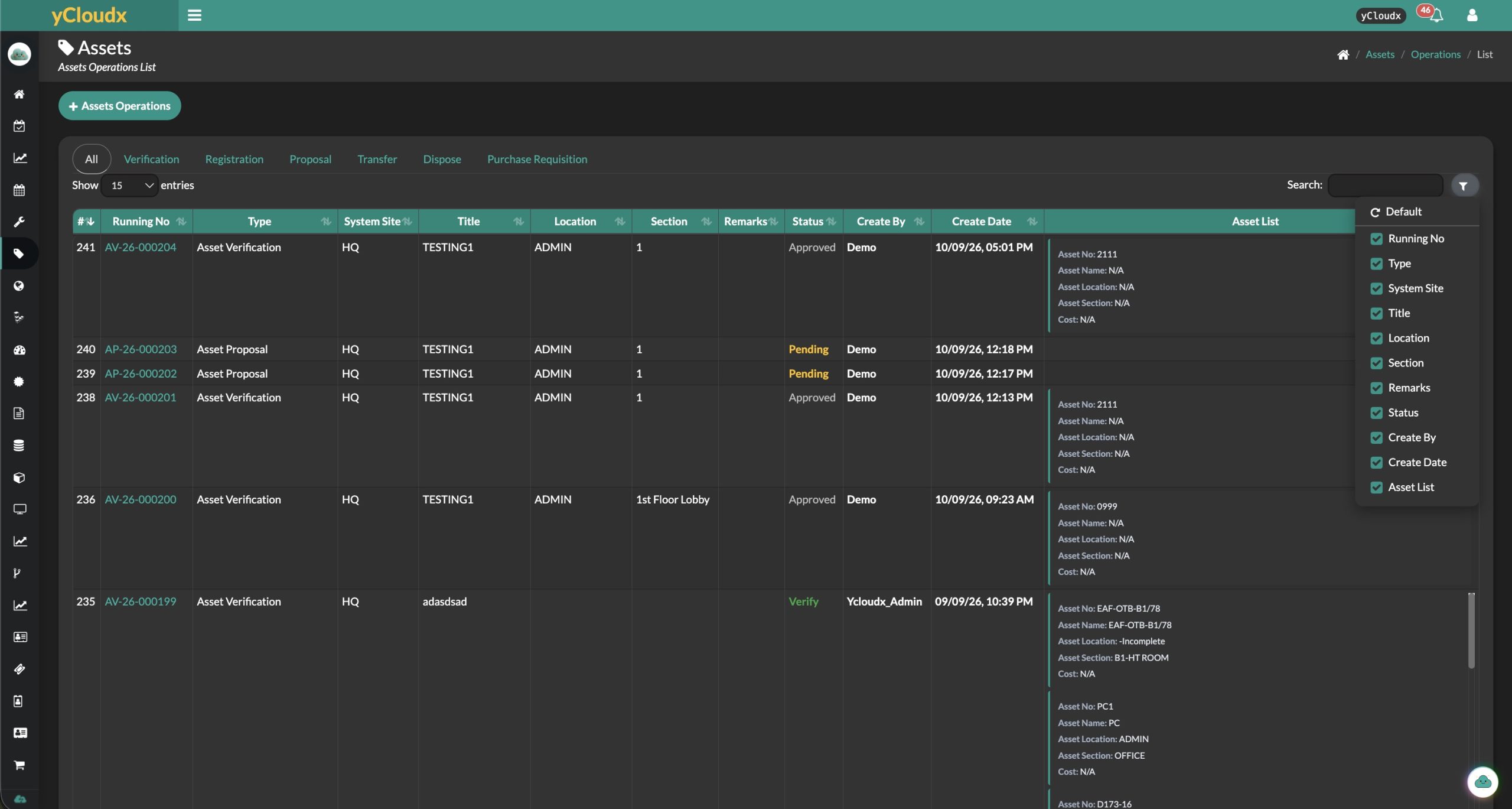
Demonstration records shown. The operations list provides workflow context; the content and status of each record depend on the configured process.
Operational decisions.
Financial context.
Bring acquisition, valuation and maintenance information into the lifecycle discussion. Review the cost of keeping an asset in service alongside its recorded value and useful life.
Purchase & useful life
Retain purchase or acquisition information and useful-life details with the asset record.
Depreciation & NBV
Review depreciation and Net Book Value using the configured asset data and calculation settings.
Maintain or retire
Consider maintenance costs, history and disposal information when reviewing continued operation or replacement.
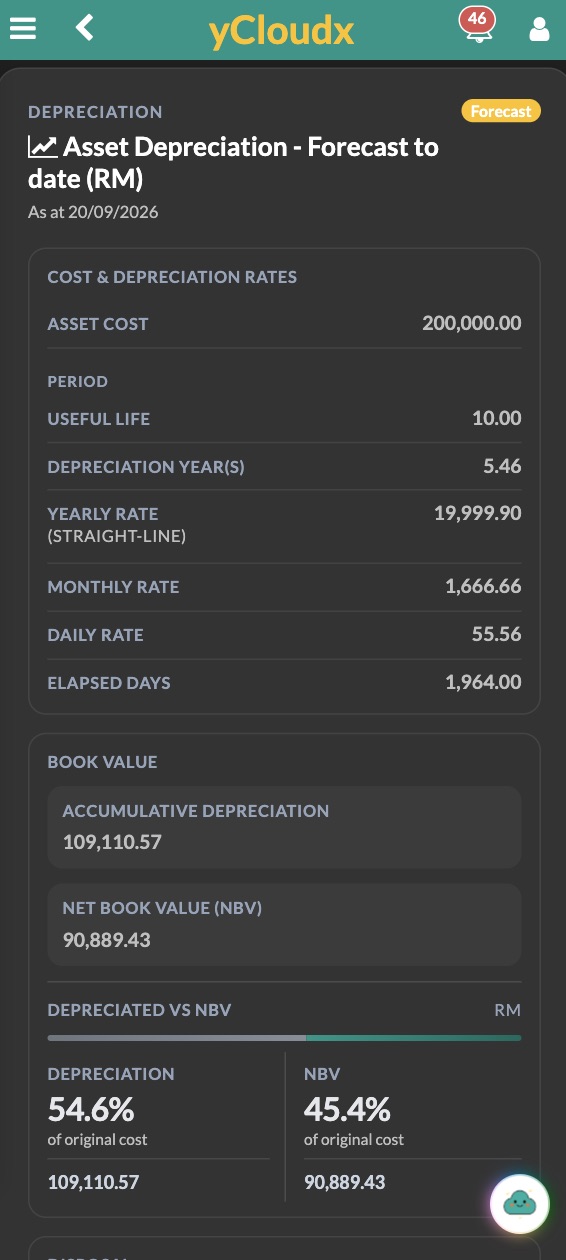
Depreciation and book value.
Visible at asset level.
The mobile view brings asset cost, useful life, straight-line rates, accumulated depreciation and Net Book Value into a single asset-level summary.
Review the valuation date and configured inputs before using the figures in a financial or replacement decision.
These are asset lifecycle and financial-information capabilities—not a replacement for a full accounting ERP. Your finance policies, calculation settings and accounting integration requirements should be agreed during implementation.
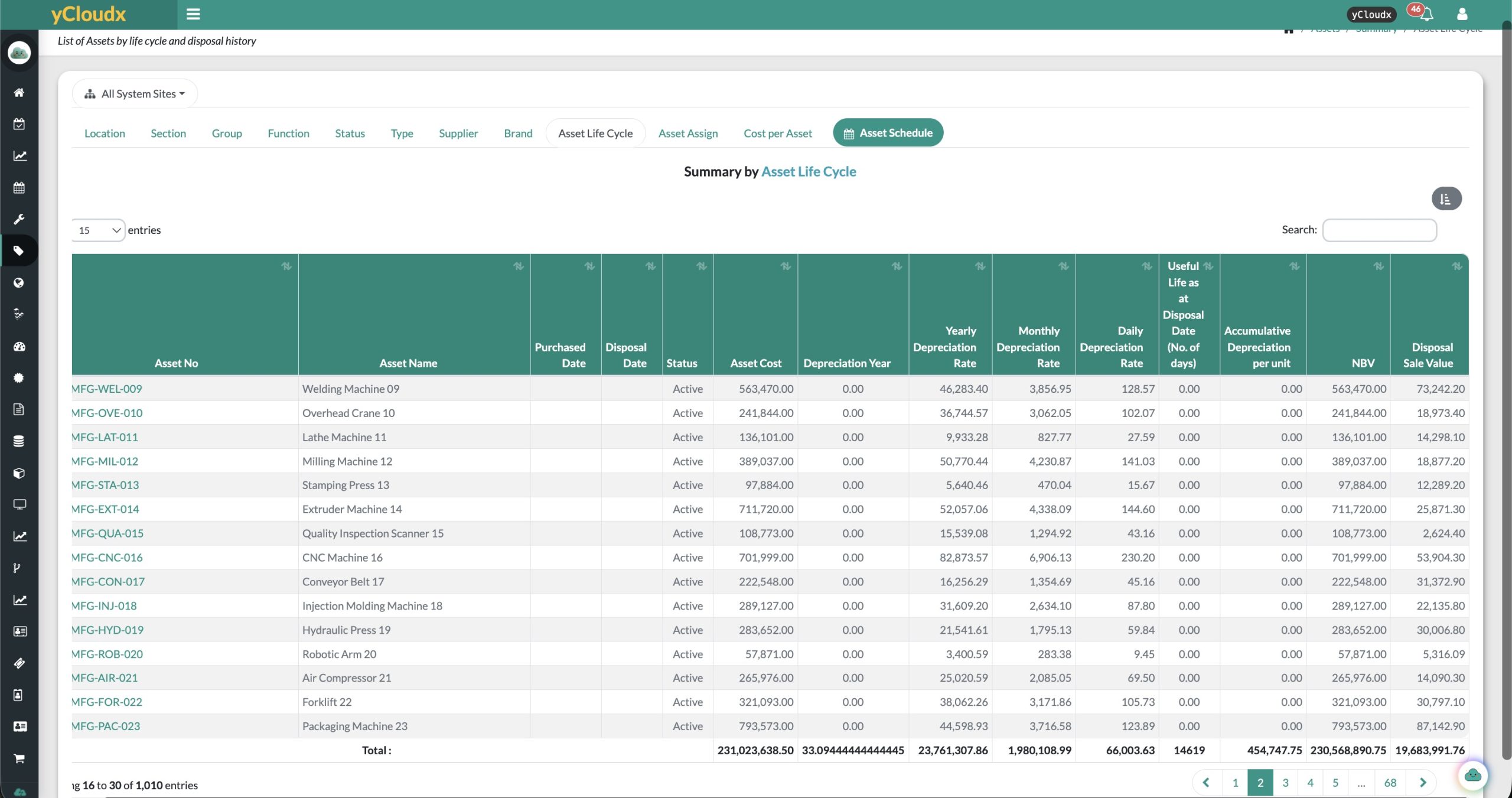
From individual records
to management perspective.
Review asset status, condition, age and lifecycle information alongside maintenance activity and cost. Use recorded failure and breakdown history to focus engineering reviews.
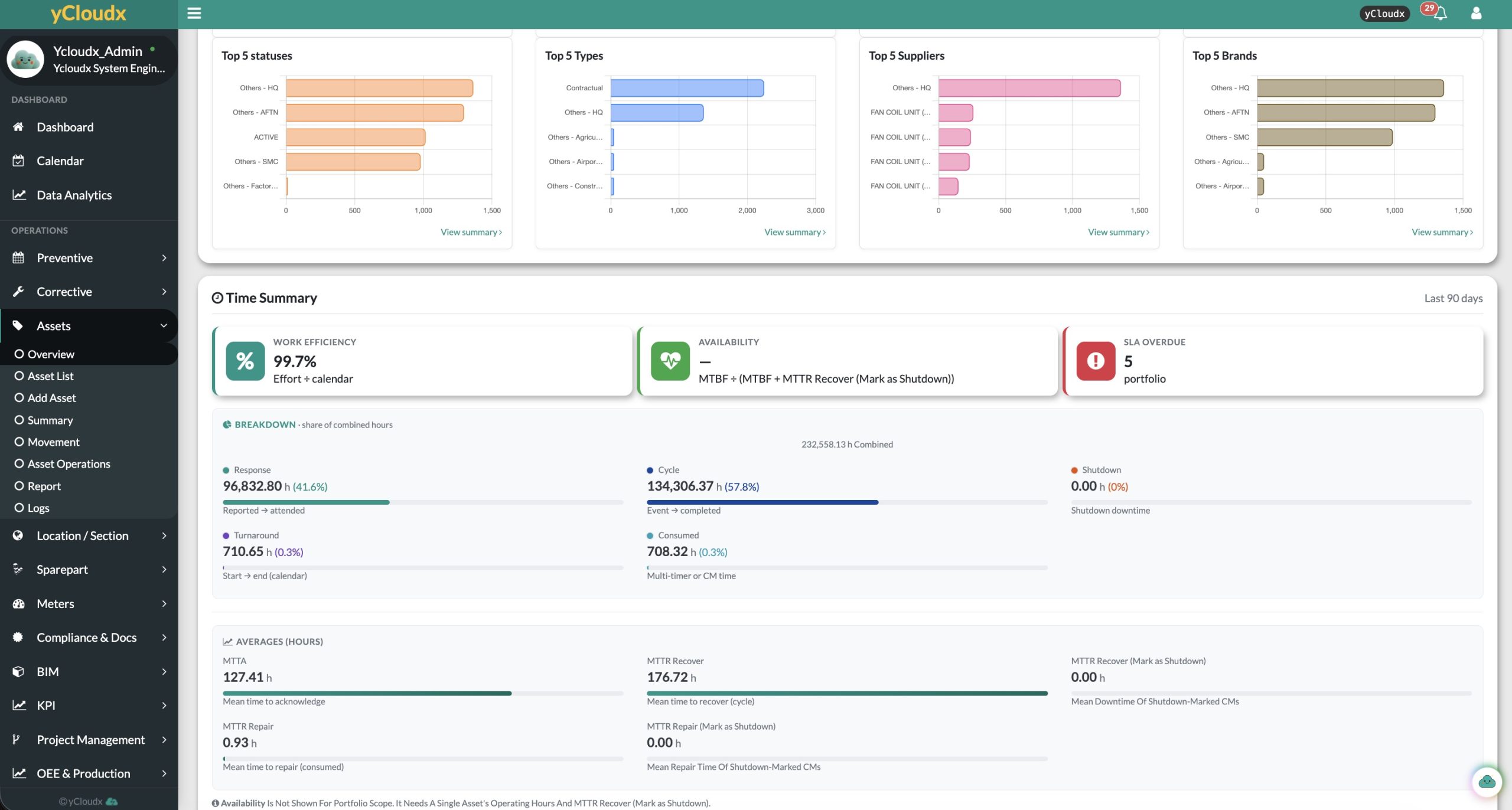
Review status, condition and overdue activity to identify records needing attention.
Bring maintenance, repair and breakdown information into asset reviews.
Consider age, recorded value and maintenance cost together.
Indicators depend on the recorded data, reporting scope and configuration. Screenshot figures illustrate the interface; they are not promised outcomes.
The asset is the reference.
The platform adds context.
Connect asset management to the workflows and information your organisation needs. Confirm the relevant modules, permissions and integration scope during solution design.
CMMS & Maintenance
Relate planned and corrective work to asset records and operational history.
Explore CMMS →BIM Integration
Connect model objects with assets, locations and sections for a visual operational reference.
Explore BIM integration →IoT Integration
Bring connected monitoring into the discussion of asset condition and operation.
Explore IoT integration →Asset Map
See every asset in its site, location and section on one zoomable map or 3D view, with what is down, faulty or under PM. Floor Plan & GIS Map adds pins on uploaded layouts and Google Maps.
Explore Asset Map →Open API & integration
Discuss the data exchange needed between yCloudx and your existing systems, including scope, access and field mapping.
Cloudy AI
Explore the available asset-related assistance with your team. Confirm the supported workflows and data access, and keep decisions subject to human review.
EAM vs CMMS:
complementary, not interchangeable.
A Computerised Maintenance Management System (CMMS) primarily supports maintenance execution: preventive maintenance, corrective maintenance, work orders, scheduling and maintenance records. Many CMMS products also include asset registers and multisite functionality.
Enterprise Asset Management (EAM) extends the scope across the physical asset lifecycle—connecting asset information, maintenance, performance, lifecycle, cost and governance. yCloudx combines important CMMS and EAM capabilities; EAM does not universally replace CMMS.
EAM vs ERP:
different responsibilities, connected systems.
Enterprise Resource Planning (ERP) manages broad business processes such as finance, purchasing, inventory and enterprise resources. Its asset-management depth varies by product and implementation.
EAM focuses on physical assets and their operational lifecycle. ERP and EAM can exchange information rather than act as direct replacements. Explore ERP & Business Operations to discuss the wider business context.
| Perspective | EAM | CMMS | ERP |
|---|---|---|---|
| Primary scope | Physical asset lifecycle and governance | Maintenance planning and execution | Enterprise-wide business processes |
| Typical records | Asset information, lifecycle, performance, maintenance and cost | Schedules, work orders, service and repair history | Finance, purchasing, inventory and business transactions |
| Working together | Connects asset decisions with maintenance and business context | Provides the maintenance execution and history layer | Provides business and financial context through integration |
Capabilities overlap and vary by product. Assess your required workflows rather than choosing on the acronym alone.
For organisations where
physical assets matter.
yCloudx supports a shared operational view for asset managers, facility managers, engineering managers and maintenance leaders. Define the asset structures, reporting needs and governance appropriate to your organisation.
Evaluating EAM software in Malaysia or for an international enterprise? Bring a sample asset register, maintenance process and lifecycle-reporting requirements to a demonstration.
Asset Management & EAM FAQs
What is an enterprise asset management system?
Enterprise Asset Management (EAM) combines processes and software for managing physical assets throughout their lifecycle. It connects asset information, maintenance, performance, cost and governance to support decisions from acquisition and operation through to disposal.
What is asset management software?
Asset management software provides a digital record of assets and the information needed to manage them. For physical operational assets, this can include identification, location, specifications, maintenance, verification and lifecycle history. An asset management system also includes the organisation’s policies, responsibilities and processes—not just the software.
What is the purpose of EAM?
EAM helps organisations coordinate asset information and lifecycle activities, improve visibility and make more informed maintenance and investment decisions. Its value depends on the quality of the asset data and how teams use the supporting processes.
What is the difference between EAM and CMMS?
CMMS primarily focuses on maintenance planning and execution, including preventive and corrective maintenance, work orders and service records. EAM covers a wider physical asset lifecycle, including maintenance, performance, cost and governance. yCloudx combines important capabilities from both.
What is the difference between EAM and ERP?
ERP manages broad enterprise business processes, while EAM focuses on physical assets and their operational lifecycle. The systems can integrate, allowing asset and maintenance information to connect with business and financial processes.
Does yCloudx support asset lifecycle management?
Yes. yCloudx connects asset registration, operational information, maintenance, verification, transfers, financial evaluation and disposal information. The workflow and required records can be defined around your organisation’s processes.
Does yCloudx support asset verification and sighting?
Yes. Asset verification can include sightings, supporting photos, condition or status updates and verification history. Define the required fields, responsibilities and review process as part of your implementation.
Can assets use QR codes?
Yes. QR identification connects a tagged physical asset with its digital record. Teams can use scanning as part of asset identification and field verification workflows.
Does yCloudx support depreciation and Net Book Value?
Yes. yCloudx supports asset depreciation and Net Book Value (NBV), alongside acquisition and useful-life information. Calculations depend on the configured data and settings. These capabilities support asset management and do not replace a full accounting ERP.
Does it support mobile asset management?
Yes. Teams can access asset information and supported verification and maintenance workflows on mobile devices. Confirm the device, connectivity and workflow requirements during a demonstration.
How long does implementation take?
The schedule depends on asset volume, data quality, site structure, integrations and the workflows being introduced. Data preparation, configuration, validation and user training should be scoped before a rollout timeline is agreed.
Is yCloudx EAM cloud-based or on-premises?
yCloudx offers cloud and on-premises deployment options. Discuss your infrastructure, security, integration and operational requirements to determine the appropriate deployment scope.
A stronger asset record.
A clearer lifecycle decision.
See how yCloudx can connect your asset register, maintenance workflows and lifecycle information in one operational platform.
