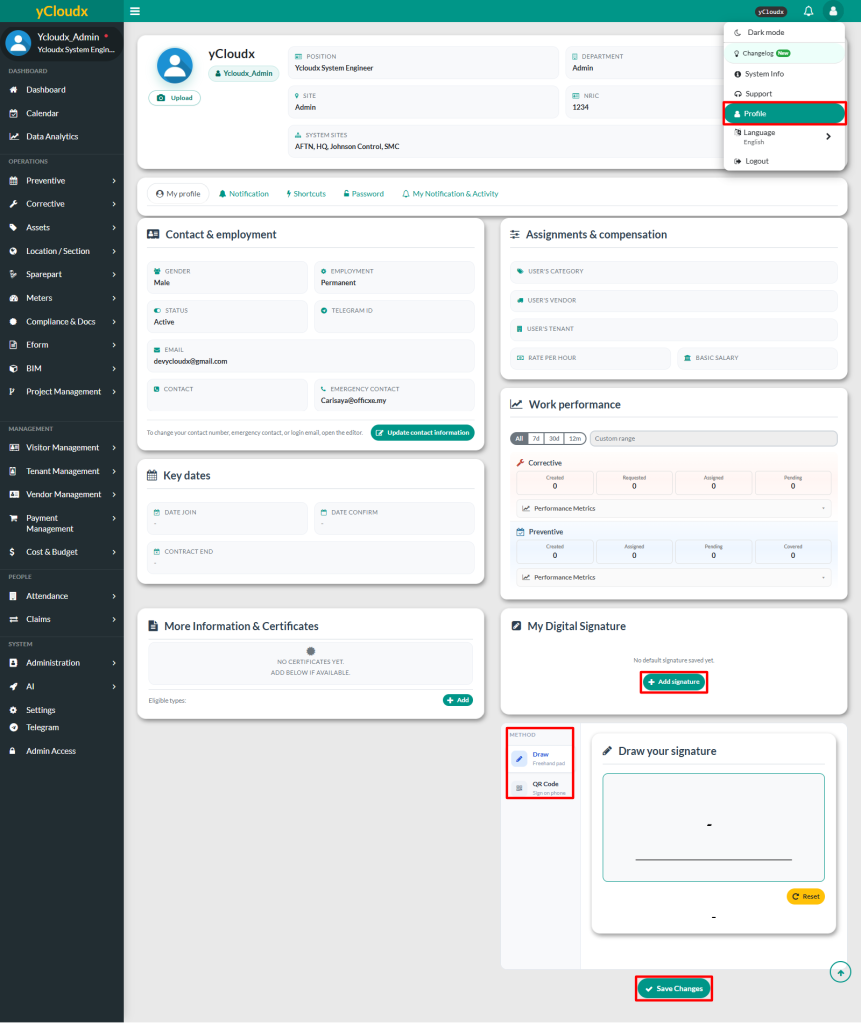
Click Avatar or User icon at the top right of the page, then select Profile to be redirected to the user information page
Click Add Signature and add your digital signature
There are two (2) methods available to add the digital signature which are Draw and QR Code (Sign on phone)
Click Save Changes to confirm
User able to click Edit to update the signature if needed or click Delete Saved to remove the signature
A popup notification will appear once the digital signature has been added, updated or deleted
**Once a user has added their digital signature, they do not need to manually sign when submitting, verifying, or confirming a work order. They just need to click “Use my signature” and the signature saved in their profile will automatically appear on the work order.