
Skip to main content

How Can We Help?
How to view leave records?
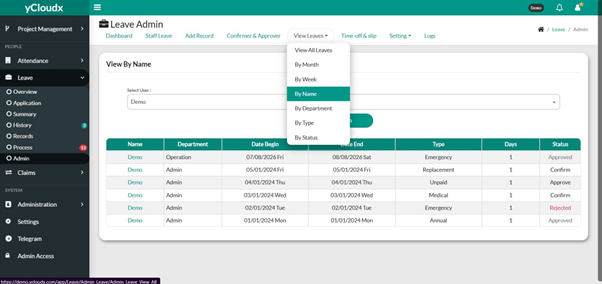
- Proceed to Leave > Admin > View Leave
- Select the preferred view option:
- View All Leaves – Displays all leave records
- By Month – Displays leave records for a selected month
- By Week – Displays leave records for a selected week
- By Name – Displays leave records for a selected employee
- By Department – Displays leave records by department
- By Type – Displays leave records by leave type
- By Status – Displays leave records based on their approval status
- Review the leave records displayed in the table
- Use the Search box to locate a specific leave record
- Click on the employee’s name to view the complete leave application details
(All Record)
(By Name)
