Skip to content
Skip to main content
How to set corrective maintenance notification?
Created On
byaini
Print
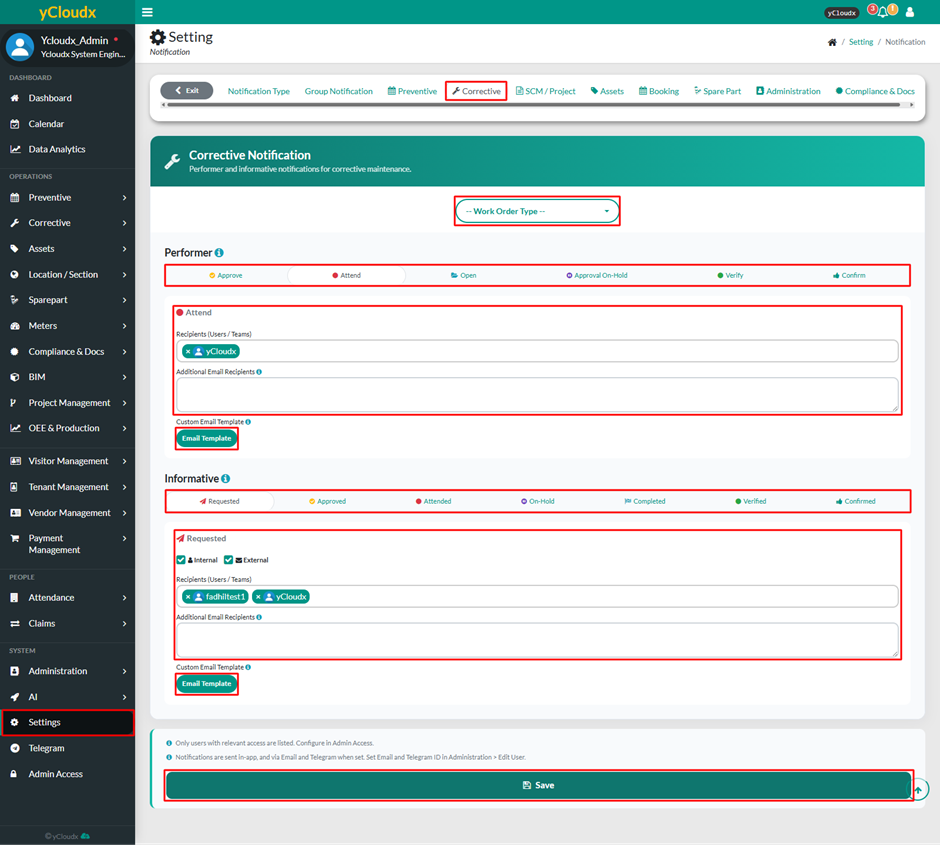
- Proceed to Setting > Notification > Corrective Maintenance
- Select work order type (Breakdown, Out of Scope, Planned Corrective Maintenance, Reactive, Self Finding, Unplanned Corrective Maintenance)
- Under Performer or Informative, select the notification status to be configured
- Select the recipient(s) from the list (Users / Teams)
- Enter additional email recipients in the Additional Email Recipients field if required
- Click Email Template to configure a custom email template for the selected notification status if needed
- Repeat steps 2 to 6 for other notification statuses
- After ensuring all data is entered correctly, click Save button
Scroll to Top

