How to View Claim Staff Setting Including Their OT Setting?
Created On
byaini
Print
You are here:
< Back
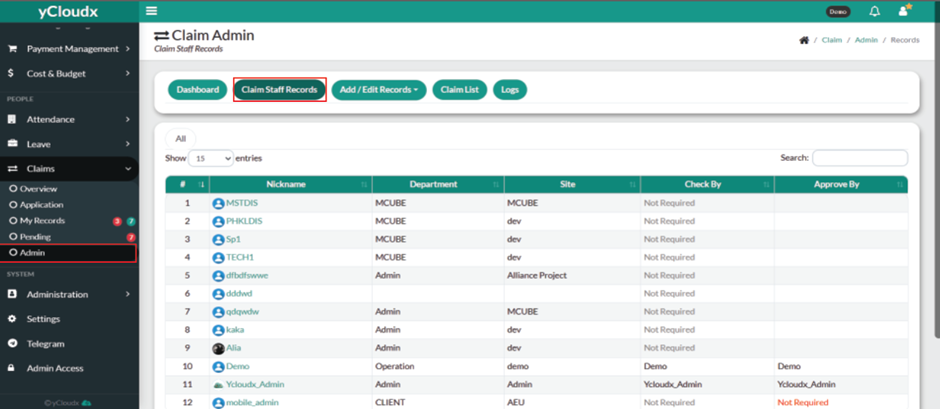
Proceed to Claims > Admin > Claim Staff Records.
Review the list of staff displayed in the table.
Locate the desired employee by checking the Nickname, Department, Site, Check By, and Approve By information.
Use the Search box to locate a specific employee, if required.
Click the employee’s Nickname to open the staff claim record.
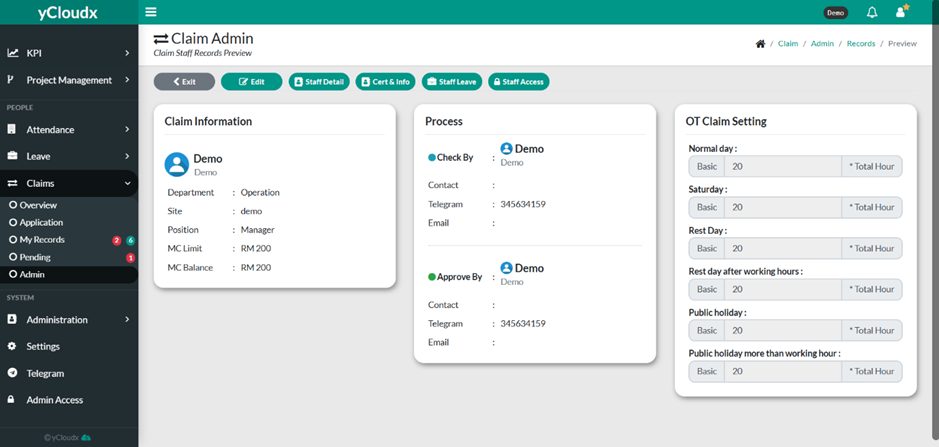
Review the employee’s claim information, including:
Claim Information (Department, Site, Position, MC Limit, and MC Balance).
Process (Check By and Approve By details).
OT Claim Setting for different day types, including Normal Day, Saturday, Rest Day, Rest Day After Working Hours, Public Holiday, and Public Holiday More Than Working Hours.
Use the available action buttons (Edit, Staff Detail, Cert & Info, Staff Leave, or Staff Access) to view or manage additional employee information, if required.