
Skip to main content
How Can We Help?
How to view Asset Summary?
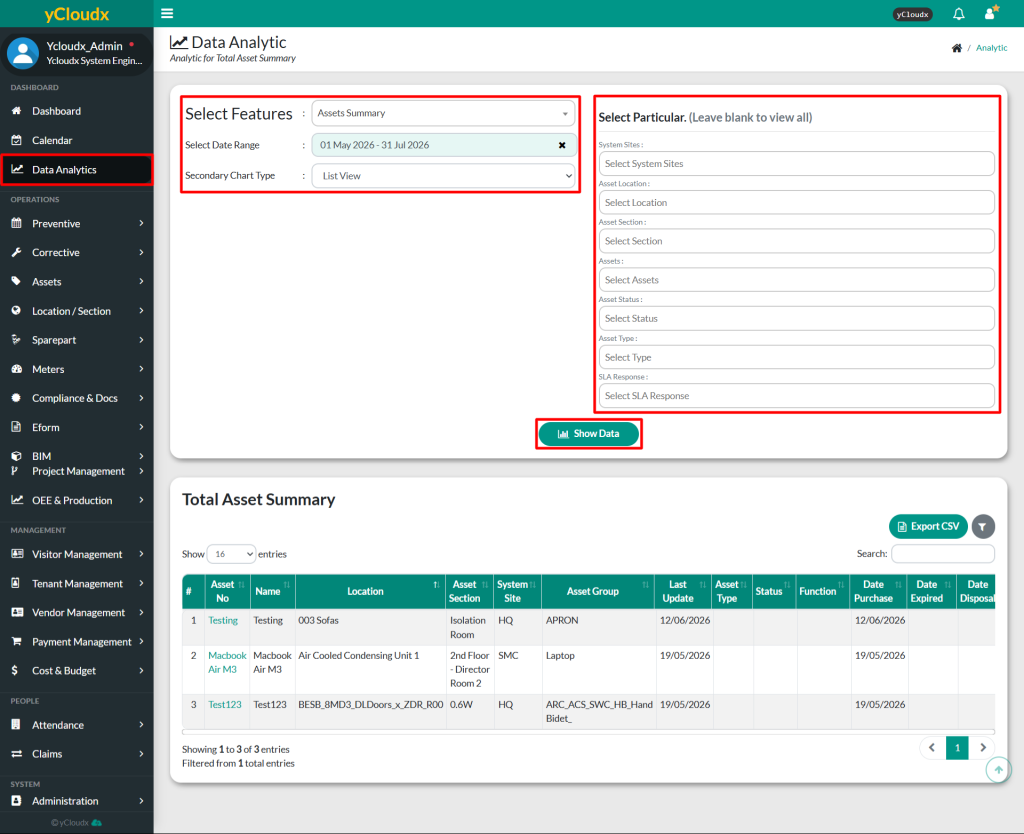
- Proceed to Data Analytic > Select Features: Asset Summary
- User able to select date range and choose main chart type they want to view
- User have more option to filter the result by asset
- System Site
- Asset Location
- Asset Section
- Assets
- Asset Status
- Asset Type
- SLA Response
- Select Show Data to view the result in list
- User can view list of asset summary
- Asset No
- Asset Name
- Location
- Asset Section
- System Site
- Asset Group
- Last Update
- Asset Type
- Status
- Function
- Date Purchase
- Date Expired
- Date Disposal
- Alt Name
- Alt No
- Model No
- Serial No
- Manufacturer
- Supplier
- Brand
- Origin Country
- Purchase Cost
- Remarks
