
Skip to main content
How Can We Help?
How to Request Booking For Asset?
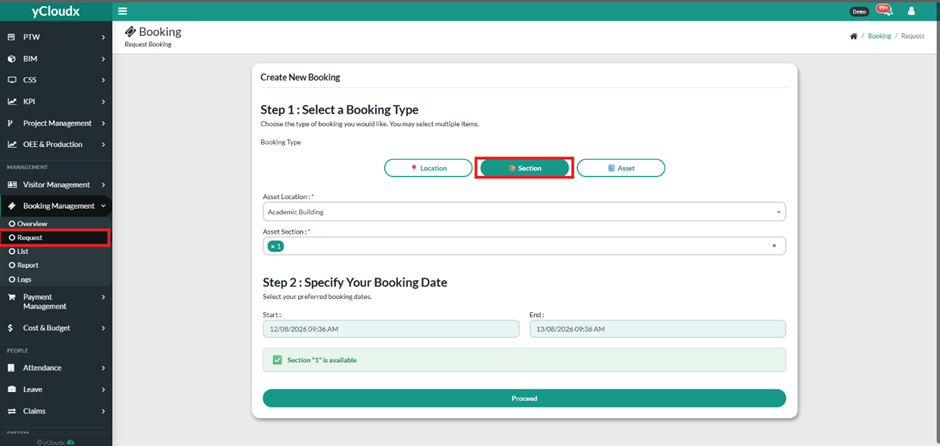
- Go to Booking Management > Request.
- Under Step 1: Select a Booking Type, select Asset.
- Select the required Asset Location.
- Select the required Asset Section.
- Select the required Asset(s). Multiple assets can be selected if required.
- Click Next.
- Under Step 2: Specify Your Booking, select the Start and End date/time.
- The system will tell you if the section is available or unavailable for booking.
- date/time.
- Click Proceed.
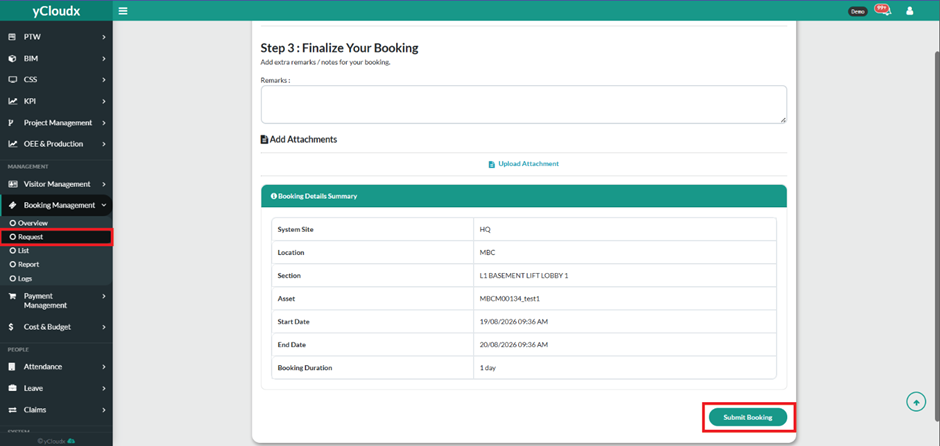
- Under Step 3: Finalize Your Booking, enter any Remarks/Notes if required.
- Upload any supporting Attachment if necessary.
- Review the Booking Details Summary.
- Click Submit Booking to submit the asset booking request.
- The status of the booking can be see at the Booking Management > List .
