Skip to content
Skip to main content
How to customize report preview settings?
Created On
byaini
Print
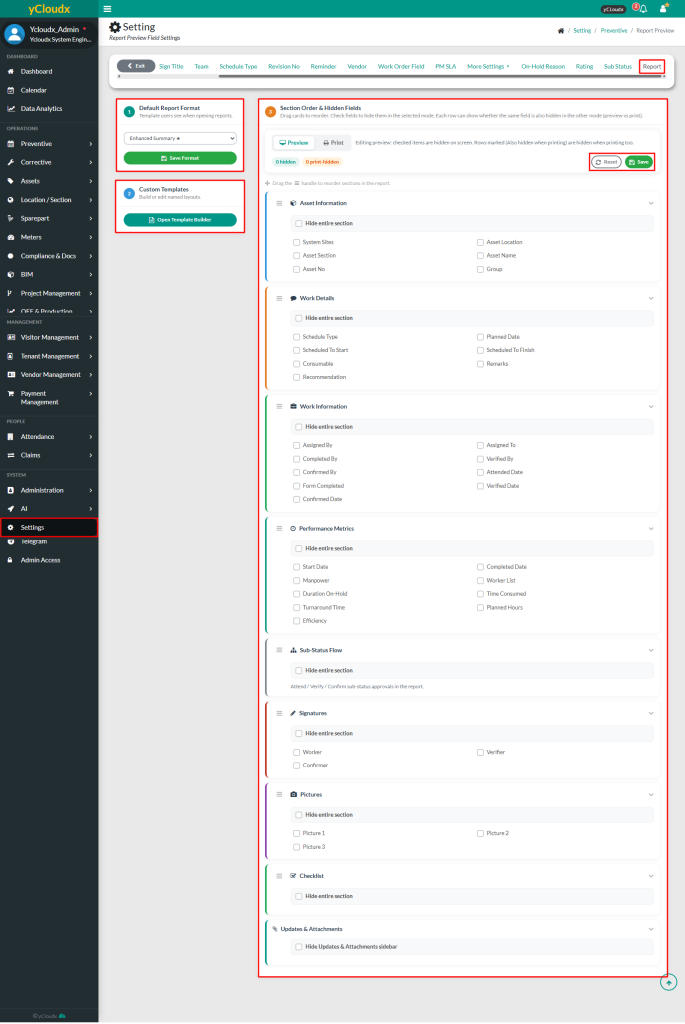
- Proceed to Setting > Preventive > Report
- Select the preferred Default Report Format and click Save Format to set it as the default report template
- To create or modify a custom report template, click Open Template Builder
- Under Section Order & Hidden Fields, select either Preview or Print mode
- Drag and drop the section headers to reorder the report layout
- Select the required fields to hide them from the selected mode
- To hide an entire section, enable Hide entire section
- Click Save to apply the updated report preview settings or Reset button to discard the changes
Scroll to Top

