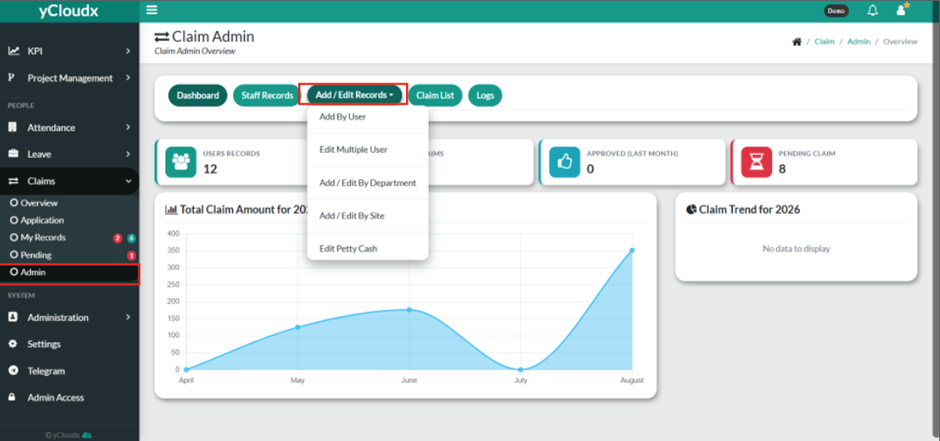
Proceed to Claims > Admin > Add / Edit Records > Edit Multiple User.
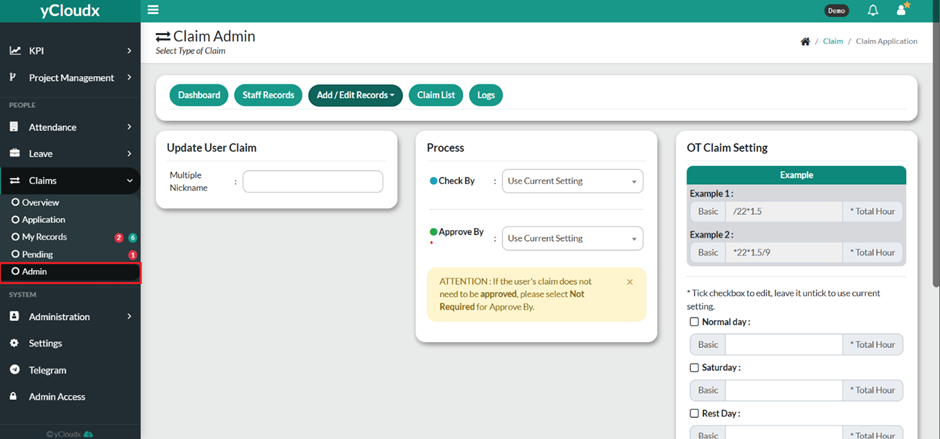
Enter or select the employee(s) in the Multiple Nickname field.
Select the appropriate user in the Check By field, or choose Use Current Setting to retain the existing checker.
Select the appropriate user in the Approve By field, or choose Use Current Setting or Not Required, if applicable.
To customize the OT claim calculation, tick the checkbox for the applicable day type (e.g., Normal Day, Saturday, Rest Day, or other available day types) and enter the formula based on the preference for example (/22*1.5 ) and it will be calculate with their basic salary and multiplied by their total OT hours.
Repeat Step 6 for each applicable day type.
Review all configured OT claim settings.
Click Save to apply the updated OT claim settings to the selected employee(s).