Check the outcome.
Review completion notes, repair details and photos against the reported issue.

Give every breakdown a clear owner, response target and repair record. yCloudx helps maintenance, engineering and facility teams manage faults and service requests—from first report to reviewed closure, across sites.
Built in Malaysia · Connected to your assets and CMMS
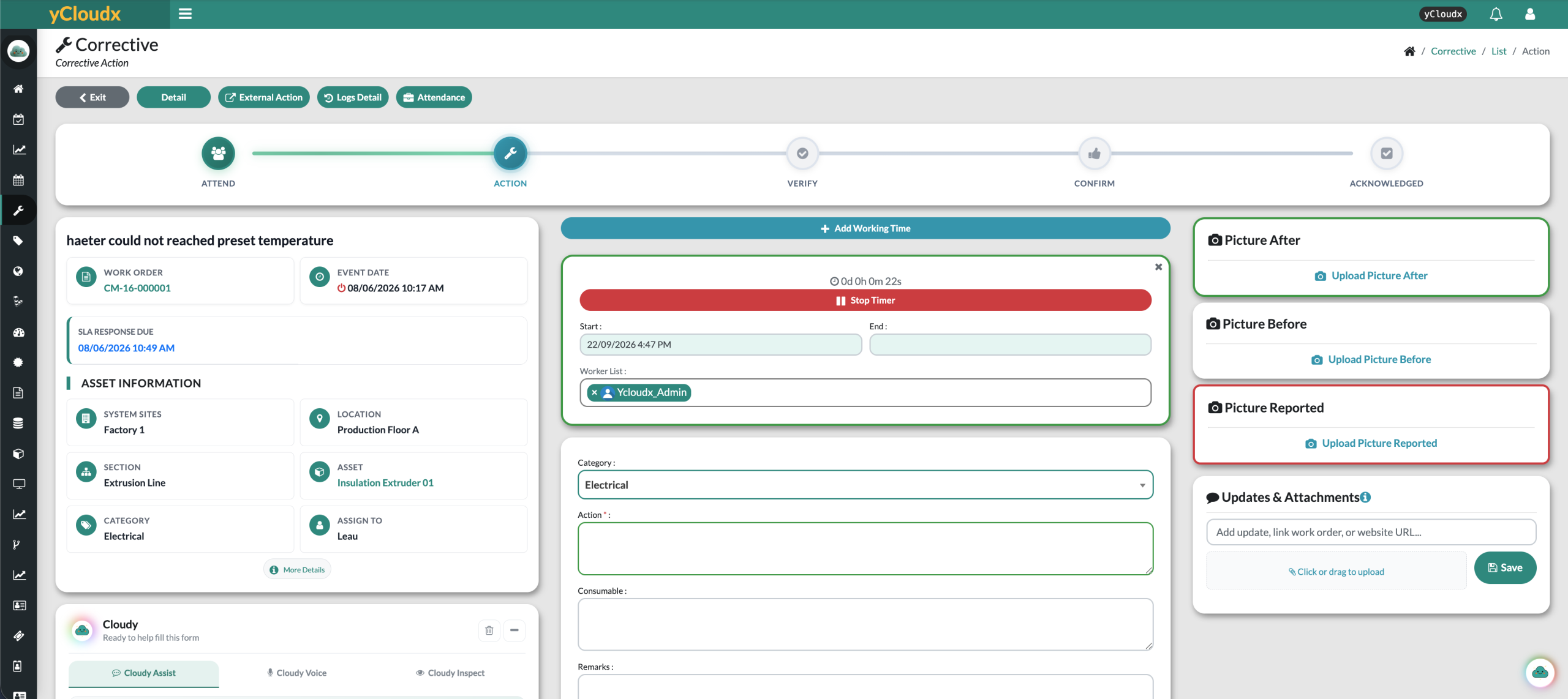
Corrective maintenance is more than recording that something broke. A structured workflow keeps the request, responsible person, repair activity and completion evidence together—so the next team member can see what happened and what remains.
Capture the issue and its asset or location.
Check the request through the configured review process.
Identify who is responsible for the work.
Record attendance and begin the task.
Record findings, actions, time and evidence.
Review the outcome and completion details.
Complete the configured confirmation and closure steps.
The flow illustrates the operational stages. Status names, approval steps and responsibilities follow your configured yCloudx process.
Turn a breakdown or service request into an actionable record. Link the issue to the relevant asset, site, location and section, with a clear description and supporting photos.
QR-based fault reporting helps users start from the tagged asset. Office teams and field users can contribute to the same corrective maintenance system, without leaving the location or equipment reference behind.
Connect the report with asset, site, location and section details.
Capture the observed fault, category and relevant request information.
Attach reported-condition photos and documents to explain the problem.
Report against tagged equipment with its asset context available.
Make ownership and service targets visible as work progresses. The work-order view shows the assignee and response deadline; management reports distinguish response performance from resolution performance.
Assign work to the responsible personnel and coordinate the handover through your operating process.
Track both the initial response and the time taken to resolve the issue against configured SLA targets.
Use work-order status and SLA results to identify outstanding work and focus follow-up where it is needed.
Agree service priorities, notifications, vendor responsibilities and any escalation rules during workflow configuration.
Give technicians a structured place to record what they found and what they did. Start and stop working time, capture repair details and retain before-and-after evidence against the work order.
Keep the activity record alongside the repair.
Explain the fault and the work carried out.
Give the reviewer the information needed to check completion.
Offline behaviour depends on the supported mobile workflow and device setup. Confirm the exact scope in your demonstration.
Where configured, completed repairs move through verification, confirmation and acknowledgement before closure. Review the recorded actions and supporting evidence instead of treating a status change as the whole maintenance record.
Review completion notes, repair details and photos against the reported issue.
Route the work through the relevant verification and confirmation stages for your team.
Retain updates, attachments and activity logs for later maintenance reviews.
Link corrective work orders to the asset they concern. A connected maintenance history helps teams review previous faults, repair activity and recorded costs before deciding the next step.
Bring meter readings, parts information and preventive activity into the wider asset review. Recurring faults can inform a preventive-maintenance review rather than remaining isolated work orders.
Technicians can record spare-part usage against corrective work orders, keeping the material record linked to the job rather than in a separate note.
Use yCloudx Spare Parts alongside your maintenance process to review parts requirements and the inventory context. Discuss stock-issue and request arrangements for your deployment.
Explore connected CMMS operations →Review open work, completed and closed jobs, shutdown-related activity and service performance. Site, location, section and asset summaries help managers move from a portfolio view to the equipment or area needing attention.
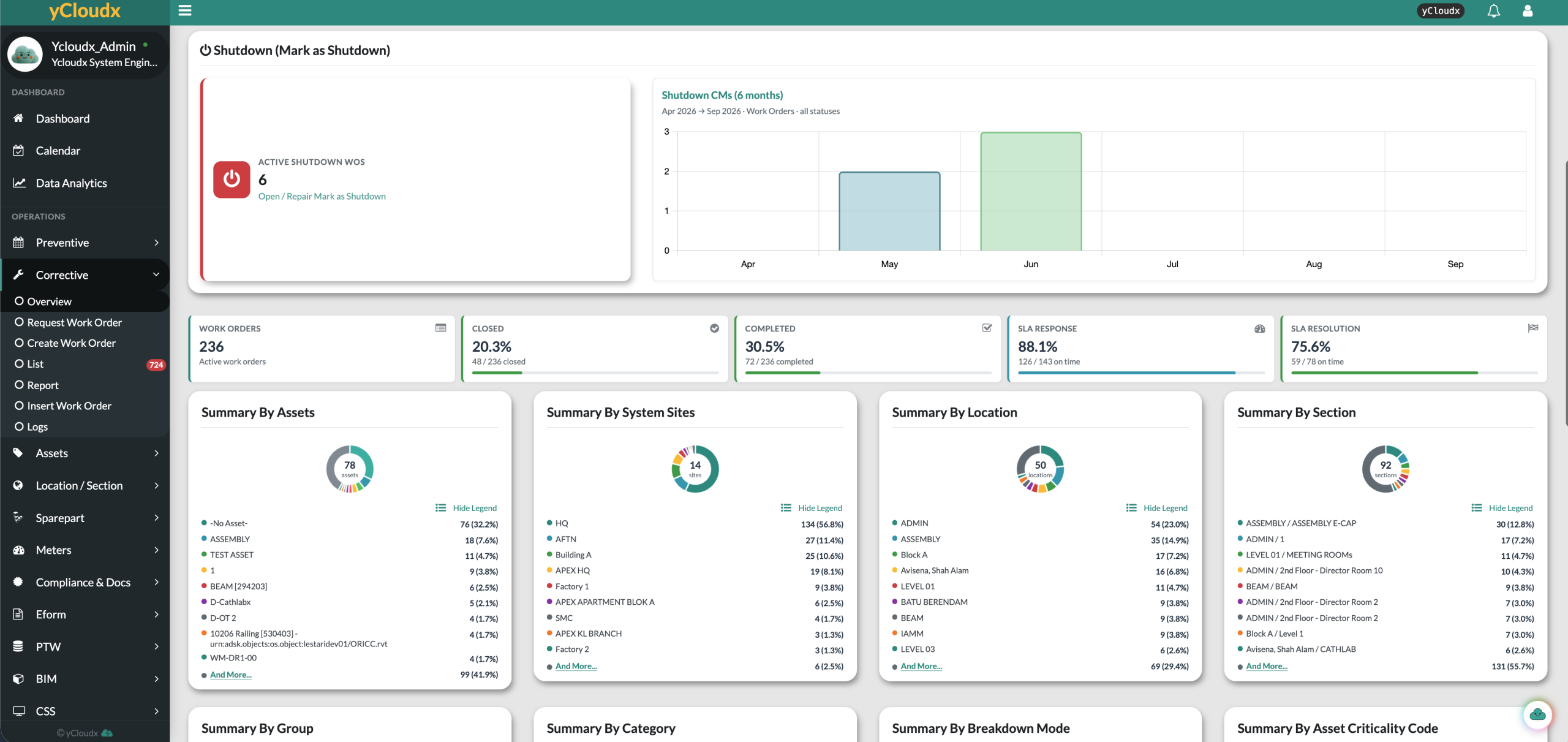
Distinguish outstanding work from completed or closed records.
Review response and resolution results against eligible work orders.
Compare work-order activity by asset to guide investigation and maintenance planning.
Reports expose response time, working time, cycle duration, recorded maintenance costs and asset-level measures such as MTTA, MTTR and MTBF. Interpretation depends on the captured events and how each measure is configured.
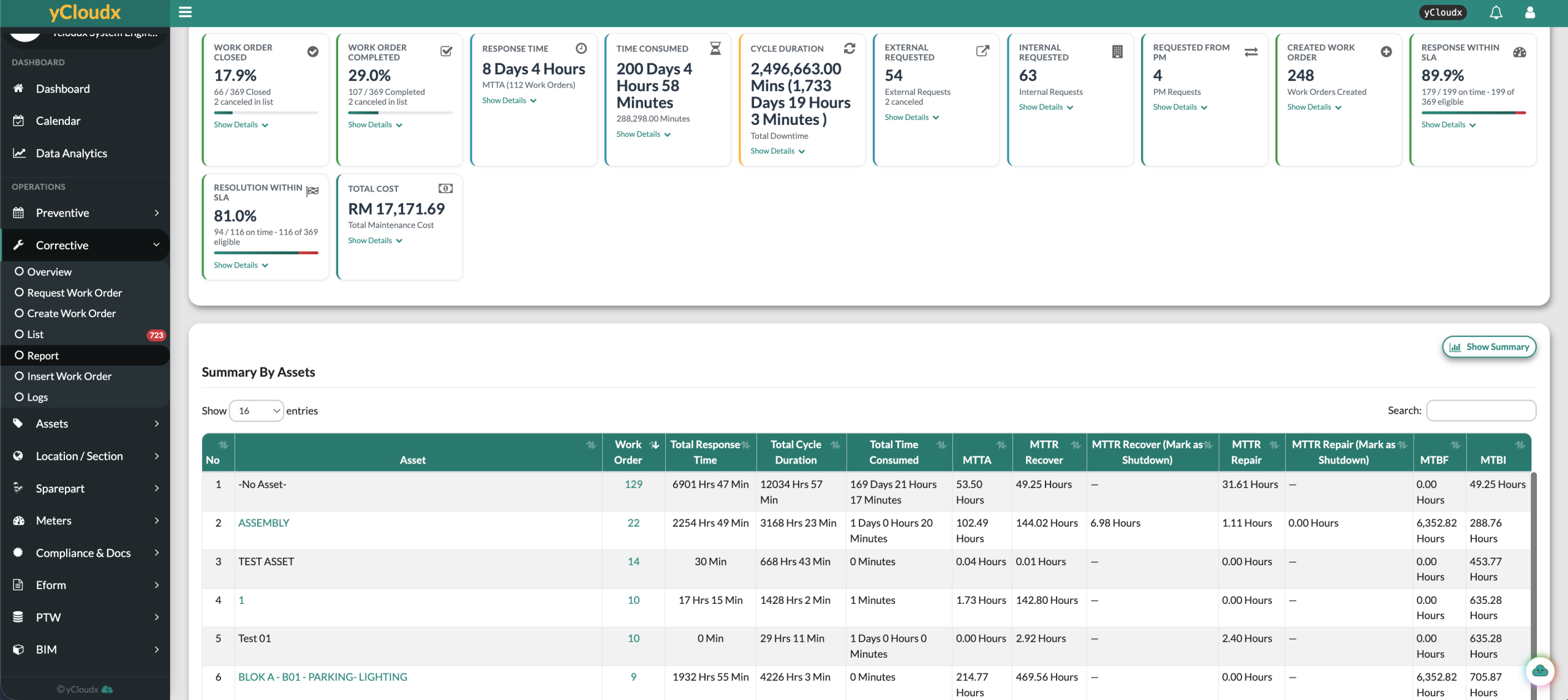
Screenshots show product records—not promised customer results. Reporting quality depends on complete and consistent maintenance data.
A year of breakdowns on one heatmap, with SLA results, open work and the hours when faults are reported. Managers can spot the weak days, the repeat offenders and the backlog that is getting old, then act before it grows.
Each square is one day of breakdowns. Switch between the number of breakdowns, the share that met SLA and the jobs that are still open. Hover a day for its numbers.
Breakdowns reported by weekday and hour over the same period. Use it to match shift cover to the hours when faults come in.
Illustrative sample data. Your own work orders, assets and SLA results appear here.
Both approaches belong in a practical maintenance programme. The difference is what initiates the work—not whether the record should be organised and traceable.
Work performed after a fault or issue is identified to restore the required function. It can be immediate or scheduled after assessment. Breakdown maintenance is the reactive case where equipment has already failed.
Typical trigger: a reported fault, failed component or service issue.
Planned work performed before failure, based on time, usage or defined schedules. In yCloudx, recurring PM schedules support planned maintenance execution and retained service records.
Typical trigger: a planned inspection or recurring service interval.
yCloudx connects corrective work order management and preventive maintenance with asset history. Teams can review repeated breakdowns, assess whether planned tasks need to change and monitor the resulting work in the same platform.
Explore Preventive Maintenance →Connect breakdown maintenance software with the systems and records your teams use to maintain buildings and equipment.
Coordinate work orders, planned servicing, parts and maintenance records.
Explore CMMS →Keep asset identity, location and service history connected to the job.
Explore EAM →Connect corrective activity with wider multi-site facility operations.
Explore Facility Management →Discuss connected readings and configured triggers that can inform maintenance action.
Explore IoT Integration →Use supported text, voice or photo assistance to draft work-order details. Review suggestions before applying them.
Meet Cloudy AI →Support facility managers, maintenance and engineering managers, technicians and service providers. Organise work around the sites, assets and responsibilities of your operation.
Corrective maintenance is work carried out after a fault or issue has been identified to restore an asset or system to its required function. Depending on the issue and operating requirements, the work may be carried out immediately or planned after assessment.
Corrective maintenance software manages reported faults and the work needed to resolve them. It brings requests, asset and location information, assignments, repair details, evidence, status and maintenance history into a structured workflow. yCloudx connects these activities within its CMMS.
Corrective maintenance follows an identified fault or issue. Preventive maintenance is planned before failure using time, usage or defined schedules. yCloudx supports both so teams can manage repairs and planned servicing with connected asset history.
Breakdown maintenance is corrective work carried out after equipment has failed. A breakdown maintenance system helps teams record the failure, assign the repair, track progress and retain the outcome for future review.
Yes. yCloudx supports QR-based fault reporting against tagged assets, helping users start with the relevant equipment context. Set up asset tags and the reporting workflow for your sites during implementation.
Yes. yCloudx shows response deadlines and reports response and resolution SLA performance. Results depend on the configured targets, captured events and eligible work orders; response and resolution are separate measures.
Yes. Technicians can access supported corrective work-order workflows on mobile, record progress and add evidence. Supported offline mobile updates can be synced later when connectivity returns. Confirm the exact device and workflow scope during a demonstration.
Yes. Spare-part usage can be recorded against corrective work orders, linking the materials used to the repair record. Stock-issue and parts-request arrangements should be configured around your operating process.
Yes. Corrective work orders can be linked to assets, with site, location and section context. The resulting maintenance record helps teams review prior faults, repairs and recorded costs alongside the asset history.
Asset-level work-order summaries and maintenance history help teams identify repeated issues and compare breakdown activity. Use this information to investigate causes and review preventive tasks. Available Cloudy AI insights can assist the review, but findings and recommended actions require human verification.
Bring a typical fault report and your service workflow. See how yCloudx connects reporting, repair activity, verification and management visibility.
