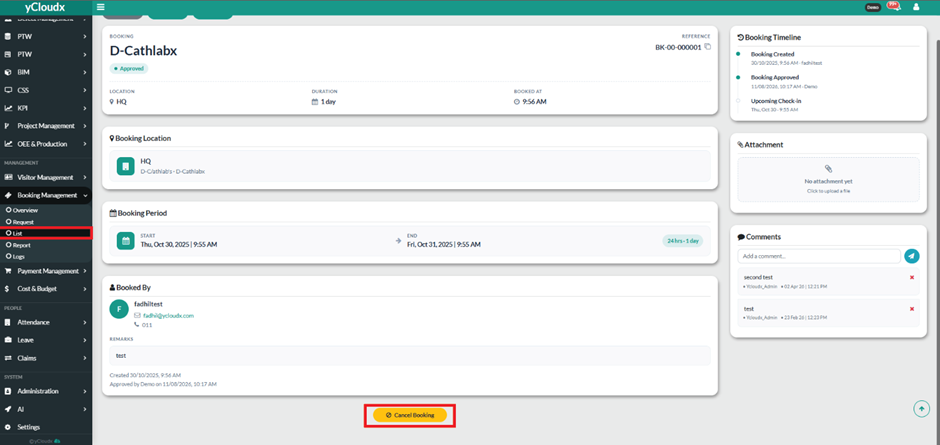
Go to Booking Management > List to view the existing booking records.
Locate the approved booking that you want to cancel and click the Booking ID to open its booking details.
Review the booking information, including the Booking ID, Location, Duration, Booking Period, and Booked By details, to confirm that the correct booking is selected.
At the bottom of the booking details page, click Cancel Booking to initiate the cancellation.
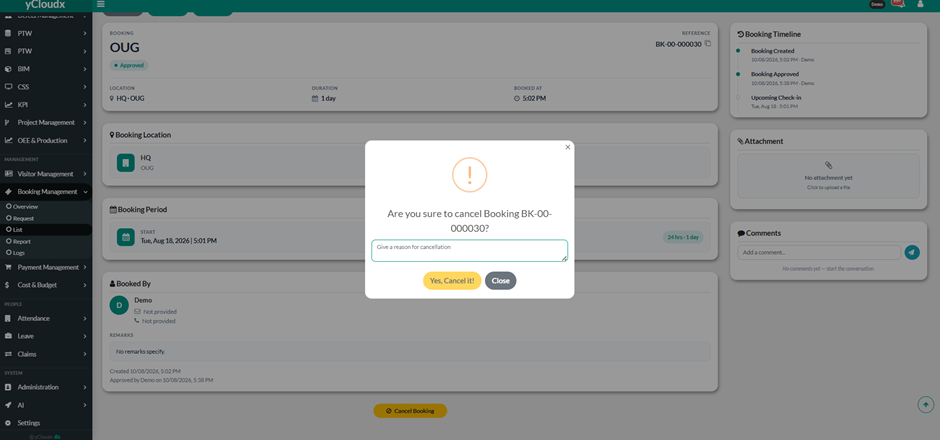
Confirm the cancellation and write the reason for the cancellation.
After the cancellation is confirmed, the booking status will be updated from Approved to Cancelled.
Return to Booking Management > List and verify that the booking is displayed with the Cancelled status.