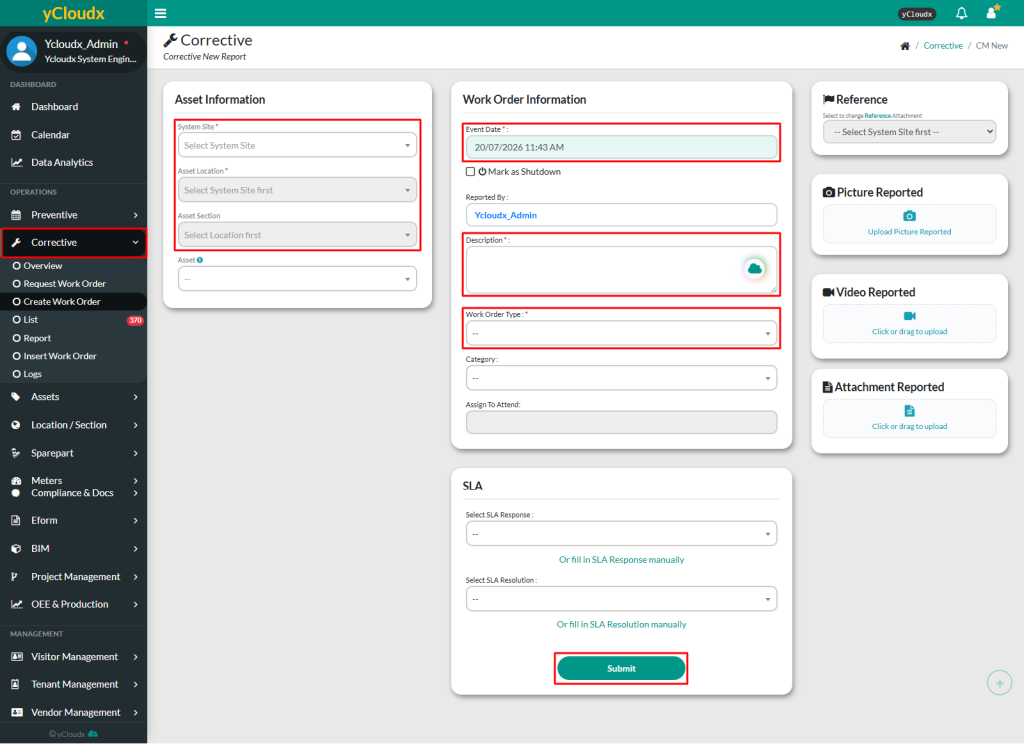
Create Work Order is to open a new corrective maintenance work order (Status: ‘Open’)
Proceed to Corrective > Create Work Order
Fill in the form to report a new asset breakdown
Reported By will be automatically filled with the account name of the user creating the work order. This can be modified if necessary
The required fields are Asset Location, Asset Section, Asset, Event Date, Description and Work Order Type. While other fields are optional, but it is recommended to fill in all details including Category, Assign to Attend, Select SLA Response and Select SLA Resolution
For Description, user can use the Cloudy AI icon to paraphrase the text or use Voice Recognition to enter the details by voice.
For event date, user can choose the date or just simply tick the current time box
User can upload an image, video and attachment as a proof of the breakdown asset
Click Submit to create the work order
If no one is selected in the Assign To Attend field, the work order status will change to Attend
Once the Assign To Attend field is filled, the status will change to Open, and the assigned workers will receive a notification to begin the work