How to perform CM work order for vendor (External Action)?
Created On
byaini
Print
You are here:
< Back
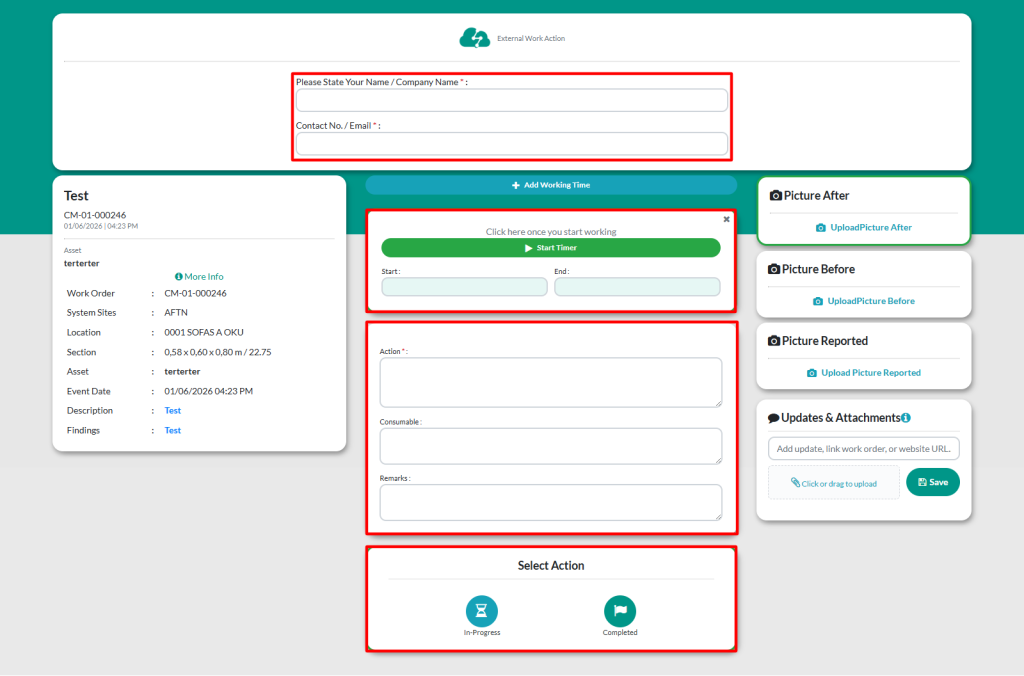
Fill out the form to do the work
Name / Company Name
Contact No / Email
Start : Start time of the repair
End : End time of the repair
You can manually enter the start and end times in the provided box
Action : Action taken to complete the work order
Consumable :List of consumable used to perform the work
Remarks : Additional notes regarding the work carried out
Picture / Video / Attachment : Upload any media or attachment if needed. It is done to make it easier to make comparisons between the condition before and after the repair work
Picture After: Image of asset after repair
Picture Before : Image of asset before repair
Picture Reported : Image uploaded by the requester during the request or when creating a new CM work order
There are TWO (2) types of actions that can be done:
In Progress : Changes the status to In Progress
Completed : Marks the work as complete and generates the report