
Skip to main content
How Can We Help?
How to set where notifications will be sent?
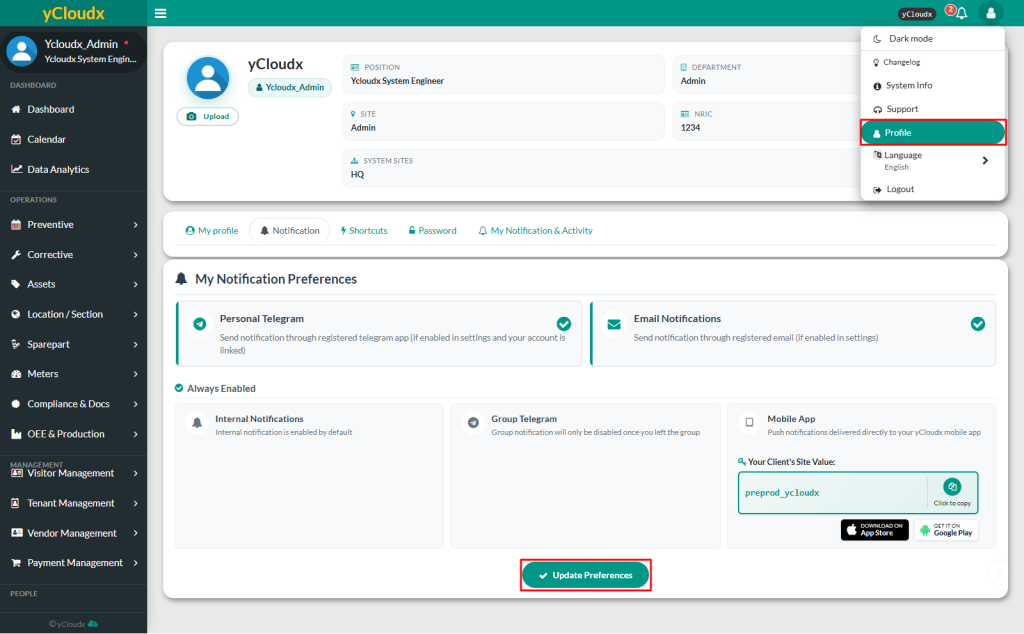
- Click Avatar or User icon at the top right of the page, then select Profile to be redirected to the user information page
- Click Notification
- Select the preferred notification method by ticking the checkboxes
- Personal Telegram
- Email Notification
- The following notification options are always enabled by default
- Internal Notification
- Group Telegram
- Mobile App
- Click Update Preferences to save the settings
- A popup notification will appear to confirm that the notification preferences have been updated
