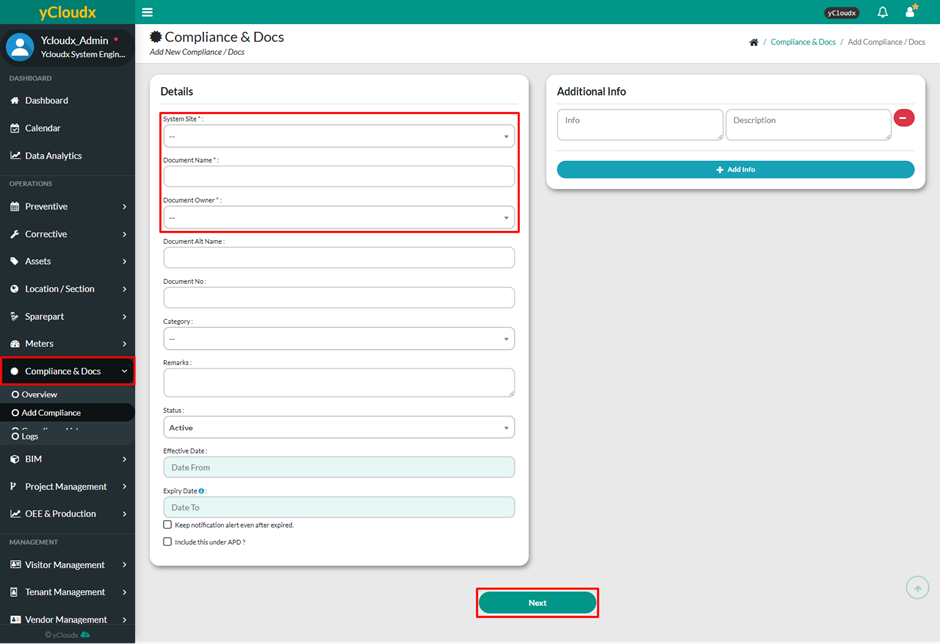
On the first page, user need to enter the information of the compliance & docs in the text fields which are Document Name and Document Owner while other fields are optional, but it is recommended to fill in all details including Document Alt Name, Document No, Category, Remarks, Status, Effective Date and Expiry Date
User can select the date for Effective Date and Expiry Date or just simply tick the current date box
User able to set Reminder to receive notifications before the license or certificate date is about to expire in a day, week, month or others regarding their reminder date
User can tick the checkbox to continue receiving notification alerts even after the document has expired
User can also tick the checkbox to include the document under APD
The Additional Info field can be used to provide extra details if needed
Click Next to proceed to the next page
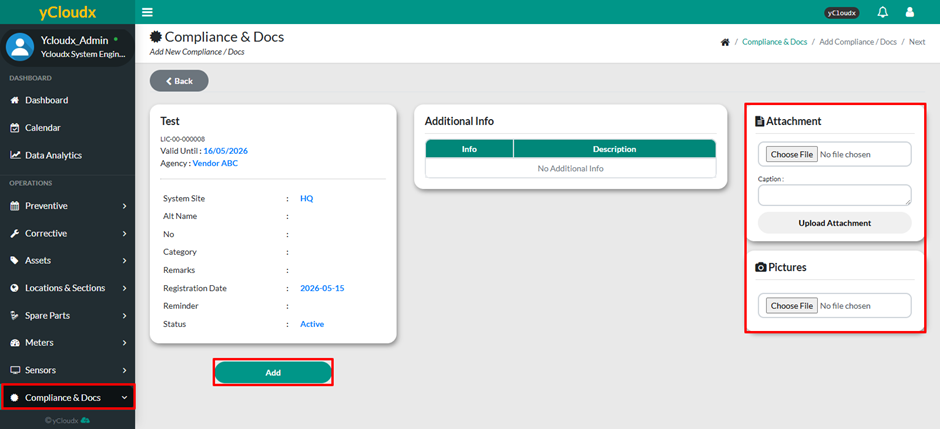
On the second page, user able to add Attachment or Pictures (if any) and provide a caption for each file
Click Add button on the page to submit the new compliance document after all the information needed has been filled in