Skip to main content
How Can We Help?
How to set preventive maintenance notification?
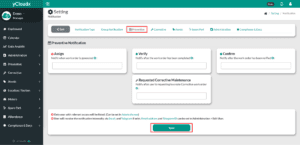
- Proceed to Setting > Notification > Preventive Maintenance
- Select which user should be notified when the work order is assign, verify, confirm and requested corrective maintenance in the provided field
- Assign : Work order is generated
- Verify : Technician completed the work order and it is waiting for verification
- Confirm : Work order has been verified and is waiting for confirmation
- Requested corrective maintenance : After a user request to create a corrective work order
- After ensuring all data is entered correctly, click Save button
- The selected users will automatically be added to the list
- Only user with relevant access will be listed