
Skip to main content
How Can We Help?
How to view PM & CM Manhours?
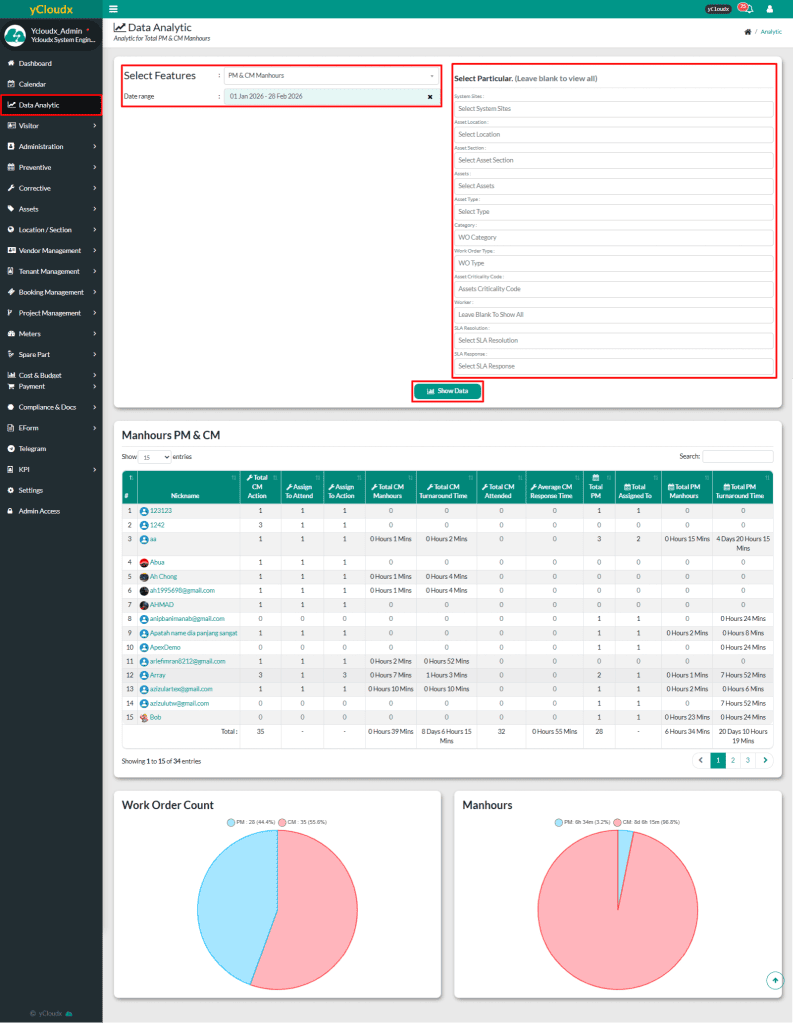
- Proceed to Data Analytic > Select Features: PM & CM Manhours
- User able to select date range
- User have more option to filter the result by asset
- System Sites
- Asset Location
- Asset Section
- Asset
- Asset Type
- Category
- Work Order Type
- Asset Criticality Code
- Worker
- SLA Resolution
- SLA Response
- Click Show Data to display the results in a list format
- User can view list of man hours for PM & CM
- Nickname
- Total CM Action
- Total To Attend
- Total To Action
- Total CM Manhours
- Total CM Turnaround Time
- Total CM Attended
- Average CM Response Tine
- Total PM
- Total Assigned To
- Total PM Manhours
- Total PM Turnaround Time
- User also able to view Work Order Count and Manhours in pie chart